


 en | USD


 CHAT WITH GODLIKE TEAM





Server Management
The Don't Starve Together dedicated server with administrator rights gives you the ability to manage players and game processes on your server. You can block a player if they are using cheats, or kick a player if they are disrupting the game process for others. You can also influence the game process using commands, altering the course of events during gameplay.
TIP
How to grant administrator rights
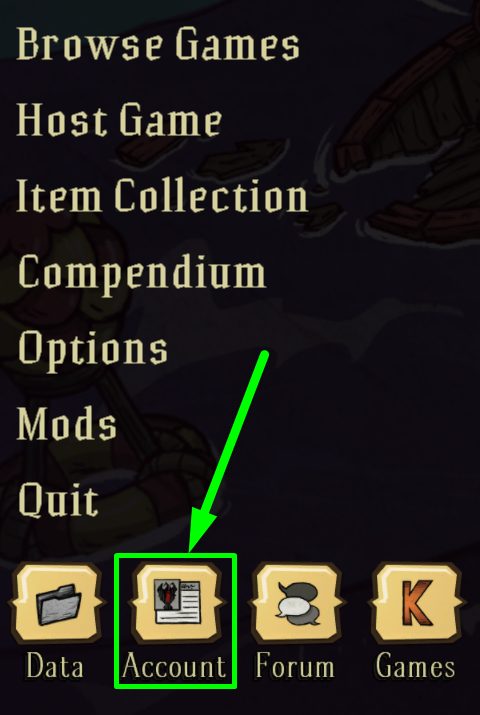
1) Open the game and click on the Account button.
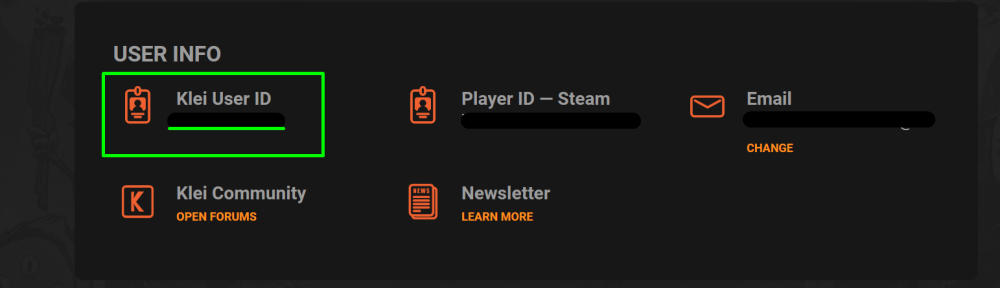
2) The Steam Relay internal window will open, where you need to find your Klei User ID - copy it.
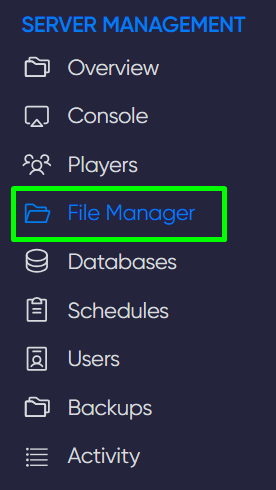
3) Go to the game panel in the File Manager section. Then create a file called adminlist.txt at the path: /config/Cluster_name/
4) Open the adminlist.txt file and paste the copied Klei User ID on the first line, then save the file.
NOTE
If you want to add another player, ask them for their Klei User ID and add it to the adminlist.txt file
5) Restart the server. Done.
Now you know how to add an administrator to your server and can conveniently manage them. Play together with GODLIKE.