en | USD

 CHAT WITH GODLIKE TEAM





Game Day
In V Rising servers, there are a full 24 in-game hours, during which day and night will pass. If you wish to make the gameplay on your server more unique or tailored to your preferences, you can change the duration of the day or night through settings.
TIP
How to Change the Duration of the In-Game Day
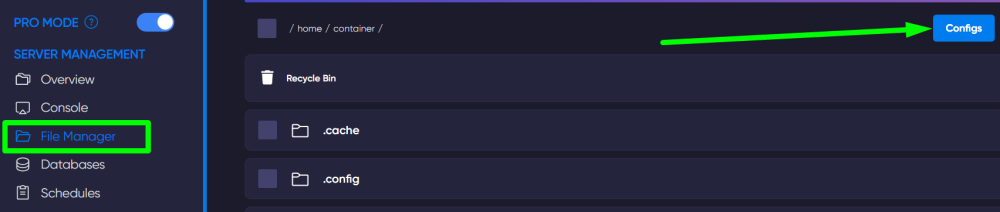
First, navigate to the game panel and turn off the server. Then, open the File Manager section and click on the blue Configs button to access the settings file.
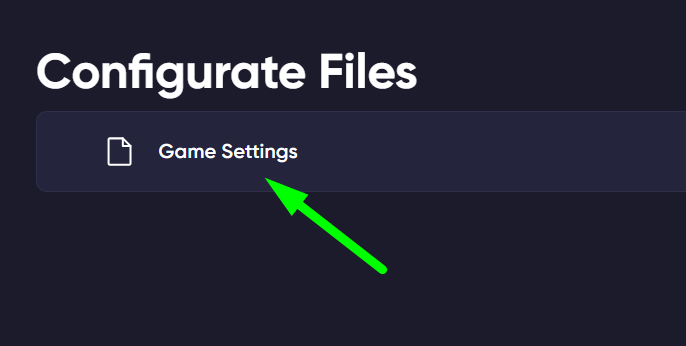
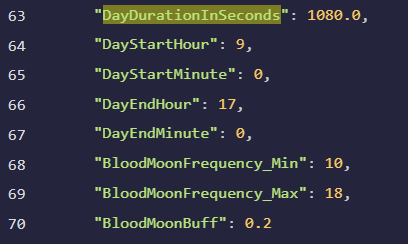
In this file, find the line DayDurationInSeconds and change the number specified there to your desired duration (in seconds).
IMPORTANT
This way, you will change the duration of the entire in-game day (day and night)
How to Change the Duration of the Day
In the same file, find the line GameTimeModifiers (it will also contain the line we changed earlier).
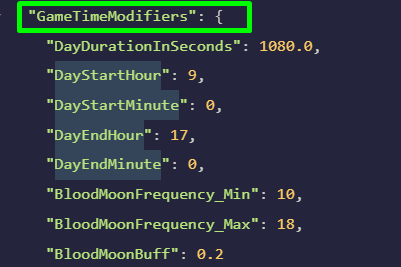
Now, you can change the duration of the day itself in the following lines:
DayStartHour;DayStartMinute - start of the in-game day (after night);
DayEndHour;DayEndMinute - end of the in-game day (start of night)
TIP
How to Change the Game Settings Preset for a V Rising Server
Now you know how to manage the duration of the day, night, and overall day for your V Rising server. Play together with GODLIKE.