Hytale is already available in Early Access and keeps evolving - server requirements can grow quickly if you play with friends or build a community. That’s why, when choosing hosting, stability under load, a convenient control panel, solid file access, backups, and protection against attacks matter. Our experts compared 7 providers and built a “Top 7” ranking. Below, you’ll find a comparison table, short takeaways for each service, and our Best Overall (Editors' Choice) with clear arguments.
This ranking is built around what truly affects a server owner's experience. That includes stability under load, panel usability, file workflows, backups, protection, refund transparency, and support quality. Later in the article, you'll see a comparison table and detailed breakdowns of each service.
Godlike.Host - Editors’ Choice, Best Overall. Focus on a convenient control panel, fast start, backups, protection, and server management tools.
HytaleHost Pro (hytalehostpro.com) – best for budget starter plans (EUR) and quick setup
Apex Hosting - A strong “premium by default” option, but some useful features are paid upgrades.
BisectHosting - A strong pick for those who care most about solid support and predictable terms, without extra noise.
Nitrado - Flexible resource configuration, but support and refund terms feel less friendly.
Shockbyte - Often wins on price, but there are questions about support and communication consistency.
Pinehosting - A clean, well-organized panel, but refunds and limitations can be too strict.
ScalaCube - The simplest, most basic option, but it’s not a leader in panel depth or support speed.
We built this ranking around practical factors that truly affect server owners. Each service below has a short breakdown.
How We Built the Ranking (our methodology)
We relied on facts and real needs that most often decide whether a server will run stably and whether it’s convenient to manage. First of all, that’s the control panel and access to settings, backups and recovery speed, protection and basic security, and how transparently refunds and upgrades are handled. We also looked at support separately, because it most often becomes a bottleneck when errors happen or setup questions come up.
For each provider, our experts personally recorded the entry price and the post-promo price, the refund window and key restrictions, the presence of upsells, and their impression of communication with support. In the reviews below, you’ll see where the terms look friendly and where there are nuances worth knowing before you pay and contact the provider.
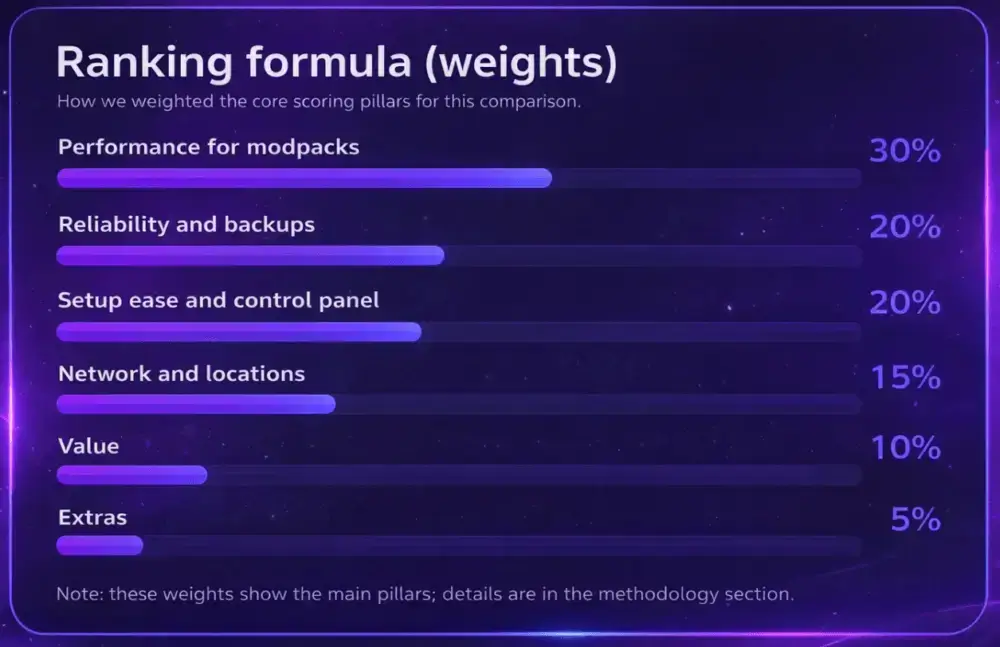
To rank the best Hytale server hosts, we used a weighted scoring model: Performance (25%), Reliability/Uptime (20%), Support (20%), Modded Support (15%), Ease of Use (10%), and Value (10%)
What to Look for When Choosing Hytale Hosting
In Hytale, it’s critical that the server is easy to maintain every day. The panel should give fast access to the console, files, and settings, and not turn any change into a quest. Backups and straightforward restores also matter, because in the early stages of the game and server builds, errors and rollbacks happen more often than you’d like.
The second layer is performance and stability. Here, hardware, fast drives, sensible locations for your audience, and basic protection matter. If a provider doesn’t have proper protection and access-control tools, any public server becomes vulnerable, even with a small online count.
And the third layer is the terms, that you’ll see after payment. Look at the post-promo price, how realistic it is to get your money back, what restrictions are written into the rules, and how upgrades are handled. Support also matters, but not based on promises on a landing page, rather on how it responds and what it does when you have a specific problem.
1. Godlike.Host. Editors' Choice and Best Overall
TL;DR
Best overall for a fast, stable Hytale server with a clean control panel, built-in backups, and protection that keeps setup and day-to-day admin simple
We put Godlike.Host in first place as Best Overall because it covers the things that truly matter in day-to-day Hytale server management. The server spins up automatically after payment, the panel is available within a few minutes, and management is built around a custom panel based on Pterodactyl. There is SFTP file access, a task scheduler, and server settings and content management in one place.
On the infrastructure side, the page lists Ryzen 9 9950X3D and NVMe, plus DDoS protection. For access control, there is a personal firewall that helps filter IPs and block unwanted activity. For managing without constantly logging into the panel, a Discord server manager is included.
PROS
CONS
Fast start: instant setup, auto-activation, panel available within minutes
50% discount applies only to the first purchase
Custom panel based on Pterodactyl, server and settings management in one place
Backups have a frequency limit (stated up to 3 per day)
Full SFTP access for files and server content
DDoS protection + personal firewall for IP filtering and blocking
Discord server manager, plus service resources like status, wiki, and ping-check
Backups are stated as up to three backups per day for free, plus restore in a couple of clicks. For customization, the focus is on a server-side approach. You can work with server plugins and assets, including .jar, JSON, art assets, as well as world and save files, within what the current Hytale version supports.
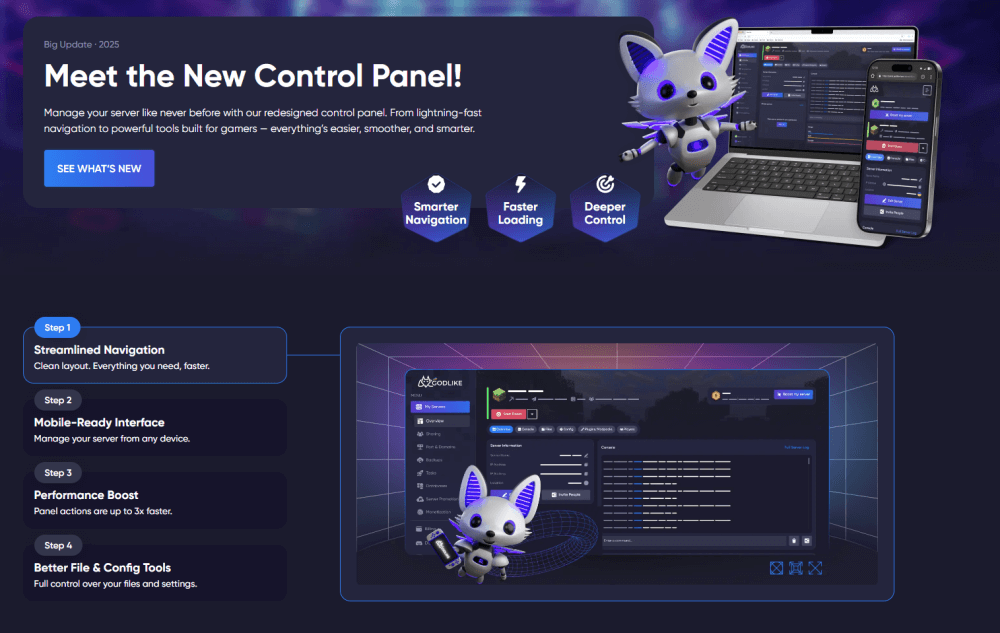
Here's our brand New Control Panel, which includes new useful functions:
Pack Management & Quick Fix Tools
Custom servers break most often because one change conflicts with another or a file ends up in the wrong place. The New Control Panel makes it easier to manage your server pack from one place, temporarily disable problem components without deleting them, and get back to a working state quickly. It’s built for real admin work: diagnose, adjust, restart, and move on.
Server Location Transfer
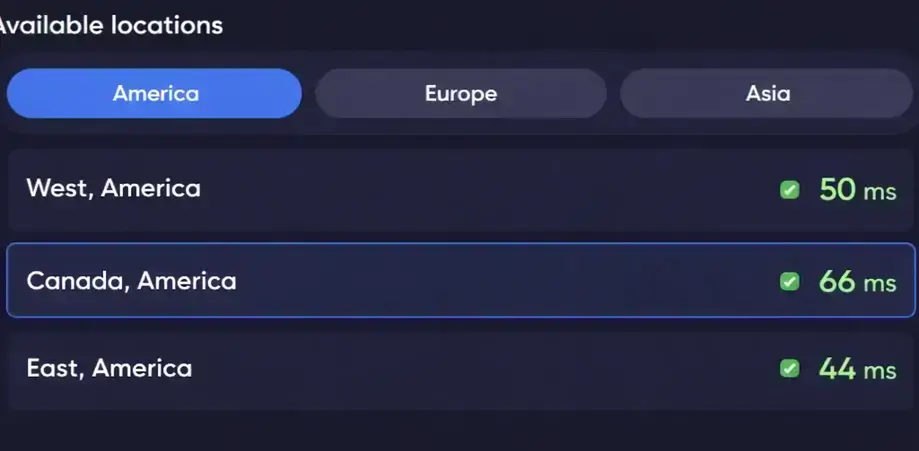
If your players are closer to another region, you can switch your Hytale server location directly in the New Control Panel in a few clicks. Pick the region that gives your community the best latency, apply the change, and keep the experience consistent without manual re-setup.
2. HytaleHost Pro
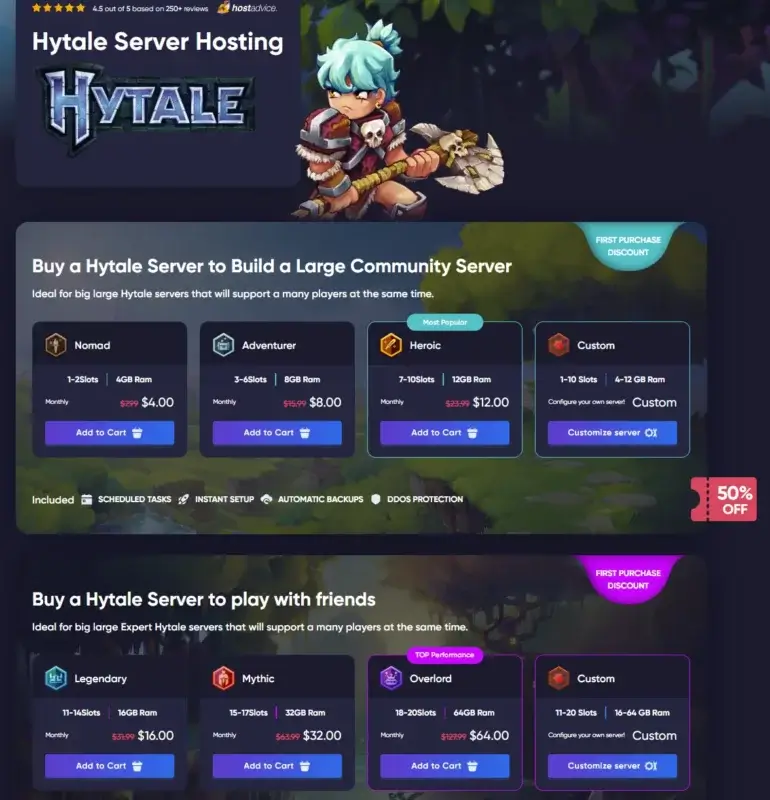
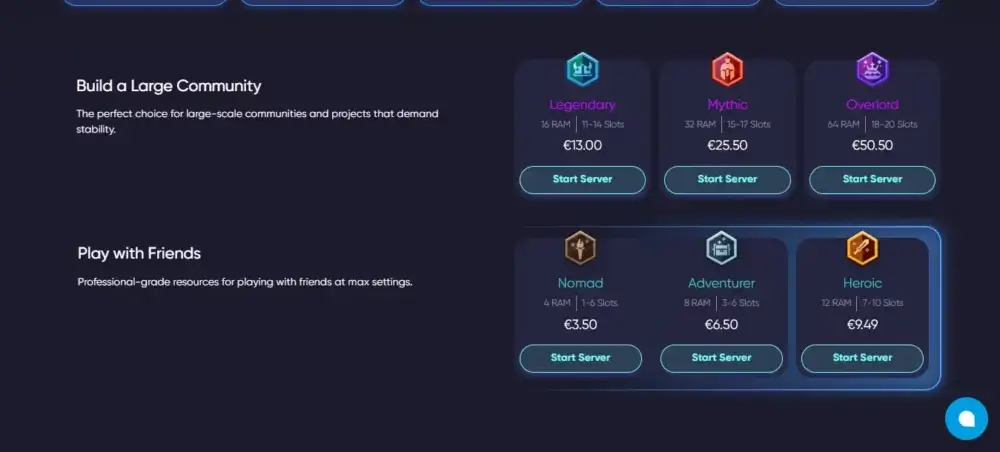
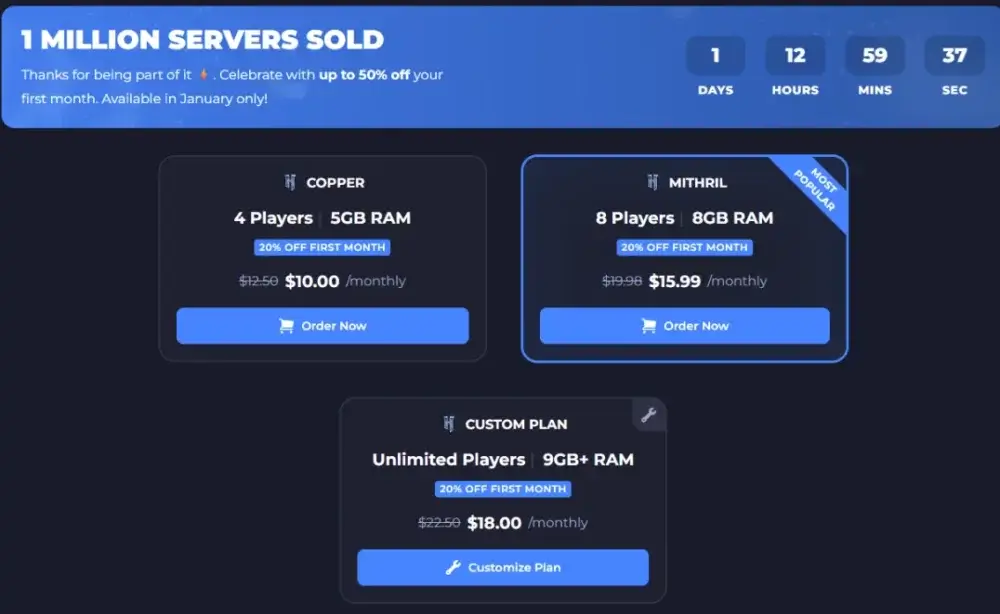
HytaleHost Pro is a Hytale-focused hosting option built around simple, pre-sized plans and fast onboarding. Pricing is clearly split by use case: smaller tiers for playing with friends and larger tiers for community servers, so it’s easy to match a plan to your player count without guessing.
The lineup starts with entry plans suitable for small worlds and casual co-op, then scales up to high-RAM tiers designed for bigger communities and heavier server workloads. The site also emphasizes basics that most users care about first: quick setup after purchase, built-in DDoS protection, automated backups, and remote file access via SFTP.
What people say
“The interface is clear and easy to use… low latency and no noticeable outages so far.” Hostadvice
PROS
CONS
Very clear plan ladder: easy to choose between small-group and large-community tiers without overcomplicating it.
Currency may be less convenient for readers expecting USD-first pricing.
Strong value at the low end: budget-friendly entry plans for getting started.
Limited technical transparency: plan cards focus on RAM and general features, but don’t clearly spell out CPU model, storage specs, or performance guarantees per tier.
High-RAM scaling available: options extend up to large memory tiers for serious communities.
Less depth on advanced management: the site emphasizes ease and speed, but provides fewer visible details on panel capabilities, admin tooling, or power-user features.
If your goal is to get a server online quickly with predictable monthly pricing, HytaleHost Pro is one of the most straightforward options in this list.
3. Apex Hosting
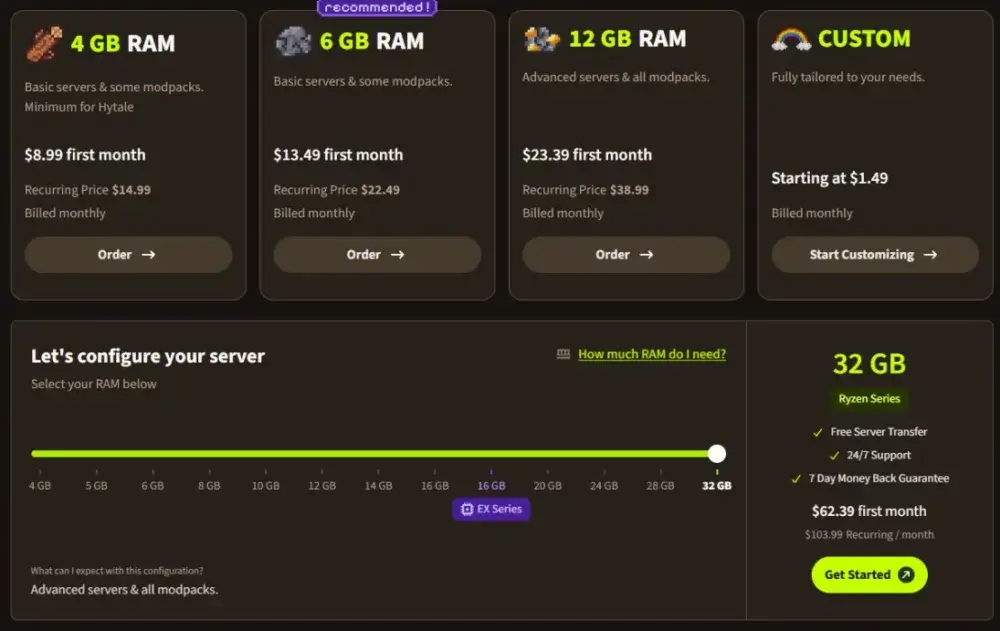
In this list, Apex Hosting looks like a service that tries to offer “premium by default,” but some useful things come with extra fees. The first month costs $8.99, then $14.99. RAM configuration is custom, with a stated range from 4GB to 32GB.
What people say
“Easy to set up!… step-by-step resources made setup super easy.” Trustpilot
PROS
CONS
Entry price $8.99 for the first month, then $14.99, custom RAM 4-32GB
Billing tickets can take a very long time, in one example the wait was 9 hours
Live chat: AI first, but a human operator connects quickly, usually 2-3 minutes
Refund only within 7 days, processed via a billing ticket
The panel has a Mod Manager, you can install and remove mods via the interface without FTP
After a refund, the server is deleted, files are wiped, you need a backup in advance
There is a server sharing feature to X.com directly from the panel
Upsells: Premium Support $4.99, extra DDoS protection $4.99, expensive EX Series
For refunds, Apex has a 7-day window and it’s handled through a billing ticket. An important nuance is that after a refund the server is deleted, so keep that in mind if you’ve already added content or settings. In our support research, we noted that live chat starts with AI, but you can reach a human operator quickly, usually in about 2-3 minutes. At the same time, tickets can be answered more slowly, up to 9 hours.
On upsells, Apex is noticeably more active than some competitors. In the research, we noted a paid Premium Support for $4.99 per month and a separate extra charge for DDoS protection of about $4.99 per month.
Who it’s for
Apex Hosting can work for those who want to start quickly and are ready to pay for individual upgrades if they’re needed specifically for your server.
4. BisectHosting
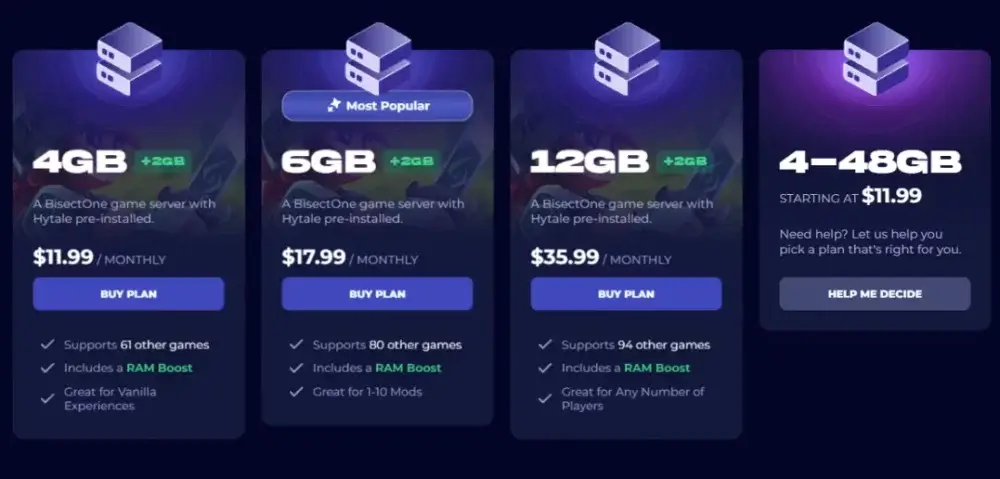
BisectHosting feels like a calmer option without aggressive upsells, but with a noticeable difference in support speed between billing and gameplay questions. The cheapest plan is $11.99 for the first month, then $17.99. RAM can be chosen custom from 4GB to 48GB.
For refunds, two things matter. They have a 3-day money-back guarantee for new plans, and refunds for auto-renewals are tied to short timelines: 1 day for a full refund, or 3 days for 50%. At the same time, some services, including certain add-ons and dedicated servers, are not refundable.
What people say
“Had a support conversation… very helpful and patient… fast reply with step-by-step guidance.” Trustpilot
PROS
CONS
Entry price $11.99, then $17.99, custom RAM 4-48GB
For gameplay questions, support can take 3-5 hours
3-day refund for new plans
Auto-renewal refunds are time-limited, full refund only within a short window
Billing replies quickly, within 5-10 minutes
There are refund exclusions for certain services and add-ons
You can show Spark stats via a mod right in the panel, useful for diagnostics
Paid add-ons increase the final price, for example BisectBoost and Dedicated IP
Upsells look moderate compared to part of the market
No AI chat, main channel is tickets
In the control panel, one useful technical feature stands out: you can connect a mod that shows Spark stats right in the interface. It’s not “ideal for a beginner,” but for diagnosing lag and load it can be a convenient argument in a review.
On support: we didn’t find an AI chat; the main channel is tickets. Billing replies quickly, around 5-10 minutes, while answers on gameplay questions can take 3-5 hours.
Upsell is minimal. Paid add-ons noted include BisectBoost for $4.99 per month (extra backups, instance slots, storage) and Dedicated IP for $3.99 per month.
5. Nitrado
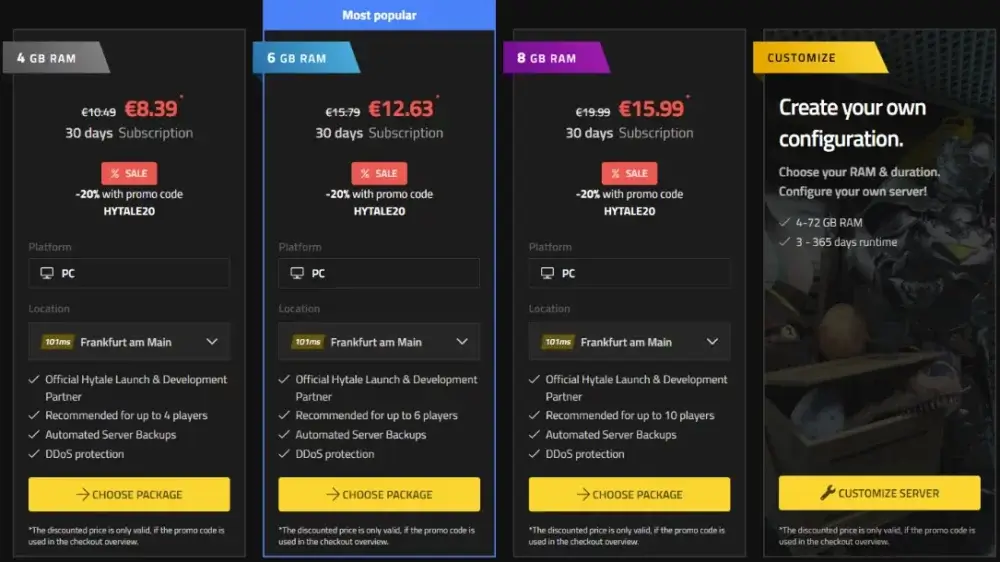
Nitrado stands out because it offers flexible resource configuration, which can be convenient if you want to match a server to a specific online count without overpaying for “extra” plans. According to the research, the starting price is about $8.39, after the promo $12.63, and RAM can be chosen custom in the 4-72GB range.
PROS
CONS
Flexible resource configuration, you can match a setup to the online count you need
Refund terms have limitations; refunds do not apply if service parameters are changed
14-day refund window looks stronger than some competitors
Auto-renewals are generally not refunded; test “as a trial” carefully
There are management tools and mod management in the panel
AI answers first, and a human reply can take noticeably longer
Works for those who want to fine-tune RAM without being tied to fixed plans
For mods, some actions may stay manual, without a convenient “smart” installer
There are important limitations with refunds. The stated window is 14 days, but the refund does not apply if you changed service parameters like RAM, location, or slots. Plus, auto-renewals are typically not refunded, and this is worth considering if you plan to test the service “as a trial.”
On support: AI answers first, and a human reply can take noticeably longer. For simple questions, answers sometimes arrive with a delay, and in the article it’s worth flagging this as a risk for those who need fast help in the first days of setup. As for the panel and mods, there are tools overall, but some work may remain manual, without “smart” parsing and convenient installers.
6. Shockbyte
Shockbyte looks like an option that hooks you with the entry price, but loses on transparency around “what happens if you need help” and on refund restrictions. The first month costs $10.00, then $15.99. RAM can be configured custom, with a 9-64GB range, and the minimum ready-made options start at 5GB.
What people say
“Support chat was 10x more useful than tools I use at work.” Trustpilot
PROS
CONS
Entry price $10.00 for the first month, then $15.99
Only AI answers in the chat
RAM can be configured custom, stated range 9-64GB, plus basic plans 5GB and 8GB
AI replies quickly, but often without value if you need context
The panel is standard and convenient, with real-time console, file access, and basic settings
Reaching a human operator is difficult; the wait can stretch to days
Mods can be enabled and disabled via the interface
Refund only 72 hours after purchase
Almost no aggressive upsells
Refund only once per account, renewals not refunded, plus exceptions and limitations
For support, the key point is simple. Only AI answers in the chat, replies come in about a minute, but without expanded information they often don’t help. At the same time, reaching a human operator is difficult, and the wait can stretch to days. For those setting up a server in the first weeks and who may run into errors, this is a real risk.
Refund rules are strict. A refund is only possible within 72 hours after purchase, the request must be created from your dashboard, and a refund is granted only once per account. Renewals are not refunded. There is a list of exceptions by service, and if a payment dispute was opened, the right to a refund is lost. It’s also noted that if a customer does not reply to support within 48 hours, the request can be canceled, and after a refund the service cannot be restored.
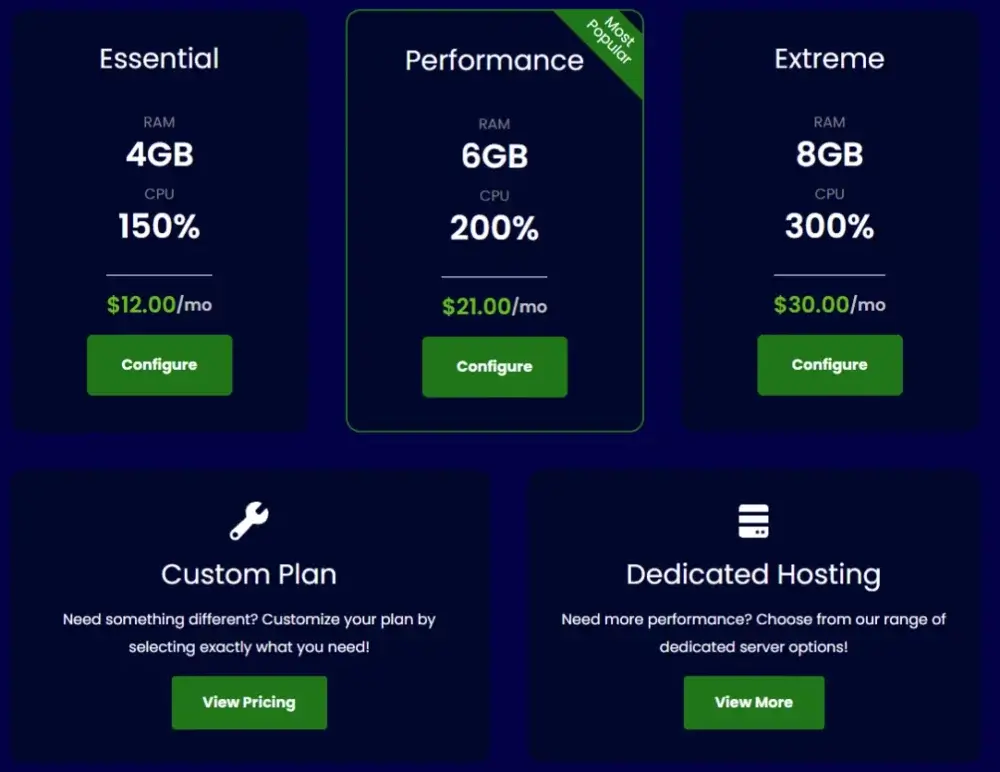
7. Pinehosting
Pinehosting looks like a service with a neat panel and minimal upsell pressure. The cheapest option starts at $12, and then the cost grows to $21. RAM can be chosen custom, in the 4-64GB range.
PROS
CONS
Entry price $12, then $21, custom RAM 4-64GB
Refund only 48 hours and only on the first order
The panel has config templates and Quick Actions, so you can speed up routine tasks
No refunds for crypto, and for regular payments they may refuse without a reason
Almost no upsells; it doesn’t feel like they constantly “sell on top”
Support runs on a schedule, with downtime windows
They promise a reply within 3 hours
Paid AI chat, communication is done via tokens
The most important point here is refunds and support. Refunds are only available within 48 hours and only for the first order. There is no refund for crypto, and for regular payment a refund can be declined without an explanation. For support, they promise a reply within 3 hours, but the team has a schedule with limited working hours. Plus, their AI chat is paid via tokens, and it’s worth considering in advance.
Who it’s for
Pinehosting works for those who want a simple panel and are already sure the service fits, without plans to test it via a refund.
8. ScalaCube
ScalaCube looks like the simplest option. The first month costs $12, then $18. The main idea here is that the service works for a basic start, but without a “deep” panel and without consistent support.
For the panel, it’s noted that this is a minimal feature set. There are basic actions like start and stop, a console, and FTP. Replies can take from one to three days, and this can be a problem if you’re setting up a server and need help quickly.
PROS
CONS
Entry price $12, then $18
Very basic panel, fewer features than stronger competitors
Simple panel for basic tasks, with a console and FTP
Support can take 1-3 days, response speed is not consistent
There is a first-month discount
7-day refund, but you need a “valid reason”; not the most friendly scenario
Backups are free in the first month
After the first month, backups become paid, an upsell that affects the final price
Refund terms are not the softest. There is a 7-day window, but you need a “valid reason.” Plus there is a separate backups mechanic. They are free for the first month, and then they become paid, and it’s important to keep this in mind if you actually need backups.
Who it’s for
ScalaCube can work for a simple test or a small server if you’re okay with a basic panel and don’t expect fast support.
Technical Requirements for a Hytale Server You Should Know Up Front
Hytale has baseline requirements, and it’s important to understand them before buying hosting. According to the official documentation, the server needs Java 25 and at least 4GB of memory. This is the lower bound for a simple start and a small online count. If you’re planning a community, frequent content changes, or denser world settings, extra RAM and CPU quickly becomes not a luxury but a necessity.
There’s one more point many people miss. Hytale uses QUIC over UDP, not the usual TCP. By default, this is UDP port 5520. If the server is hosted at home or on a VPS, it’s important to open UDP specifically, otherwise the connection may not work even with the right settings. With managed hosting, some of these nuances are handled for you, but when moving servers or doing migrations, this fact is still useful to keep in mind.
Because Early Access updates are frequent, it’s more practical to choose a provider where restarts are easy, file access is solid, and backups are regular. In this mode, the panels where routine tasks are done quickly and without extra manual steps win.
Your own (manual) server or a dedicated one: which is better, and which should you choose?
Self-hosting can work if you have server experience and want full control. This is usually a VPS or your own machine (device: PC/laptop) where you install Java, configure ports, watch for updates, make backups, and solve problems when something goes wrong. This path is cheaper at the start, but it often costs more in time and stress, especially in the first weeks.
Dedicated hosting takes on the infrastructure and part of the routine. Usually you get a control panel, fast start, built-in backups, and a clear recovery process. This is especially useful when the server grows, players show up, and any downtime starts to cost you reputation.
We usually recommend a simple rule of thumb. If you need a server for a community where stability and regular updates matter, dedicated hosting is almost always more practical. The self-hosted option makes sense when you’re confident in your setup and want to optimize costs, understanding the risks.
Hytale Server Requirements
Before choosing hosting, it’s worth understanding the baseline threshold. A Hytale dedicated server runs on a device with at least 4 GB RAM and Java 25. x64 and arm64 architectures are supported. After the first launch, the server goes through authorization via a Hytale account. Without authorization, the server will not start accepting player connections.
Networking matters. Hytale uses QUIC over UDP. By default, port 5520 is used. If the server is hosted at home or on a VPS, you need to open and forward the UDP port. TCP forwarding is not required for Hytale.
Player Count and RAM
RAM for Hytale isn’t only about online players. Memory usage depends heavily on how much of the world is loaded at the same time. It’s affected by view distance and how far players spread out across the world. A practical approach is this. First, pick a plan based on slots and RAM. Then watch actual load. If you see higher latency and frequent spikes, it’s easier to increase RAM and limit view distance than to try to squeeze stability out of a minimal configuration.
Guideline for choosing a plan by slots and RAM:
1-2 slots. 4 GB RAM
3-6 slots. 8 GB RAM
7-10 slots. 12 GB RAM
11-14 slots. 16 GB RAM
15-17 slots. 32 GB RAM
18-20 slots. 64 GB RAM
If players actively explore the world in different directions and you keep a high view distance, it usually makes sense to choose a plan one tier higher.
CPU: What Matters
CPU becomes a bottleneck with high online counts and a large number of entities. That includes NPCs, mobs, and active events. In Hytale, each world runs in its main thread, and parallel tasks go to a shared thread pool. That’s why high single-core performance and a solid thread budget matter so the server doesn’t hit load spikes.
CPU typically handles tasks like:
processing player actions and combat
simulating NPCs and mobs
world generation and streaming
running plugins and server mods
What to look for when choosing Hytale hosting
Most providers promise roughly the same thing. The difference starts in the details. That includes slots, locations, actual resource configuration, payment terms, customization support, and protection.
Enough Slots
Slots are the limit of players online at the same time. It’s better to choose a plan with a buffer so your community growth doesn’t hit a ceiling. It’s important to check how scaling works. Can you increase slots and RAM without migration and without losing files? Is there a quick upgrade from the panel?
Location Coverage
Server location directly affects latency. For a US audience, it makes sense to choose a US region; for an EU audience, an EU region. If your audience is mixed, it’s helpful to have several location options and a simple way to check ping to a region before purchasing.
Server Resources and Disks
For Hytale, the key resources are RAM and CPU. For memory, what matters is the loaded world area; for CPU, players and entities are the drivers. Disk speed matters because the server constantly works with assets, saves, and logs. It’s better when the host uses NVMe. Another plus is when backups are built in, can be enabled with one click, and can be restored without manual steps.
Payment Terms and Post-Promo Price
Don’t look only at the entry price. Check the post-promo price and auto-renewal terms. Monthly billing is more convenient for testing. Annual billing can be a better deal, but it makes sense when you’re already confident in the provider and the configuration.
Content, Mods, and Customization Support
Hytale is built around a server-side approach to customization. Logic and content come from the server, and players connect without manually installing client mods. For hosting, that means simple requirements. You need convenient file access, a clear process for uploading mods and assets, normal restarts, and the ability to roll back quickly to a backup if an update or mod causes errors.
DDoS Protection
For public servers, DDoS protection is always important. Check whether it is included by default or offered as a paid option. Access-control tools are also useful. That includes firewall rules, IP filtering, and quick blocks. They save time when junk traffic floods in or brute-force attempts start.
Starter Plans, Pricing, and What Matters
Provider
Price, promo -> after
RAM, scaling
Control panel, management
Support, in practice
Godlike.Host, Editors’ Choice
$3.50 -> $6.99 (first purchase -50%)
plans from 4GB to 64GB
custom panel based on Pterodactyl, SFTP, scheduled tasks, auto backups, DDoS, personal firewall, Discord manager & Mod Manager
24/7/365, the page lists an average response time of about 20 minutes
Apex Hosting
$8.99 -> $14.99
custom 4-32GB
Mod Manager, server sharing to X.com
AI first in chat, human operator usually in 2-3 minutes, billing tickets can take a long time
BisectHosting
$11.99 -> $17.99
custom 4-48GB
you can enable Spark stats in the panel via a mod
billing replies quickly, for technical questions answers can take several hours, no AI chat noted
Nitrado
$8.39 -> $12.63
custom 4-72GB
Mod Manager is available, mods without parsing, manual upload
live chat AI first, a human reply can be heavily delayed
Shockbyte
$10.00 -> $15.99
minimum 5GB, custom 9-64GB
standard panel, mods are visible and can be managed via the interface
AI answers in chat, reaching a human is difficult, replies can take a while
Pinehosting
$12.00 -> $21.00
custom 4-64GB
config templates and Quick Actions
a reply is stated within 3 hours, but support runs on a schedule, AI chat is paid
ScalaCube
$12 -> $18
4GB, 6GB, 9GB
very basic panel: start, stop, console, FTP
chat and tickets, replies are often delayed, backups are free only in month 1, then paid
Feature comparison
Provider
Custom RAM
Noted control panel features
Mods and content
Backups, what’s stated
Support, how it works
Upsells, what
Godlike.Host
yes
Pterodactyl, SFTP, scheduled tasks, personal firewall, Discord manager & Mod Manager
manage server-side content via panel and SFTP
auto backups, up to 3 per day free
24/7/365, the page lists an average response time of about 20 minutes
50% discount on the first purchase
Apex Hosting
yes
Mod Manager, sharing to X.com
Mod Manager in the panel
AI first, then operator quickly; billing tickets can take a while
Premium Support $4.99, extra DDoS $4.99, EX Series
BisectHosting
yes
Spark stats in the panel via a mod
BisectBoost adds extra backups
tickets; AI not found
BisectBoost $4.99, Dedicated IP $3.99
Nitrado
yes
Mod Manager
mods are manual, without parsing
live chat AI first, a human reply can be delayed
focus on brand and partnerships, not panel add-ons
Shockbyte
yes
standard panel, mods are visible and managed via UI
manage mods via the interface
AI in chat, reaching a human is difficult
no aggressive upsells noted
Pinehosting
yes
config templates, Quick Actions
live chat and billing, paid AI chat
almost no aggressive upsells
ScalaCube
no
basic start, stop, console, FTP
backups are free for 1 month, then paid
chat and tickets, replies are often delayed
backups as a paid option after month 1
Plans for Larger Servers, 20+ GB RAM
Provider
20+ GB RAM availability
Examples of larger options
Price, promo -> after
What to know
Godlike.Host
yes, up to 64GB
Mythic 32GB, Overlord 64GB, plus Custom 16-64GB
32GB $25.50 -> $50.99, 64GB $50.50 -> $100.99
scheduled tasks, auto backups, DDoS, personal firewall, SFTP, custom panel with Mod Manager
Apex Hosting
yes, up to 32GB
custom up to 32GB
$8.99 -> $14.99 (entry), price increases with selected RAM
paid upgrades are available, including Premium Support and extra DDoS
BisectHosting
yes, up to 48GB
custom up to 48GB
$11.99 -> $17.99 (entry), price depends on RAM
you can get Spark stats in the panel, upsells are moderate
Nitrado
yes, up to 72GB
custom up to 72GB
$8.39 -> $12.63 (entry), price depends on RAM
Mod Manager without parsing, support via AI chat
Shockbyte
yes, up to 64GB
custom 9-64GB
$10.00 -> $15.99 (entry), price depends on RAM
AI in chat, live answers can be difficult to get
Pinehosting
yes, up to 64GB
custom up to 64GB
$12.00 -> $21.00 (entry), price depends on RAM
support runs on a schedule, AI chat is paid
ScalaCube
no, max 9GB
not suitable for 20+
$12 -> $18
simple option, but without large configurations
Results: Godlike.host Is Best Overall for Hytale Server Hosting (2026)
In our balanced evaluation, where stability under load, ease of administration, launch speed, security, and real support matter, Godlike.host confidently comes out as Best Overall for Hytale in 2026. We put it first not for marketing, but because the platform removes common admin pain points. Fast start, a clear panel, file access, automatic backups, and protection tools reduce the risk of downtime and errors that typically show up in the first weeks of a server’s life.
Why Godlike.host Gets #1, What You Actually Get
Modern hardware: servers on Ryzen 9 9950X3D and NVMe, so Hytale stays more stable under load and works faster with world files.
Fast launch: the server is usually ready within a few minutes after payment.
Control panel and full control: access to a custom panel based on Pterodactyl, plus full SFTP access to manage files without unnecessary restrictions.
Server-side customization: support for Hytale dedicated servers with settings for mods, plugins, launch options, and the game version.
Protection by default: DDoS protection plus personal firewall for IP filtering and blocking unwanted activity.
Low latency: global locations, plus a separate tool to check ping to US and EU regions before launch.
Backups and rollbacks: automatic backups, up to three backups per day for free, restore is available in a couple of clicks.
Admin tools that save time: manage key actions via Discord manager, plus server status and separate resources for monitoring and quick checks.
Team collaboration: sub-user access and permissions for staff or friends, so you don’t have to hand out one password to everyone.
Scaling without stress: plan upgrades and downgrades are available at any time from the dashboard, changes apply immediately.
FAQ
What do you need to launch a Hytale server?
You need a Hytale dedicated server, a Hytale account to authorize the server, Java 25, and enough RAM for your online count. On hosting, most of the technical basics like Java and networking are usually already set up for you.
Do players need to install mods to join a modded Hytale server?
Usually no. Hytale is built around server-side customization, so joining typically doesn’t require players to install modpacks. It depends on what exactly you add to the server and how it’s implemented in Early Access.
How much RAM does a Hytale server need?
The minimum is 4GB for a small server. For a stable community, it’s usually more reasonable to start with 8-16GB. If players spread out across the world and the server has a lot of activity at the same time, moving to 32GB helps maintain stability.
Can you migrate a Hytale server to another host?
Yes. Usually you migrate the world, configs, and backups. A provider with full file access via SFTP makes migration and troubleshooting much easier.
How do backups work, and how often should you make them?
Backups save the server state so you can quickly roll back after an update, an error, or a problematic config. For Early Access, it makes sense to have at least daily backups. If you change content and settings often, it’s better to do several backups per day.
kasara
Support Team, Game Specialist
Game server support specialist focused on mod configuration, server setup, administration, and technical troubleshooting
Important Note: Godlike.host is our own service. This ranking is editorial (not paid placement) and follows the scoring criteria shown below. Always verify current plan limits, pricing, and regions on each provider’s website before purchasing….
Hytale looks like a sandbox adventure game you can sink a decade into. But the real reason the hype never fully died isn’t only the art style or the Minecraft meets RPG pitch. It’s…



 en | USD
 CHAT WITH GODLIKE TEAM