en | USD
 CHAT WITH GODLIKE TEAM





BEST OVERALL IF YOU WANT A QUICK MODPACK SETUP, AN INTUITIVE CONTROL PANEL, AND PERFORMANCE-FOCUSED AMD RYZEN/EPYC + NVME NODES FOR HEAVY MODDED MINECRAFT SERVERS IN 2026

Best Modded Minecraft Server Hosting (2026): 10 Providers Compared & Ranked

- 21 min read
- 2243 views
- 50 likes
Important Note: Godlike.host is our own service. This ranking is editorial (not paid placement) and follows the scoring criteria shown below. Always verify current plan limits, pricing, modpack support, and regions on each provider’s website before purchasing.
What is the Best modded Minecraft server hosting in 2026?
Best overall: Godlike.host (pre-installed modpacks and a modern panel with one-click installs)

Best for big modpacks: BisectHosting (deep modpack support and responsive ticket help)
Best “hands-on help”: Akliz (guided setup, backups, and lots of locations)
Best for beginners: Apex Hosting (migration-friendly support and long-running stability)
Best budget value: Shockbyte (strong pricing, just pick enough RAM)
Best panel UX: G-Portal (clean management and a swap-friendly workflow)
Choose best server hosting for modded Minecraft in 2026
If you’re looking for the best modded Minecraft server hosting in 2026, the goal is simple: run Forge or Fabric without the usual headaches, whether that’s a lightweight SMP or a heavy pack like FTB StoneBlock 4 or All the Mons - ATMons. This comparison helps you choose among the top providers, explains how we scored them, and shows why Godlike.host ranks #1 overall for modpack server hosting. If you’re choosing a host for a modded server with friends, building a community as a modpack creator, or scaling a growing modded server, you’ll also see which provider can maintain a steady 20 TPS on heavy modpacks while delivering low latency from the region closest to you.
Advantages of using Minecraft hosting for heavy modpacks instead of Selfhosted
A good host takes the pain out of modded servers: quick setup, a modern control panel, automated backups, DDoS protection, and low-latency regions, plus the modded essentials like simple modpack installs, easy config management, and straightforward file access when you need to troubleshoot. Whether you want a private modded world for a few friends or you’re building a bigger modpack community, the picks below are set up to get you online fast and keep your server stable.
At-a-glance comparison (editorial scores)
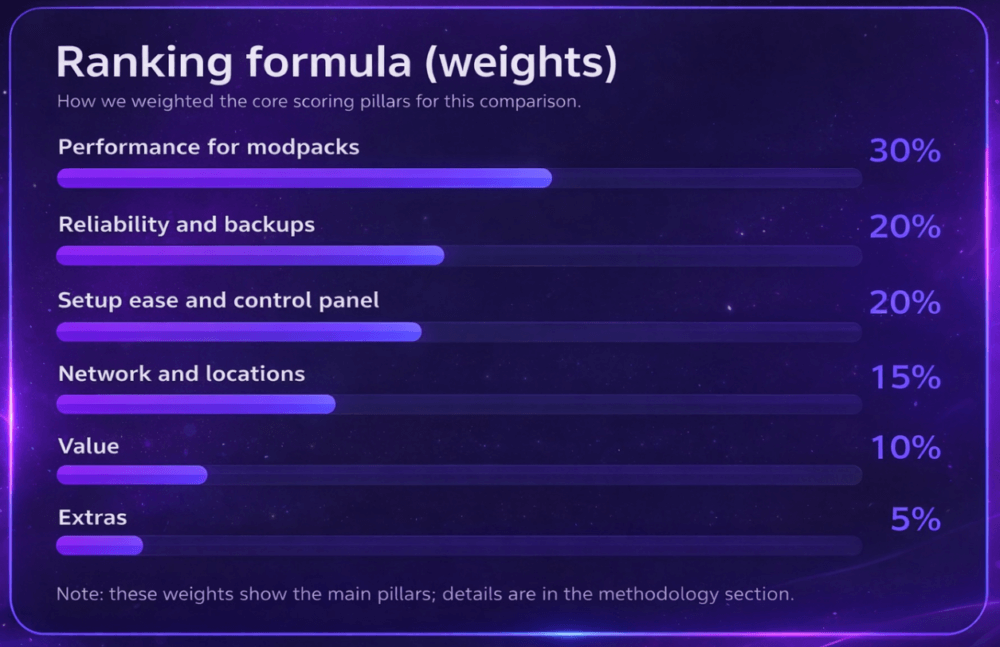
To rank the best modded Minecraft server hosts, we used a weighted scoring model: Performance for modpacks (30%), Reliability and backups (20%), Ease of setup and control panel (20%), Network and locations (15%), Value (10%), and Extras (5%).
| Rank | Host | Best for | Performance | Reliability | Support | Modded Support | Ease of Use | Value | Overall* |
|---|---|---|---|---|---|---|---|---|---|
| 1 | Godlike.host | Best for heavy modpacks (18k modpacks in list) that you want online fast | ★★★★★ | ★★★★★ | ★★★★★ | ★★★★★ | ★★★★½ | ★★★★½ | 4.9 |
| 2 | BisectHosting | Best for CurseForge/FTB modpacks with guided support | ★★★★½ | ★★★★½ | ★★★★★ | ★★★★★ | ★★★★½ | ★★★★½ | 4.7 |
| 3 | Akliz | Best for hands-on help and tricky modpack migrations | ★★★★½ | ★★★★½ | ★★★★½ | ★★★★½ | ★★★★½ | ★★★★½ | 4.6 |
| 4 | Apex Hosting | Best for beginners launching their first modded server | ★★★★½ | ★★★★½ | ★★★★½ | ★★★★½ | ★★★★★ | ★★★★☆ | 4.6 |
| 5 | G-Portal | Best for low-latency play across many regions | ★★★★½ | ★★★★½ | ★★★★☆ | ★★★★☆ | ★★★★½ | ★★★★☆ | 4.4 |
| 6 | Host Havoc | Best for stable “set it up once” modded servers | ★★★★½ | ★★★★½ | ★★★★½ | ★★★★☆ | ★★★★☆ | ★★★★☆ | 4.4 |
| 7 | Shockbyte | Best for budget starts (small modpacks, fewer players) | ★★★★☆ | ★★★★☆ | ★★★★☆ | ★★★★☆ | ★★★★☆ | ★★★★½ | 4.3 |
| 8 | GTXGaming | Best for admins who want granular file and config control | ★★★★☆ | ★★★★☆ | ★★★★☆ | ★★★★½ | ★★★★☆ | ★★★★½ | 4.2 |
| 9 | Nodecraft | Best for clean panel UX and quick modpack switching | ★★★★☆ | ★★★★☆ | ★★★★☆ | ★★★★☆ | ★★★★★ | ★★★½☆ | 4.1 |
| 10 | MCProHosting | Best for long-running communities that want a familiar host | ★★★★☆ | ★★★★☆ | ★★★★☆ | ★★★★☆ | ★★★★☆ | ★★★★☆ | 4.0 |
Starting prices change often; check each hosting provider for current plans and bandwidth specifics.
Our methodology
We scored each host using two inputs:
-
Public proof points (review roundups and large-scale user feedback) to cross-check reliability, support, and real-world modpack stability.
-
Practical admin checks to confirm the modded workflow is actually smooth, not just advertised.
What we checked for modded servers
-
Modpack setup options: one-click installers where available (CurseForge/Modrinth/FTB) or a clean path to run Forge/Fabric/Quilt.
-
Hands-on control: console + logs, file manager, and SFTP/FTP access for configs and troubleshooting.
-
Backups you can trust: scheduled backups and a restore flow that’s easy to use when a pack update breaks a world.
-
Stability under load: enough CPU headroom for TPS-heavy gameplay and sensible RAM allocation for bigger packs.
Note: hosts change hardware, panels, and plan limits often. Always verify current limits, pricing, and regions on the provider’s site before purchasing.
Our evaluation method (how we ranked)
-
Modded performance (30%) — strong single-core CPU for stable TPS, NVMe-backed storage, sensible RAM per slot, and how well the server stays smooth with large packs and more players.
-
Reliability & security (20%) — backups you can schedule and restore quickly, snapshot/retention options where offered, DDoS coverage, and consistent uptime during busy hours.
-
Setup & control panel (20%) — how easy it is to launch modpacks (CurseForge/Modrinth/FTB), panel clarity, file manager + console/logs, and whether SFTP/FTP makes day-to-day admin work painless.
-
Network & regions (15%) — location variety, the ability to host close to your playerbase, and routing/latency that holds up for common regions.
-
Value & clarity (10%) — fair pricing for the resources you get, transparent limits, and upgrade paths that don’t force a rebuild as your server grows.
-
Extras (5%) — quality-of-life add-ons like staging/instances (if available), scheduled tasks, and role-based access for teams.
The 10 best modded Minecraft hosts (2026)
1) Godlike.host — Best overall for modded Minecraft (Editor’s Choice)
TL;DR
What people say
“The interface is clear and easy to use… low latency and no noticeable outages so far.” Trustpilot
Why it’s #1: Godlike.host is built around the two things modded servers punish the most: CPU headroom (for TPS spikes) and storage speed (for chunk-heavy worlds). The stack is tuned for big Forge/Fabric packs, with NVMe-backed servers and a panel that keeps the everyday admin work simple: install a pack, manage files, check logs, restore a backup, and move on without digging through confusing menus.
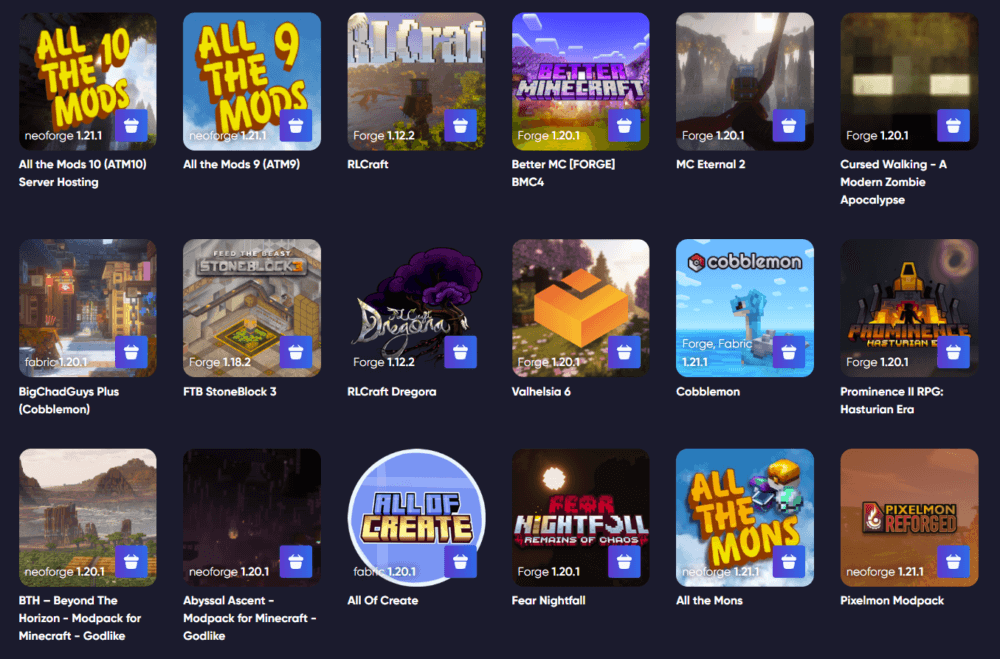
Godlike.host is consistently ranked among the top Minecraft hosting providers in 2026 thanks to a strong mix of performance and day-to-day reliability. The platform is built around fast, stable servers and a modern control panel that keeps modded administration straightforward, from installing packs to handling updates and backups.
Whether you’re running a small modded server for friends or scaling to a larger community, Godlike.host offers flexible plans that let you match RAM and resources to your modpack size. Support is available 24/7/365 when you need help with setup, migrations, or troubleshooting. Below is our new control panel, which adds several practical features for modded server owners.
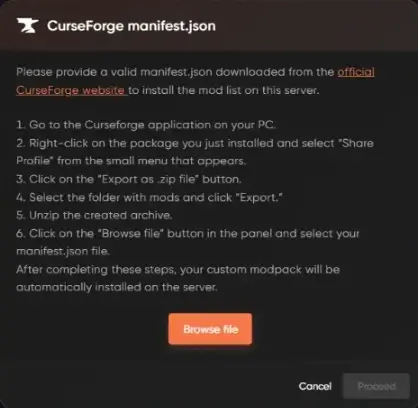
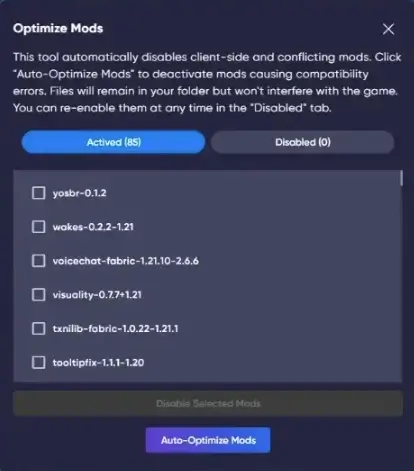
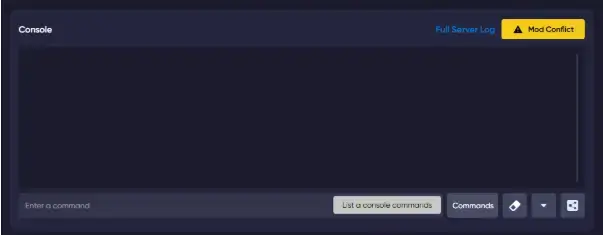
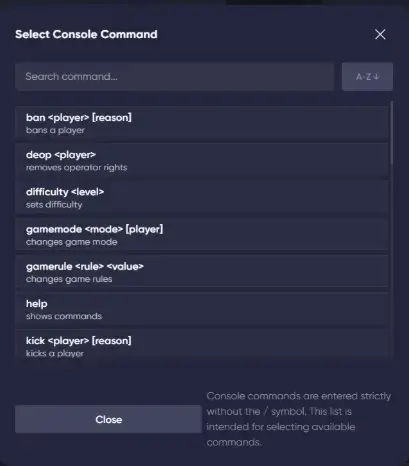
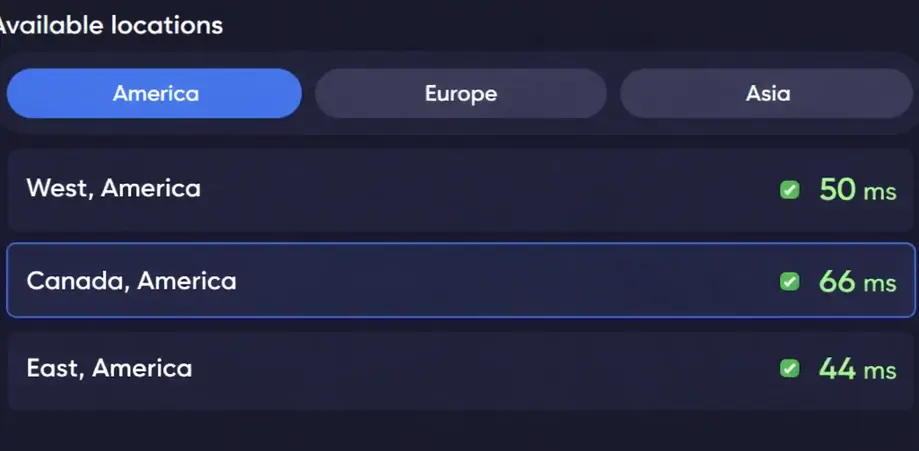
Where it pulls ahead for modded is the control-panel workflow. Beyond one-click installs, it’s designed for the annoying real-life problems: uploading a custom pack when you are not using a library preset, reducing crashes from conflicting or client-side mods, running common server commands without memorizing syntax, and even moving the server to a closer region when your player base shifts.
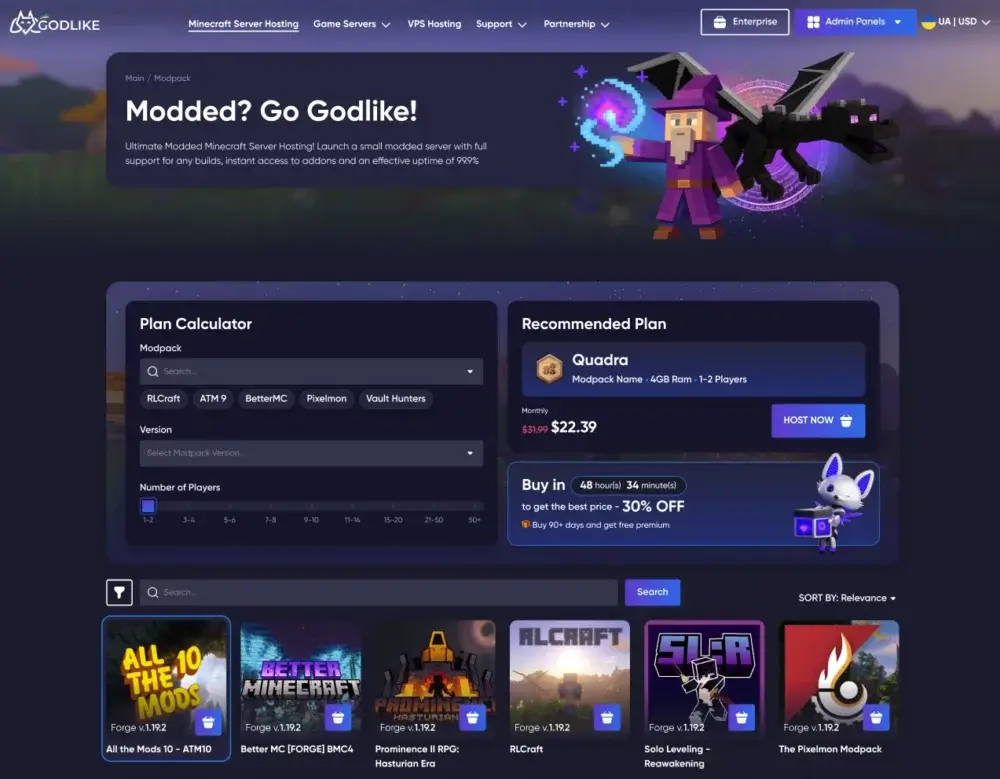
Here's our brand New Control Panel, which includes new useful functions:

Best for: creators and SMPs running larger packs, plus teams who want strong performance without giving up day-to-day usability.
Pros: fast modpack deployment, strong admin tooling, built-in backups and protection, good fit for heavier packs.
Cons: as with any host, exact hardware and feature availability can vary by plan/region, so confirm before you buy.
2) BisectHosting — Huge modpack library & quick support
What people say
“Had a support conversation… very helpful and patient… fast reply with step-by-step guidance.” Trustpilot
Why it’s good: BisectHosting is a steady pick for modded servers because it leans into the full modpack lifecycle: install a pack, update it cleanly, roll back when something breaks, and keep file access straightforward for manual tweaks. If you run popular packs or like experimenting with different versions, the ecosystem around modpacks and server management is one of its main strengths.
It’s also a good fit when you expect to ask for help. Modded issues often come down to logs, version mismatches, missing dependencies, or broken configs. This is where a host’s support quality matters more than marketing features, and Bisect is commonly chosen by admins who value “read the logs and fix it” responses rather than generic copy-paste replies.
Best for: CurseForge/FTB-style packs, busy worlds that need frequent updates, and admins who want solid ticket support.
Pros: strong modpack focus, clear server management workflow, good support reputation for modded issues.
Cons: higher tiers can cost more than budget-first hosts.
3) Akliz — For experienced server administrators
What people say
“Powerful servers and amazing customer service… some of the most kind and courteous server hosts.” Trustpilot
Why it’s good: Akliz is geared toward people who do not mind getting their hands dirty. If you like running specific server jars, building custom modpacks, or maintaining a long-running world with a tuned setup, Akliz tends to support that style well. It is especially relevant when your server is not “install a popular pack and forget it,” but something you actively maintain.
Another advantage is how it approaches modpack variety and custom installs. If your plan is to test different packs, run hybrids, or migrate an existing modded world with a specific file layout, the platform is positioned for that kind of admin workflow rather than purely beginner onboarding.
Best for: experienced admins, custom modpacks, and servers where you expect to tweak configs and JVM settings.
Pros: good support for custom installs, modpack variety, admin-friendly approach.
Cons: not the simplest option if you want the most guided “click and play” experience.
4) Apex Hosting — Friendly onboarding & rich knowledge base
What people say
“Easy to set up!… step-by-step resources made setup super easy.” Trustpilot
Why it’s good: Apex stands out when you care less about fiddly admin details and more about getting a modded server running correctly on the first try. Modded hosting can be intimidating because of loaders, pack versions, and client-server matching. Apex leans into guides, onboarding, and “do this next” documentation so newer admins do not get stuck on the basics.
It is also a solid choice when your group wants common modded setups without a lot of custom work. If the plan is to run established Forge or Fabric packs and you want straightforward management with backups and support, Apex is usually comfortable for that.
Best for: beginners, friend-group servers, and admins who want strong documentation for modpacks and common fixes.
Pros: beginner-friendly workflow, strong guides, smooth setup for common modded use cases.
Cons: can be pricier than budget hosts, especially as you scale resources for larger packs.
5) G-Portal — Wide global footprint & low-latency routing
What people say
“Prompt response times from the support team… assistance within minutes.” Trustpilot
Why it’s good: G-Portal is often chosen for its geographic flexibility and simple “pick a region and go” approach. If your players are spread out, the ability to choose a nearby location can matter as much as raw specs. That is especially true for modded servers where lag feels worse during chunk loading, automation, and boss fights.
For modded servers, the key expectation-setting is that some modpack workflows may be more manual. If you are comfortable uploading/modifying packs via file access and keeping your pack versions organized, it can still be a good fit. Just do not treat it like a host that is built entirely around a huge one-click modpack library.
Best for: groups prioritizing nearby regions and stable connections across multiple locations.
Pros: good location flexibility, simple management approach, solid choice for latency concerns.
Cons: modpack workflows may require more manual file handling depending on your setup.
6) Host Havoc — “Set it and play” reliability
What people say
“Host Havoc blows them away… others take days to respond, Havoc answers in minutes.” Trustpilot
Why it’s good: Host Havoc’s value is straightforward: stable hosting fundamentals, scheduled backups with simple restores, and full FTP access when you need to manage files directly. That combination is practical for modded worlds because issues often require quick file edits or restoring a working state after a bad update.
It is a sensible pick if you want modded hosting without overcomplicating the panel experience. You can run popular modded setups, keep backups on, and rely on a stable baseline rather than chasing flashy features.
Best for: small-to-mid modded servers that want reliability, backups, and simple file access.
Pros: backups + easy restores, full FTP access, stability-focused hosting basics.
Cons: not as “modpack ecosystem” heavy as hosts that center their product around huge pack libraries.
7) Shockbyte — Strong value for small teams
What people say
“Support chat was 10x more useful than tools I use at work.” Trustpilot
Why it’s good: Shockbyte is usually considered when price matters and you still want the basics for modded: modpack support, protection, backups, and a panel that does not fight you. For casual servers (friends, smaller communities, lighter packs), that can be enough to get playing quickly.
The main thing to be realistic about is scaling. Modded servers can jump from “fine” to “needs more resources” fast when you add content mods, automation, or more players. Shockbyte works best when you choose an appropriate plan and leave room to upgrade if your modlist grows.
Best for: budget starts, smaller modpacks, and newer admins who want modded features without a premium price.
Pros: strong entry value, modpack support, good for smaller groups.
Cons: heavier packs may push you to upgrade sooner.
8) GTXGaming — Granular control & visual editors
What people say
“Support staff are professional, patient, and knowledgeable.” Trustpilot
Why it’s good: GTXGaming is a workable pick when you prefer direct management over a heavily guided experience. If you are the type to edit configs, adjust launch parameters, and keep a close eye on logs, it is more aligned with that admin style than hosts that aim purely at beginners.
It is also helpful for modded servers where you do not want to be boxed into a single “approved” workflow. Being able to manage pack files, swap versions, and maintain your server structure matters if you run custom packs or do frequent modlist changes.
Best for: hands-on admins, custom modpacks, and setups that need frequent tweaking.
Pros: flexible admin workflow, good for custom setups, works well for people comfortable managing files.
Cons: less guided than beginner-first hosts.
9) Nodecraft — Polished NodePanel with safety nets
What people say
“Always and I mean ALWAYS a great experience.” Trustpilot
Why it’s good: Nodecraft is attractive if you care about panel UX and safer iteration. Modded servers break. Having a workflow that supports backups and makes switching between modpacks or configurations feel controlled (rather than risky) is a real advantage when you are testing packs or updating often.
Its platform is also known for supporting a wide selection of modpacks, which makes it easy to spin up a server, try a pack, and pivot without rebuilding everything from scratch.
Best for: admins who want a polished UI and cleaner workflows for trying packs, updating, and rolling back.
Pros: strong panel UX, good modpack breadth, safety-friendly management style.
Cons: can cost more than budget-first providers.
10) MCProHosting — Familiar choice for long-running worlds
What people say
“Very simple and easy to use, staff respond quickly and are knowledgeable.” Trustpilot
Why it’s good: MCProHosting has been a familiar name in Minecraft hosting for a long time, and historically it appealed to people who wanted a straightforward “Minecraft-only host” approach with support and predictable management.
However, in 2026 you should treat MCProHosting as a “verify first” option. The service has been in a transition toward Apex Hosting, which can affect what plans exist, what panel experience you get, and what new purchases look like. If you are considering it, confirm the current signup flow and feature set before committing.
Best for: readers who already know the brand and want to check whether the current offering still matches their needs.
Pros: established legacy name, historically simple Minecraft-focused hosting.
Cons: ongoing transition means you should confirm current details before buying.
How to choose a plan (for modded servers)
Modded Minecraft punishes the wrong plan fast. A server that feels fine in vanilla can start rubber-banding the moment you load a bigger pack, generate new chunks, or add automation. Use the checklist below to pick a plan that stays stable as your world and player count grow.
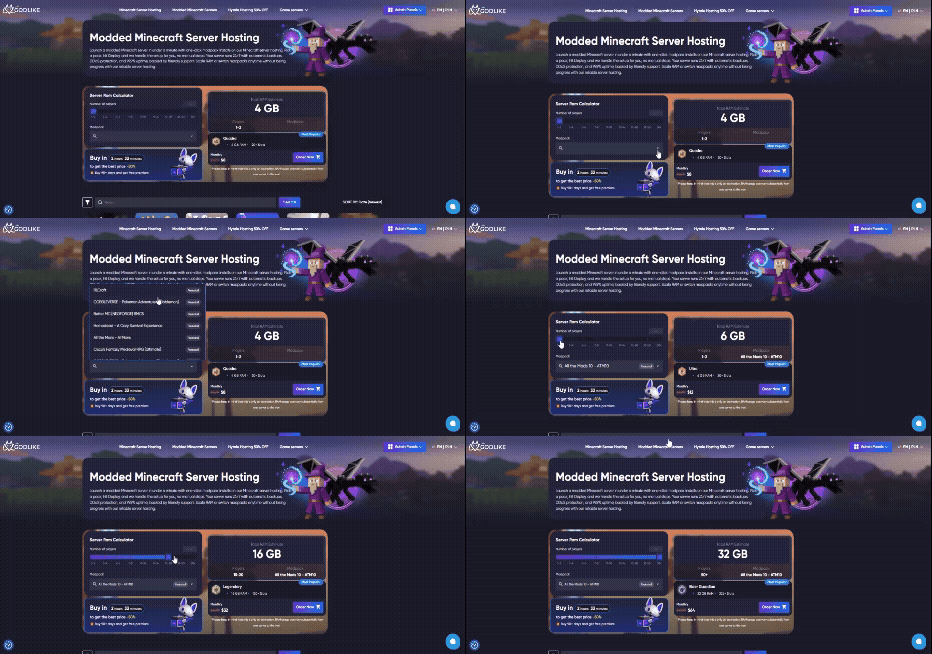
- Use our RAM calculator first. If you’re not sure where to start, Godlike.host includes a built-in RAM calculator for modded servers. Pick the modpack you want to run, estimate world size and player count, and it recommends a suitable RAM range (and a matching plan estimate) so you don’t underbuy and end up lagging. You’ll also see the discounted price shown for that plan (up to 50% off, depending on the current offer).
TIP
-
Pick the right region first. Choose a location closest to where most of your players live. Lower latency makes combat, flying, and chunk loading feel smoother, and it reduces the “the server feels laggy” complaints that are really just distance and routing.
-
Prioritize RAM, then CPU. Most modpacks are RAM-hungry, especially kitchen-sink packs and anything with lots of entities, machines, or dimensions. Start with enough RAM for the pack and leave headroom for player activity. After that, look at CPU strength, because TPS drops usually show up when the server is doing heavy tick work (mob farms, automation chains, big bases, or lots of chunk loading).
-
Make backups non-negotiable. For modded, backups are not just “nice to have”. A bad mod update, corrupted region file, or broken config can wipe hours of progress. Look for scheduled automatic backups and a restore flow you can use quickly, plus options to keep a few older versions of the world.
-
Choose a panel that makes modded admin easy. You will eventually need console access, logs, and file management. A good panel also makes it simple to install or switch modpacks, edit configs safely, and upload custom files without fighting the UI.
-
Confirm file access (SFTP/FTP) before you buy. Modded servers often require manual config tweaks, adding server-side mods, or fixing mismatched files after updates. SFTP/FTP access (or an equivalent full file manager) turns “I’m stuck” into a 5-minute fix instead of a support ticket.
-
Don’t ignore security and permissions. Keep DDoS protection enabled, use strong passwords, and limit who can access the panel. If you’re running a community server, role-based access for staff is a big plus, because it lets you delegate moderation without handing over full control.
-
Plan upgrades like you’ll need them. Most modded servers start small and then expand: more players, bigger worlds, more mods, more automation. Check how easy it is to upgrade RAM/CPU and whether plan upgrades require a migration, downtime, or surprise fees.
Conclusion: Godlike.host is our top pick for modded Minecraft hosting in 2026
Using the scoring model in this comparison (performance, reliability, support, modpack tooling, ease of use, and value), Godlike.host comes out #1 for modded Minecraft in 2026. The main reason is simple: it removes the pain points that actually slow admins down, from launching and switching modpacks to recovering quickly when an update breaks a server.
Why Godlike.host ranks #1 for modded servers (what you get)
-
Huge modpack library: access to 18,000+ packs with support for CurseForge, Modrinth, and FTB, plus common stacks like Forge, Fabric, and Paper.
-
Fast time to play: modded servers can be deployed in under a minute in the usual flow, with pack switching handled from the panel.
-
Hardware built for heavy packs: NVMe SSDs and performance-focused AMD Ryzen 9 9950X3D / AMD EPYC 9474F nodes (availability can vary by region/plan).
-
Backups + monitoring: 99.9% uptime SLA, proactive monitoring, and automatic backups so you can roll back after crashes or bad updates.
-
Protection included: always-on DDoS protection (Path.net, 12TB) plus firewall controls.
-
Scale without rebuilding: upgrade RAM and player slots as your modpack and community grow, with zero downtime upgrades.
-
Custom pack support: upload your own Forge/Fabric/Quilt server pack as a ZIP, manage files in-panel, and use SFTP/FTP for hands-on changes.
-
Regions + localization: multiple locations for better ping, with panel language options for smoother admin work.
-
Support that fits modded: help via live chat, tickets, or Discord, with a listed average first response of ~5 minutes.
-
Admin tools that save time: console/log access, server status checks, a troubleshooting knowledgebase, Discord actions (restart/ban/view logs), and team/sub-user permissions for shared management.
FAQ
-
What’s the difference between vanilla and modded Minecraft hosting?
Vanilla runs the base game; modded adds Forge/Fabric/Quilt plus content packs. You’ll need more RAM, reliable backups, and a panel that simplifies modding. -
Can I migrate my own server files?
Yes upload world files, configs, and mods via SFTP/FTP or the file manager. Most hosts provide step-by-step guides and a support team to verify settings. -
How many players can I run on 4–8 GB RAM?
It depends on mods. Light packs with friends may be fine on 4–6 GB; big packs need 8–12+ GB and fast cpu. Always leave headroom. -
Do I really need DDoS protection?
Yes. Built-in DDoS protection or free DDoS protection prevents attacks from knocking your world offline especially for public communities. -
What’s the easiest way to install a modpack on a server (CurseForge/Modrinth/FTB)?
Use a host with a built-in modpack installer: pick the pack and deploy. For custom uploads, match the Minecraft + Forge/Fabric/Quilt version and upload the correct pack files (CurseForge typically uses a manifest.json). -
Why does my modded server lag even with enough RAM?
Most modded lag is CPU tick load (entities, automation, farms, chunk loading) or chunk generation. Check TPS and logs, then roll back the last mod/config changes to find the culprit. -
Can I switch modpacks later without wiping my world?
Sometimes, but it depends on the pack. Switching between different modpacks usually changes blocks, items, and world data, which can corrupt a save or cause missing content. The safer approach is to back up first, then either keep the same modpack and update it, or run a new world for a different pack. If you need multiple packs, it’s better to run separate instances/servers so each pack has its own clean world and configs.
Read Next
-
Best Minecraft Server Hosting 2026 – 12 Compared & Ranked Providers
Important Note: Godlike.host is our own service. This ranking is editorial (not paid placement) and follows the scoring criteria shown below. Always verify current plan limits, pricing, and regions on each provider’s website before purchasing….
-
Minecraft 1.21+ Seeds Worth Trying (Cherry Villages, Dungeons, and Beauty)
TL;DR If you want one seed that feels like a complete starter world, pick Cherry Valley Trio (Seed: 608548899648438462) for villages, deep structures, and a strong exploration route.If you want a dramatic build location with…
-
What Y Level is Best for Diamonds in Minecraft (1.20 -1.21)
Ultimate Minecraft Diamonds Mining Guide Why are diamonds so wanted by many? Minecraft Diamonds – shiny blue gems in the world of Minecraft that also happen to be the ore required to have the best…