en | USD
 CHAT WITH GODLIKE TEAM





Best Palworld Server Hosting (2026): 10 Providers Compared & Ranked
- 16 min read
- 1570 views
- 0 likes
Important Note: Godlike.host is our own service. This ranking is editorial (not paid placement) and follows the scoring criteria shown below. Always verify current plan limits, pricing, and regions on each provider’s website before purchasing.

What is the best Palworld server hosting in 2026?
 Best overall: Godlike.host (performance-first hosting with a clean panel for fast Palworld setup and stable day-to-day play)
Best for beginners: Apex Hosting (clear guides and a simple control flow so first-time admins don’t get stuck)
Best for region choice: G-Portal (useful when your group is spread out and you want a nearby location quickly)
Best for long-running worlds: Nitrado (good for persistent servers where consistency matters more than extra features)
Best set-and-forget pick: Host Havoc (straightforward hosting that’s easy to keep running once it’s configured)
Best for hands-on control: GTXGaming (more admin-level tools for settings, files, and advanced server tweaks)
Best budget start: Shockbyte (lower-cost entry plans if you pick enough resources for your player count)
Best panel UX: Nodecraft (polished management experience for day-to-day changes and troubleshooting)
Best for small groups: ScalaCube (quick, low-friction hosting for casual co-op servers)
Best for guided onboarding: ServerBlend (helpful support/docs if you want a smoother first setup)
Choose Palworld Hosting in 2026
If you’re picking a Palworld host in 2026, the goal is to get a server online quickly and keep it stable once players join. This guide compares the top providers, explains how we scored them, and shows which hosts are easiest to manage day to day, especially when you’re changing settings, updating server files, or growing from a small friend server into a larger community.
Advantages of using Palworld hosting
A good host removes the tedious parts of running a server yourself: manual setup, unstable connections, and risky no backup worlds. The best options give you a clean control panel, automatic backups you can restore fast, protection against unwanted traffic, and multiple regions so you can host close to your players. You also want solid file access and straightforward admin tools, because real servers need changes and fixes without waiting on support.
How We Build the Ranking (our methodology)
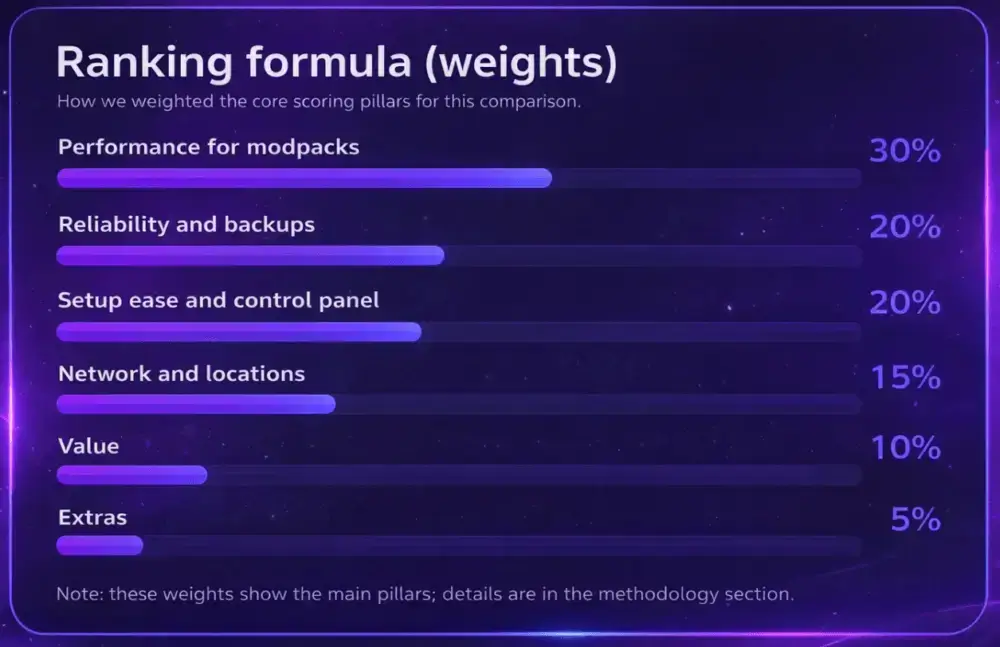
We score hosts based on what actually determines a good Palworld server experience: how stable the server stays under load, how easy it is to manage day to day, and how quickly you can recover when something goes wrong. That means we look closely at the control panel and core admin tools, backup and restore options, protection and basic security, plus how clear the provider is about upgrades, limits, and policies. Support also matters more than most people expect, because Palworld setup and troubleshooting questions are usually time-sensitive.
For each provider, we compare the practical details that affect real buyers: entry pricing versus renewal pricing, refund terms, common restrictions, and whether there are obvious upsells you only discover after checkout. In the reviews below, we call out where the setup feels straightforward and where you should double-check fine print before you commit.
To rank the best Palworld server hosts, we use a weighted scoring model: Performance (25%), Reliability/Uptime (20%), Support (20%), Game Support (15%), Ease of Use (10%), and Value (10%).
| Rank | Host | Best for | Performance | Reliability | Support | Mod Support | Ease | Value | Overall |
|---|---|---|---|---|---|---|---|---|---|
| 1 | Godlike.host | High clocks, SSD storage, clean control panel | ★★★★★ | ★★★★★ | ★★★★★ | ★★★★☆ | ★★★★☆ | ★★★★☆ | 4.9 |
| 2 | Apex Hosting | Friendly docs + regular backups | ★★★★★ | ★★★★★ | ★★★★★ | ★★★★☆ | ★★★★★ | ★★★★☆ | 4.7 |
| 3 | G-Portal | Wide global server locations, fast start | ★★★★☆ | ★★★★★ | ★★★★☆ | ★★★★☆ | ★★★★☆ | ★★★★☆ | 4.6 |
| 4 | Nitrado | Long-running worlds, automatic updates | ★★★★☆ | ★★★★★ | ★★★★☆ | ★★★★☆ | ★★★★☆ | ★★★★☆ | 4.6 |
| 5 | Host Havoc | Set-and-forget reliability | ★★★★☆ | ★★★★☆ | ★★★★★ | ★★★★☆ | ★★★★☆ | ★★★★☆ | 4.5 |
| 6 | GTXGaming | Deep server management & editors | ★★★★☆ | ★★★★☆ | ★★★★☆ | ★★★★★ | ★★★★☆ | ★★★★☆ | 4.5 |
| 7 | Shockbyte | Affordable pricing, quick instant setup | ★★★★☆ | ★★★★☆ | ★★★☆☆ | ★★★★☆ | ★★★★☆ | ★★★★★ | 4.3 |
| 8 | Nodecraft | Polished UI, full access via SFTP | ★★★★☆ | ★★★★☆ | ★★★★★ | ★★★★☆ | ★★★★☆ | ★★★★☆ | 4.3 |
| 9 | ScalaCube | Low-friction panel for small groups | ★★★★☆ | ★★★★☆ | ★★★★☆ | ★★★★☆ | ★★★★☆ | ★★★★☆ | 4.3 |
| 10 | ServerBlend | Helpful onboarding & guides | ★★★★☆ | ★★★★☆ | ★★★★☆ | ★★★★☆ | ★★★★☆ | ★★★★☆ | 4.2 |
Use these mini-reviews to shortlist a host, then match features, locations, cost, and resources to your group size.
NOTE
Overall score is a weighted editorial average not a raw benchmark
The 10 best Palworld server hosting providers (2026)
1) Godlike.host - Best overall Palworld server hosting
TL;DR
BEST OVERALL IF YOU WANT A FAST, STABLE PALWORLD DEDICATED SERVER WITH A CLEAN CONTROL PANEL, BUILT-IN BACKUPS, AND PROTECTION THAT MAKES DAY-TO-DAY ADMIN SIMPLE
We rank Godlike.host #1 for Palworld in 2026 because it covers the stuff that actually affects real sessions: quick deployment, easy access to server settings, reliable backups, and admin tools that help you fix problems without waiting on support. After purchase, the server provisions quickly, the panel is ready fast, and the workflow is designed around the tasks Palworld admins do most often: changing world settings, restarting safely, checking logs when something feels off, and keeping save data protected.
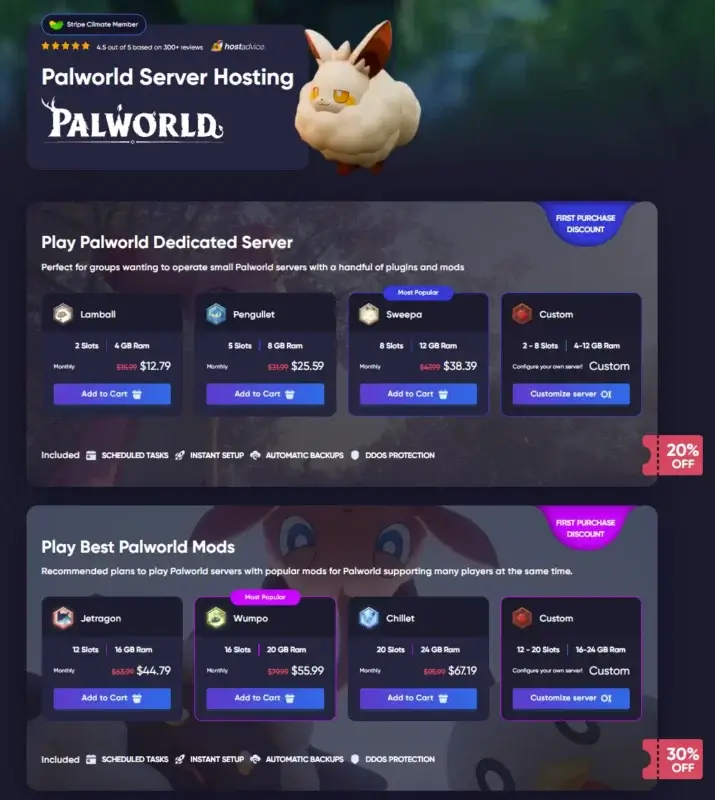
On the infrastructure side, the platform is built around performance-first nodes with NVMe storage and always-on protection. For access control, there are firewall-style tools for filtering unwanted traffic. And for quick management when you don’t want to log into the panel every time, there’s Discord-based server control.
What people say
“The interface is clear and easy to use… low latency and no noticeable outages so far.” Hostadvice
Pros
-
Fast setup flow with a modern panel for Palworld server settings and routine admin
-
Full SFTP access for saves/configs/logs when you need hands-on control
-
Always-on DDoS protection plus extra access filtering tools for public servers
-
Built-in backup workflow + quick restore for “bad update / bad setting” moments
-
Discord server manager for quick actions (restart, basic control, status checks)
Cons
-
First-purchase discounts (if shown) typically apply to the initial order only
-
Backup limits can exist depending on the plan (confirm frequency/retention)
Here's our brand New Control Panel, which includes new useful functions:
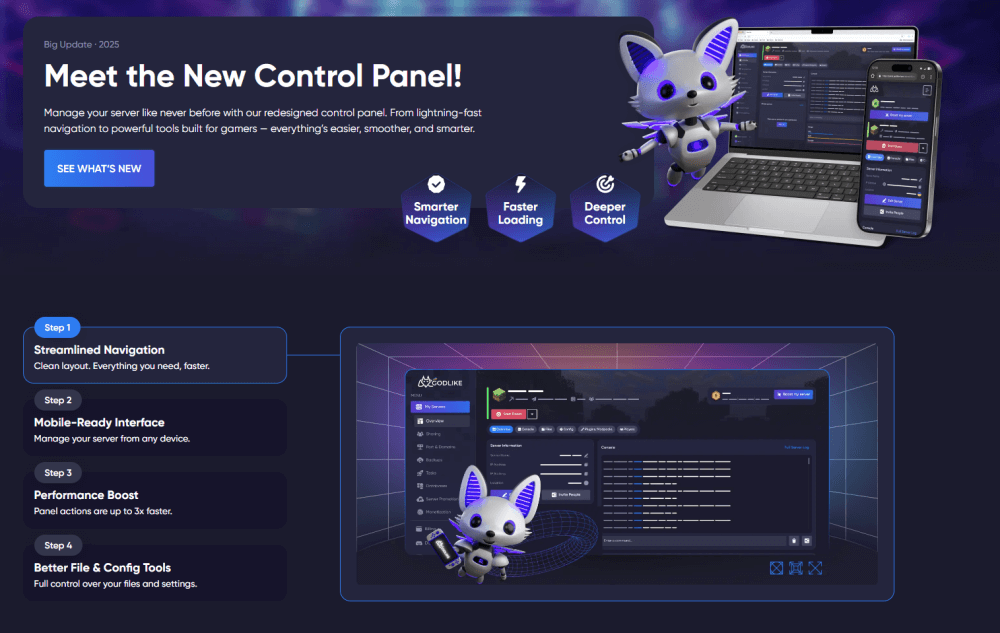
Server Location Transfer (lower ping for your group)

If most of your players are closer to another region, you can move your Palworld server location directly from the control panel in a few clicks. Pick the region that gives your group the best latency, apply the change, and keep connections more consistent without rebuilding the server from scratch.
Pack Management & Quick Fix Tools (for Palworld server files)
Palworld servers tend to break for the same reasons: one change conflicts with another, a config value is wrong, or files get out of sync after updates. The new control panel is built to make that easier to handle. You can manage your server files from one place, quickly roll back using backups if something goes sideways, and get back to a working state without doing a full reinstall.
2) Apex Hosting - Beginner-friendly with real safeguards
Apex is built for people who want a Palworld server online quickly without learning every server detail on day one. The setup flow is straightforward, and their docs tend to cover the “first week” problems: how to connect, where settings live, and what to do when the server needs an update or restart. For Palworld specifically, that matters because most of the “admin work” is routine: editing server settings, restarting safely, and keeping backups so a bad change doesn’t wipe progress.
If you’re hosting for friends and you don’t want to fight with file paths and config formats, Apex is usually a low-friction choice. Just make sure the plan you pick matches your expected player count and base complexity, because Palworld worlds get heavier as automation and large bases appear.
Pros: Easy onboarding; good documentation; quick setup and common admin tasks are simple.
Cons: Confirm renewal pricing/limits and upgrade path if your server grows faster than expected.
3) G-Portal - Wide global footprint and quick scaling
G-Portal is a strong option when your players are spread across countries and you want an easy way to pick a nearby region. Palworld feels noticeably better with decent latency during combat and fast travel, so location choice is not a “nice extra”, it’s a real quality-of-life factor. G-Portal’s pitch is basically: pick a region, deploy fast, adjust resources as your world gets busier.
It’s best for groups that want stable hosting fundamentals and don’t need a super developer workflow. If you expect to do lots of hands-on tweaking (custom scripts/mods, heavy file work), double-check how deep the file access and configuration workflow is on your plan.
Pros: Region coverage; quick deployment; simple scaling.
Cons: Verify how much low-level control you get if you plan to tinker a lot.
4) Nitrado - Automatic updates and sturdy housekeeping
Nitrado works well for Palworld servers you plan to keep online long-term. The big practical advantage is update handling: when Palworld patches, you want the server to catch up without turning into an evening project. Nitrado also tends to target people who value consistent uptime and predictable management over fancy extras.
If your goal is stable persistent world more than “I want to tweak everything", it’s a solid fit. The main thing to check is how flexible the plan/resources and settings access are for your exact use case.
Pros: Strong long-run orientation; update workflow is a priority; stable “keep it running” vibe.
Cons: If you want deep hands-on customization, confirm the exact control/file workflow you’ll need.
5) Host Havoc - Consistent uptime with a tidy panel
Host Havoc is a practical choice if you want a Palworld host that gives you the core admin tools without drama. Their control panel guides focus on real tasks: using FTP, setting up scheduled restarts, and restoring saves from backups. For Palworld, that’s exactly what you end up doing as an admin: you change a setting, restart, verify, and if something breaks, you roll back.
This is a good fundamentals pick rather than a flashy one. It’s especially useful if you want straightforward file access for configs/saves and you prefer a host that documents how to handle problems instead of hiding them behind support tickets.
Pros: FTP + backups are clearly supported; scheduled restarts and restore workflows are documented.
Cons: Panel experience may feel more utilitarian than modern, depending on your preference.
6) GTXGaming - Deep editors for power users
GTXGaming is aimed at people who like to control more of the server setup. Their knowledgebase leans into file access, upgrades/downgrades, and Palworld-specific tasks, and they publish guides for installing common Palworld mod approaches (like UE4SS). If you’re the admin who wants to tweak settings aggressively, test changes, and iterate, GTX is more aligned with that style.
It’s also a reasonable pick if you expect your server to evolve (bigger bases, more players, more frequent config adjustments). Just be aware that more control means you’ll have more decisions to make.
Pros: Strong for file-level control; guides for Palworld admin tasks and mod workflows; flexible tuning mindset.
Cons: Not as beginner autopilot as beginner-first hosts.
7) Shockbyte - Affordable and fast to launch
Shockbyte is often picked when price matters and you still want a proper Palworld dedicated server (not self-hosting). They market full access to configuration options, which is important for Palworld because most customization lives in settings files and server parameters. For small-to-medium friend servers, it’s a common “get online fast” option.
The main risk is the usual budget-host reality: if the server becomes busy (large bases, lots of Pals, more players), you may need to upgrade sooner. Pick enough resources up front and treat upgrades as part of the plan.
Pros: Lower barrier to entry; full settings/config control is emphasized; fast setup.
Cons: Budget tiers can get tight as your world grows—plan upgrades may come earlier than you expect.
8) Nodecraft - Polished UI with full SFTP access
Nodecraft is best when you care about panel UX and safer management flows. They focus on storing world/config data and making it easier to manage changes without losing your setup. If you’re the type who wants to snapshot, experiment, and roll back when needed, that style fits Palworld well, because updates and tuning can be frequent.
It’s also a good fit for admins who want things to feel organized: clear interface, easy access to what matters, and fewer “where is that setting” moments.
Pros: Polished control panel; good workflow for saving/restoring server state; comfortable day-to-day management.
Cons: Compare price at your needed resources—UX-oriented hosts can cost more at higher specs.
9) ScalaCube - Friendly for small groups and creators
ScalaCube is positioned as a fast way to get a Palworld server running, typically aimed at smaller groups that want a simple setup. It can work fine when you’re not trying to do anything exotic: basic server, basic settings, get your friends in, play.
For Palworld, the make-or-break is usually backups and file access (for settings and saves). Before buying, confirm exactly what your plan includes for backups/restore and how you manage files. If those are clear and included, it can be a reasonable lightweight option.
Pros: Simple entry path; works well for casual servers when you keep the setup straightforward.
Cons: Make sure backups + file access are clear on your plan before committing.
10) ServerBlend - Documented workflows and patient support
ServerBlend’s reputation in hosting directories is more about being a long-running game server provider with a documentation/support-forward approach. That’s useful for Palworld admins because most friction is procedural: where settings live, how saves move, how backups restore, how to update safely.
Since Palworld offerings and panel features can vary by provider over time, treat this as a “verify first” option: confirm the control panel, backup frequency, file access method, and update workflow match what you need before checkout.
Pros: Documentation/support-oriented positioning; good fit if you prefer step-by-step workflows.
Cons: Confirm Palworld-specific feature details (backups, file access, update flow) before buying.
How to choose the right Palworld hosting plan
- Pick a region first. A server location close to your players is the biggest ping win.
- Balance CPU/RAM with storage. Palworld worlds grow; SSD storage keeps saves fast. Leave more resources (20–30%) for events.
- Use a capable panel. A good control panel reduces mistakes and shows log output when you need to debug.
- Plan for safety. Regular backups + DDoS protection prevent data loss and downtime.
- Watch costs, not just price. Cheap vps hosting or a generic vps provider can look attractive, but dedicated resources from a game-focused host usually deliver better reliability.
- Check support. Read how the support team handles spikes, migrations, and refunds real customer support beats glossy marketing.
Quick setup checklist (lag-free launch)
- Purchase your plan and create an account.
- Choose a server location closest to your users.
- In the control panel, set server settings (rates, password/allowlist, visibility).
- Enable regular backups and verify they complete.
- Keep nodes up to date with automatic updates or scheduled restarts.
- Invite friends, monitor performance, and upgrade if the palworld community grows.
Results: Godlike.host Is Best Overall for Palworld Server Hosting (2026)
Using our scoring pillars (stability under load, admin usability, launch speed, security, and real support), Godlike.host ranks #1 overall for Palworld in 2026. The reason isn’t branding, it’s the workflow: you can bring a server online fast, manage settings and files without friction, and recover quickly when updates or configuration changes cause problems. That combination reduces downtime and prevents the common “server is broken and nobody knows why” situations that show up early in most Palworld communities.
Why Godlike.host gets #1 (what you actually get)
-
Performance-first hardware: NVMe-backed nodes and modern AMD Ryzen/EPYC options for smoother play when bases get large and the world gets busy (availability can vary by region/plan).
-
Fast launch: servers provision quickly after purchase, so you can start playing the same day without manual setup.
-
Control panel + full access: a modern panel plus SFTP so you can manage saves, configs, and logs without unnecessary restrictions.
-
Server-side customization: clear access to key server settings and files, with the flexibility you need for real admin work as your community grows.
-
Protection by default: always-on DDoS protection plus firewall-style tools for filtering unwanted traffic.
-
Low-latency regions: multiple locations and an easy way to choose the region that fits your players (and switch later if your community shifts).
-
Backups + rollbacks: automatic backups with a restore flow designed for quick recovery after bad updates or broken settings.
-
Admin tools that save time: Discord-based management for common actions, plus status/monitoring checks so you can spot issues early.
-
Team access: sub-user roles and permissions so you can share admin work without sharing one master password.
-
Flexible scaling: upgrade or downgrade resources from the dashboard as your Palworld server load changes, without rebuilding from scratch.
FAQ
-
What specs do I need for Palworld?
Start with high-clock CPU, 8–12 GB RAM, and SSD storage for small private worlds. For busy servers, add RAM and bandwidth headroom and consider splitting instances by region. -
Can I install mods and customize settings?
Yes use the control panel to install mods when available, change server settings, and view log output. SFTP gives access for manual tweaks. -
Is a VPS good enough for Palworld?
A web host or generic vps provider can work for testing, but for sustained gaming experience we recommend a game-focused host with dedicated resources, better reliability, and support that understands a game server. -
How do I avoid data loss?
Schedule regular backups, test restores, and keep automatic updates outside peak hours. Good hosts expose one-click snapshots and show log status after maintenance. -
What if I need to scale?
Choose plans that let you upgrade CPU/RAM/slots without rebuilds. As users increase, move to larger tiers or additional instances in the same dashboard.

Read Next
-
Best Minecraft Server Hosting 2026 – 12 Compared & Ranked Providers
Important Note: Godlike.host is our own service. This ranking is editorial (not paid placement) and follows the scoring criteria shown below. Always verify current plan limits, pricing, and regions on each provider’s website before purchasing….
-
Palworld Best Base Locations (2025): Map & Coordinates
In Palworld server hosting picking where to drop a base isn’t just a comfort choice it dictates how quickly you unlock tech, how often you run loops, and how much busywork you avoid later. Below…
-
Palworld Fishing Guide: Tides of Terraria Update
Palworld server hosting has never stopped surprising its players with creative ways to interact with its vibrant world, and fishing is the latest activity that hooks adventurers in for a calmer, yet rewarding break from…