en | USD
 CHAT WITH GODLIKE TEAM





Best Terraria Server Hosting (2026): 12 Providers Compared & Ranked
- 20 min read
- 1344 views
- 0 likes
Important Note: Godlike.host is our own service. This ranking is editorial (not paid placement) and follows the scoring criteria shown below. Always verify current plan limits, pricing, and regions on each provider’s website before purchasing.

What is the Best Terraria Server Hosting 2026?
 Best overall: Godlike.host
(fast setup, clean control panel, always-on DDoS protection, and the admin basics like console + file access)
Best for new(beginners) admins: Apex Hosting
(beginner-friendly setup with clear guides for common Terraria tasks and server basics)
Best for many regions(Internation): G-Portal
(strong pick if your players are spread out and you want flexible region options with prepaid-style renting)
Best for steady long runs: Nitrado
(a familiar web-based management flow geared toward keeping a world running consistently)
Best “set it and forget it”: Host Havoc
(made for groups who want a simple hosting workflow and a server that stays stable once configured)
Best for power(in topic) admins: GTXGaming
(more hands-on control for configs and mod-ready setups, suited to players who like tuning and tweaking)
Best budget start: Shockbyte
(good entry option if you mainly want a quick hosted Terraria world without overpaying for extras)
Best for clean panel feel: Nodecraft
(polished management experience that works well when you want an easier UI for day-to-day changes)
Best for small groups: ScalaCube
(a straightforward, low-friction way to spin up a Terraria server when you’re keeping things simple)
Best for guided onboarding: ServerBlend
(a practical choice if you want a more guided start and help getting your server organized early)
Best for long-running worlds: Survival Servers
(aimed at players who care most about keeping a persistent world stable over time)
Best for network reach: PingPerfect
(worth a look if you prioritize broad network coverage and responsive ticket-based help)
Choose Terraria Server Hosting in 2026
If you’re picking a Terraria host in 2026, focus on the stuff that actually affects play: how quickly you can get a world online, how easy it is to change settings, and whether your friends can connect without lag spikes. This guide breaks down the top providers, explains how we scored them, and helps you choose a host that fits your group size, region, and playstyle, from casual co-op worlds to bigger public servers.
Advantages of using Terraria hosting
A solid Terraria host saves you from the annoying parts of running a server yourself: manual setup, unstable connections, and losing progress when something goes wrong. The best options offer a simple control panel, automatic backups you can restore fast, DDoS protection for public worlds, and region choices that keep ping reasonable. If you plan to use server tools like tModLoader or TShock, file access and basic permissions also matter, because updates and config changes shouldn’t be a headache.
At-a-glance comparison (editorial scores)
To rank the best Terraria server hosts, we use a weighted scoring model built around what most Terraria admins care about: Performance (25%), Uptime/Reliability (20%), Control panel & settings (20%), Support/Docs (20%), and Value (15%).
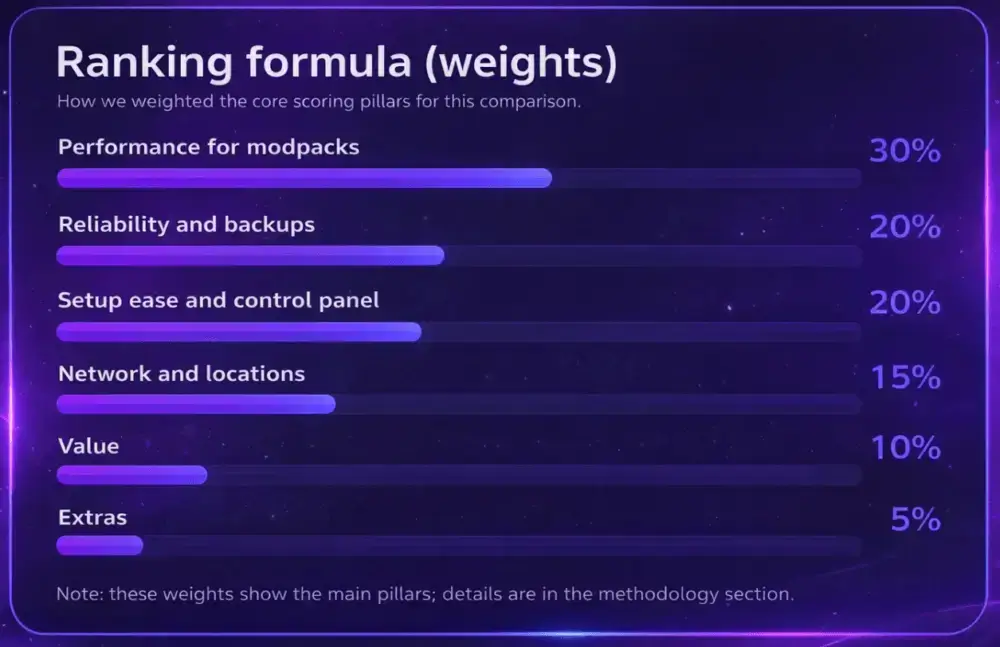
The table below is meant to help you shortlist, then you can pick a plan and region that match your world and player count.
| Rank | Host | Best for | Performance | Reliability | Control | Support | Value |
|---|---|---|---|---|---|---|---|
| 1 | Godlike.host | High clocks, clean panel, instant setup | ★★★★★ | ★★★★★ | ★★★★★ | ★★★★★ | ★★★★☆ |
| 2 | Apex Hosting | New admins, strong docs | ★★★★★ | ★★★★★ | ★★★★★ | ★★★★★ | ★★★★☆ |
| 3 | G-Portal | Wide regions, low ping | ★★★★☆ | ★★★★★ | ★★★★☆ | ★★★★☆ | ★★★★☆ |
| 4 | Nitrado | Rock-steady uptime | ★★★★☆ | ★★★★★ | ★★★★☆ | ★★★★☆ | ★★★★☆ |
| 5 | Host Havoc | “Set and play” stability | ★★★★☆ | ★★★★☆ | ★★★★☆ | ★★★★★ | ★★★★☆ |
| 6 | GTXGaming | Deep editors, permissions | ★★★★☆ | ★★★★☆ | ★★★★★ | ★★★★☆ | ★★★★☆ |
| 7 | Shockbyte | Terraria hosting on a budget | ★★★★☆ | ★★★★☆ | ★★★★☆ | ★★★☆☆ | ★★★★★ |
| 8 | Nodecraft | Polished UI + SFTP | ★★★★☆ | ★★★★☆ | ★★★★★ | ★★★★★ | ★★★★☆ |
| 9 | ScalaCube | Fast setup for small groups | ★★★★☆ | ★★★★☆ | ★★★★☆ | ★★★★☆ | ★★★★☆ |
| 10 | ServerBlend | Helpful onboarding | ★★★★☆ | ★★★★☆ | ★★★★☆ | ★★★★☆ | ★★★★☆ |
| 11 | Survival Servers | Long-running worlds | ★★★★☆ | ★★★★☆ | ★★★★☆ | ★★★★☆ | ★★★★☆ |
| 12 | PingPerfect | Many POPs, quick tickets | ★★★★☆ | ★★★★☆ | ★★★★☆ | ★★★★☆ | ★★★★☆ |
Scores are editorial; use them to shortlist a host before you pick a plan.
Our methodology (what we checked and why it matters)
To keep the ranking grounded, we combined a few signal types instead of relying on marketing pages:
-
Independent comparisons and recent roundups to sanity-check uptime claims, setup speed, and what’s actually included in plans.
-
Large-scale user feedback (review platforms and community reports) to spot patterns around support quality, panel usability, and long-term stability.
-
Practical admin checks in the control panel to see what running a Terraria server feels like day to day.
What we verified in the panel
-
Spin-up basics: create a server, pick a region, and confirm the core server settings are easy to find.
-
Admin access: console/log visibility, restarts/stops, and whether common changes (world settings, player access) are straightforward.
-
File tools: confirm there’s a usable file manager or SFTP/FTP access for configs and server tools.
-
Backups: scheduled backups and a restore flow that’s clear enough to use when something breaks.
-
Modded/server tools readiness (where relevant): support for tModLoader and common server tooling like TShock (if the host claims it), plus safe handling of config edits.
How we prioritized performance for Terraria
Terraria servers don’t need the same hardware profile as heavy sandbox games, but they still benefit from stable CPU performance during busy moments (boss fights, events, lots of entities) and fast storage for world saves and backups. We ranked providers higher when they stayed responsive under load and didn’t hide the basics behind confusing panels.
Important note: hosts can change hardware, control panels, limits, and included features over time. Always confirm current plan details and region availability on the provider’s site before purchasing.
The 12 best Terraria hosting providers (2026)
1) Godlike.host — Best overall
TL;DR
Best overall for a fast, stable Terraria server with a easy (clean) control panel, built-in backups & protection and 24/7 Technical Support
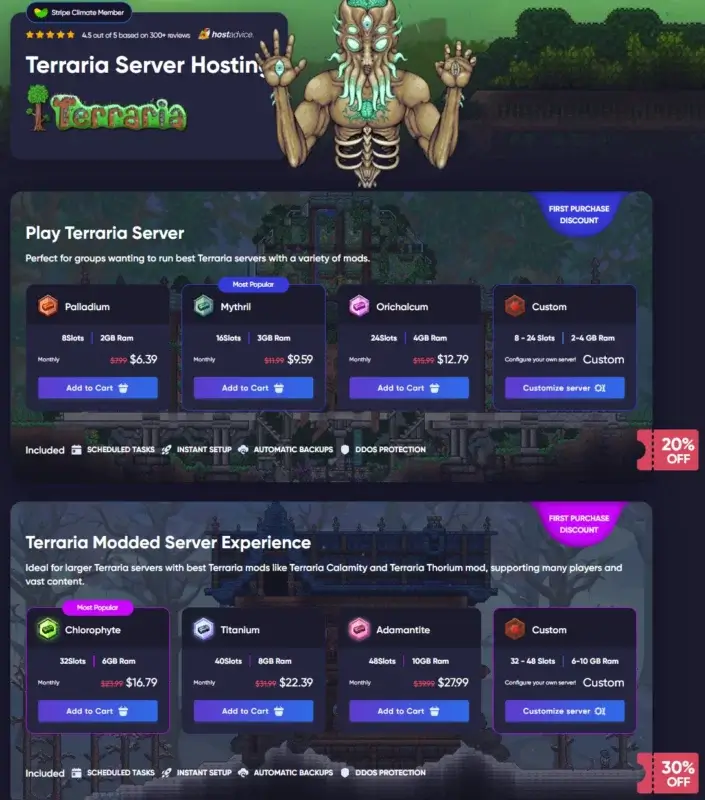
Godlike.host takes the top spot for Terraria in 2026 because it focuses on the stuff that actually affects day-to-day play: quick deployment after payment, simple admin workflows, 24/7 full support, and the basics that prevent “we lost the world” or “we can’t join” nights. You get a modern panel for routine tasks, proper file access for hands-on changes, and safety tools that help you keep a public or friends-only server under control.
What people say
“The interface is clear and easy to use… low latency and no noticeable outages so far.” Hostadvice
Pros
Fast setup with a clean control panel for day-to-day Terraria admin
Automatic backups + quick restore (useful after updates or config changes)
Full SFTP access for worlds, configs, and tModLoader files
DDoS protection plus extra safety tools (e.g., IP filtering/firewall options)
Discord-based management for quick actions without logging in
Cons
tModLoader stability still depends on your mod list (conflicts can happen anywhere)
Region switching is easy, but you’ll still want to double-check ping and uptime timing
Below (at the end of article) you can find details.
Brand-new Control Panel & Functions and quick-fix tools
Here's our brand New Control Panel, which includes new useful functions:
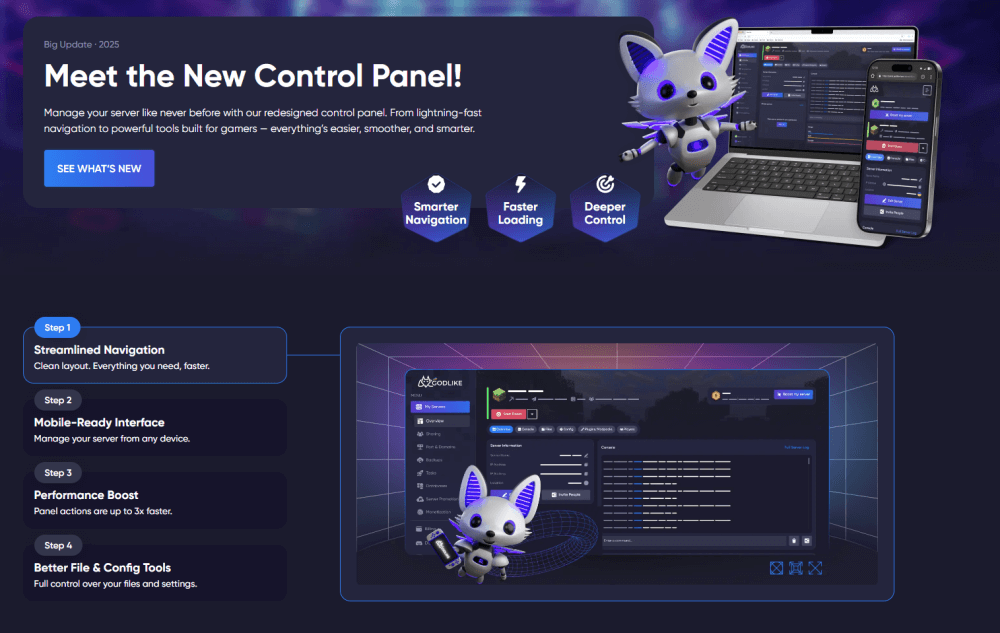
The new panel is meant to reduce the annoying parts of hosting: faster navigation, cleaner settings, and tools that make it easier to diagnose issues, apply changes, restart safely, and keep the server consistent after updates. That matters in Terraria because most “server problems” are simple things: wrong config, mismatched files, bad mod update, or a missing backup.
Server Location Transfer (lower ping for your group)
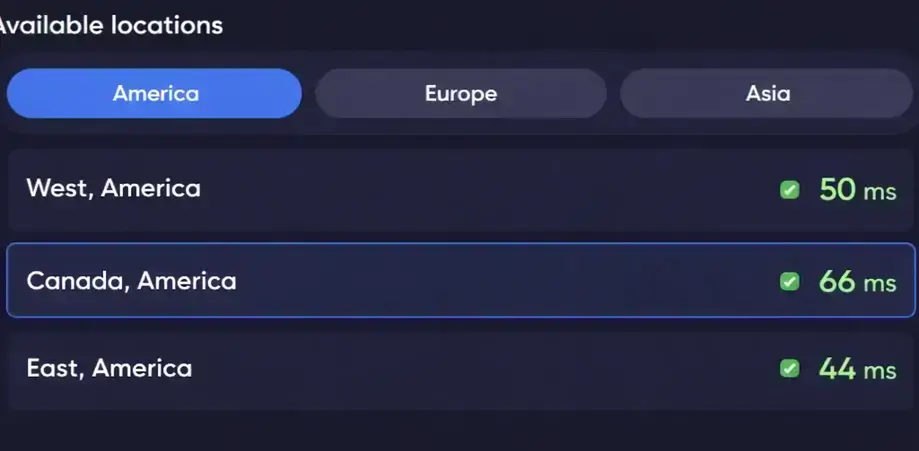
If your players are closer to another region, you can switch the Terraria server location from the control panel in a few clicks. Pick the region that gives your group the best latency, apply the change, and keep the connection quality consistent, without manual re-setup.
If you’re running vanilla Terraria or a tModLoader server, the main advantage is that you can do the important work (configs, saves, mods, restores, access control) without turning every change into a support ticket.
2) Apex Hosting — Friendly for first-timers
Best pick for first-time Terraria admins who want a guided setup and clear help when something breaks
Apex is a good fit if you’re setting up a Terraria server for the first time and want the process to feel guided instead of figure it out yourself. The panel flow is straightforward for the basics (server visibility/name, restarts, and day-to-day management), and the documentation is the kind you’ll actually use when something breaks or when you’re trying to add tModLoader without guessing. Automated backups matter a lot in Terraria once your world gets valuable (or once you start modding), and Apex is positioned as a “start clean, learn fast” option rather than a deep, hardcore admin platform.
Pros: Beginner-friendly workflow; practical help content for common Terraria/tModLoader tasks.
Cons: If you plan to run a heavily modded world, confirm your RAM headroom and how fast upgrades happen before you commit.
3) G-Portal — Low-ping regions
Best for groups spread across regions who want an easy way to choose a nearby location for lower ping
G-Portal makes the most sense when your group is split across countries or you’re trying to keep ping complaints low without overthinking networking. The biggest win here is location choice: you can place the server near where most players live, which matters in Terraria more than people expect during boss fights, fast movement, and high-action events where desync feels awful. The panel is clean and the “get online fast” experience is strong, so it works well for friend groups that want reliable sessions, don’t want to babysit a server, and just need a sensible way to scale up if the world gets busier.
Pros: Strong region coverage for mixed-location groups; quick deployment and simple scaling.
Cons: If you plan to mod heavily, double-check how mod tooling is handled and what file access options you get for manual tweaks.
4) Nitrado — Reliable workhorse
Best for long-running Terraria worlds when you care more about consistency than fancy extras
Nitrado is the pick when you care more about consistent uptime and “it just runs” behavior than fancy extras. That’s especially relevant for Terraria worlds you keep for weeks or months, where the real pain isn’t setup, it’s stability and recovery when something goes wrong. The control layer is built for quick settings changes and predictable maintenance tasks, and backups are part of the conversation (which they should be, because a single mistake can ruin a long-running world). If you want a dependable Terraria server that doesn’t demand constant attention, Nitrado sits in that steady middle ground.
Pros: Stability-first positioning; convenient settings workflow for long-running Terraria worlds.
Cons: If you’re doing advanced modding/admin work, confirm how much low-level access (files/configs) you’ll have without extra steps.
5) Host Havoc — Set it and play
Best for a simple “set it up once” Terraria server that stays stable for regular co-op play
Host Havoc fits groups that want a stable Terraria server for regular co-op sessions and don’t want to treat hosting like a side hobby. You get quick provisioning, a clean admin experience, and practical safety features (notably DDoS protection and backup tools) that reduce the chance of a world-ending mishap. It’s a good match for “we just want to play” servers, but it still gives you enough control to handle normal admin tasks like restarts, updates, and basic troubleshooting when a plugin/mod tweak causes issues.
Pros: Built around stability and low hassle; backups + protection are part of the default mindset.
Cons: If you expect lots of manual tinkering, verify how comfortable the file/config workflow is for deeper Terraria customization.
6) GTXGaming — Editors for everything
Best for hands-on admins who want more control over configs, files, and server-side tweaks
GTXGaming is for admins who actually like tuning settings instead of leaving everything on defaults. Terraria servers often end up needing small but important tweaks (rates, permissions, config adjustments, mod compatibility fixes), and GTX leans into that hands-on style with tools that reduce the “edit raw files and pray” feeling. It’s a good option if you run modded Terraria, want clearer control over roles/permissions, and expect to iterate—because on a real server, you usually adjust things after players hit mid-game and your world gets more complex.
Pros: Strong for hands-on configuration and admin workflows; good for iterative server tuning.
Cons: More control means more decisions, if you want zero thinking and pure plug-and-play, this style may feel too much.
7) Shockbyte — Budget without losing basics
Best budget-friendly start if you just need a hosted Terraria world and can size the plan correctly
Shockbyte is the “get started cheap, keep it sensible” option for Terraria, especially if your plan is a small hosted world for friends rather than a big public server. The panel experience is familiar, setup is fast, and there are support articles that cover the common stuff people mess up early (versions, basic settings, and mod-related questions). The main thing with Terraria hosting at a budget tier is sizing correctly: if you’re doing tModLoader or you expect heavy building/farms/events, you’ll want enough RAM headroom and a clear upgrade path when the world gets busy.
Pros: Low-barrier entry; documentation and a straightforward setup path.
Cons: Budget plans punish bad sizing - confirm what “enough resources” looks like for your mod setup and player count.
8) Nodecraft — Polished control + SFTP
Best for a cleaner management experience if you value an easy-to-use panel for day-to-day changes
Nodecraft makes sense if you value a polished control panel and you’re the type of admin who wants clean day-to-day management without digging through messy UI. Terraria servers become easier to run when you can quickly access console/logs, keep snapshots/backups, and use SFTP for the moments you need to do real work (manual edits, imports, or troubleshooting after updates). It’s a strong middle ground: friendly enough for normal hosting tasks, but not limiting when you need deeper access - especially for modded Terraria where file-level changes are sometimes unavoidable.
Pros: Smooth management experience; good balance of “easy UI” and real admin access (console/SFTP/snapshots).
Cons: If your priority is purely price-per-RAM, compare cost at your target specs before choosing based on UX.
9) ScalaCube — Minimal friction
Best for quick, straightforward Terraria hosting for smaller groups and simple setups
ScalaCube is a practical option for smaller Terraria groups that want to get online quickly and keep things simple. It’s aimed at “launch fast, play now” rather than deep server engineering, which works well if you’re running a casual world or testing a modded playthrough without long-term commitments. Where it helps is reducing friction: quick setup, a simple plan ladder, and a straightforward way to manage common changes. Just keep in mind Terraria servers can grow in complexity as your world progresses, so it’s worth confirming how easy it is to scale resources or handle mod-related file work if your server turns into a long-running main world.
Pros: Fast start and low friction for small groups; simple scaling path for basic growth.
Cons: For advanced modding and heavy customization, verify the depth of admin/file tooling you’ll actually need.
10) ServerBlend — Helpful onboarding
Best for a guided onboarding feel if you want extra help getting started smoothly
ServerBlend is positioned for people who want a smoother start and support that feels useful instead of generic. That matters for Terraria because a lot of problems are just early-stage setup friction: version mismatch, bad config change, mod confusion, or not knowing what to back up before updating. The value here is guided onboarding plus a clear backup mindset so your world stays safe while you learn. It’s a good pick if you’re migrating an existing Terraria world, starting a modded playthrough, or simply want quick, readable answers when something goes sideways.
Pros: Onboarding/support-forward approach; practical backup focus for protecting long-running worlds.
Cons: If you’re very technical, confirm you’ll still get the level of manual control you prefer for files/config changes.
11) Survival Servers — Veteran option
Best for persistent servers that you plan to keep running for a long time with minimal fuss
Survival Servers fits players who want a dependable Terraria host with a known quantity feel predictable management, stable operation, and a platform style that prioritizes reliability over flashy features. This is especially useful when you’re moving an older world, planning to keep the server up for a long time, or you simply don’t want surprises after updates. Terraria isn’t the heaviest game in the world, but it becomes unforgiving when mods/config changes go wrong, so a steady host with clear routines (restarts, backups, troubleshooting) is often more valuable than fancy extras.
Pros: Reliability-first vibe that suits long-running Terraria worlds; stable day-to-day management.
Cons: If you want modern UX and lots of convenience automation, compare the panel experience before committing.
12) PingPerfect — Lots of POPs
Best for broad location coverage and ticket-based support when you want options and responsiveness
PingPerfect is a strong match when server location options are the priority and you’re trying to serve players from different regions. Terraria feels best when latency stays consistent, especially during boss fights and high-speed movement—so having a wide location footprint can be a real advantage. PingPerfect is also a good pick if you want responsive ticket support and a hosting setup where you can run a serious long-term world without constant server babysitting. If your group spans multiple countries, it’s worth paying attention to how easy it is to move regions or swap to a closer location when your community shifts.
Pros: Location coverage for mixed-region groups; support flow that fits long-running servers.
Cons: If you need heavy mod tooling, confirm the exact workflow for mod installs and manual file edits on your plan.
Quick buyer’s checklist
- Choose the closest region first; ping beats every other feature.
- Match plan size to terraria players and RAM needs; leave room for mods.
- Turn on backups day one; test a restore.
- Keep permissions tight for admins and users.
- If you stream or host events, validate support response times at odd hours.
Technical Requirements for a Terraria Server You Should Know Up Front
Terraria servers are fairly lightweight, but the “feel” of the server changes a lot once you add more players, bigger worlds, or mods. Before you pick a plan, think about three things: how many people will be online at once, whether you’re staying vanilla or using tModLoader, and how long you want the world to run without babysitting.
CPU matters most for smooth moments. Boss fights, heavy building areas, and busy farms can cause slowdowns if the server can’t keep up. A strong single-core CPU helps keep gameplay responsive, especially when the world is active.
RAM is your breathing room. Small vanilla worlds for a few friends don’t need much memory, but modded servers usually do. Larger modpacks, lots of entities, and long-running worlds all push RAM usage up over time.
Storage and backups are not optional. Terraria saves often, and world files grow. SSD/NVMe storage helps with save times and reduces hitching during heavy activity. Reliable backups also protect you from corrupted saves, bad configs, and mod updates that go sideways.
If you self-host, double-check your firewall rules and port settings. Terraria’s dedicated server uses port 7777 by default, and the server executable needs to be allowed through your firewall. If you’d rather avoid that setup work (and keep the server online 24/7), managed hosting is usually the simpler path.
Results: Godlike.host Is Best Overall for Terraria Server Hosting (2026)
In our editorial scoring, Godlike.host lands as the best all-around choice for Terraria in 2026 for one simple reason: it removes the annoying parts of running a server without taking control away from you. You get fast setup, a clean control panel for day-to-day changes, solid file access when you need to tweak something, and safety features (backups and protection) that help your world stay online even when the server gets busy.
Why Godlike.host Gets #1 for Terraria Servers (What You Actually Get)
-
Fast start, minimal setup: launch a Terraria server quickly and get straight into playing instead of troubleshooting basics.
-
Clean control panel for real admin work: change settings, restart, check status, and handle routine tasks without hunting through menus.
-
Full SFTP access: manage files securely when you need deeper control (configs, logs, world backups, and mod-related files).
-
Personal firewall tools: add an extra layer of control for access and unwanted traffic, especially for public servers.
-
Backups you can rely on: built-in backup flow so a broken update or corrupted world doesn’t wipe a weekend of progress.
-
Discord-based management: handle key server actions through Discord when you want quick control without logging into the panel.
-
Built-in text editor: edit config-style files safely without downloading, re-uploading, and risking mistakes.
-
Server sharing options: useful if you run more than one world or want separate setups for different groups.
-
Support that can actually help: when something breaks, you want answers that relate to Terraria servers, not generic scripts.
FAQ
-
What makes a host the best choice for a Terraria server?
Balanced performance, instant setup, mod support, strong DDoS protection, and responsive support. A good panel keeps common actions easy and reduces mistakes. -
How much RAM do I need?
Small private worlds run on modest RAM. Add more when you raise slots, install lots of mods, or load giant maps. Start small; change plans later as needed. -
Can I migrate my existing world?
Yes, upload your world files via SFTP, match settings, and you’re ready. Most hosts have guides and 24/7 help if you get stuck.

Read Next
-
Best Minecraft Server Hosting 2026 – 12 Compared & Ranked Providers
Important Note: Godlike.host is our own service. This ranking is editorial (not paid placement) and follows the scoring criteria shown below. Always verify current plan limits, pricing, and regions on each provider’s website before purchasing….
-
Dead Cells, Palworld Terraria Update 1.4.5 – All New Things from the Trailer
This update comes with a Dead Cells collab, with a lot of new features from that game. Among all of the new items there are new hairstyles, new boss music, new zone backgrounds and much…
-
All Dead Cells items in Terraria 1.4.5 and How to get them
Here is all the detailed info about Dead Cells items in Terraria 1.4.5 TIP Find all Dead Cell Items in Terraria 1.4.5 update on your own Terraria Server Barnacle Staff Sentry weapon Best enchant: Fabled…