en | USD
 CHAT WITH GODLIKE TEAM





How to Set Up Palworld Dedicated Server?
- 3 min read
- 832 views
- 0 likes
What is Palworld?
Palworld quickly captured gamers' attention with its release on January 19, 2024, reaching over two million copies sold the following day. One of the key features of this Pokémon-inspired game is the ability to set up private servers. This allows players to create their own game worlds, whether on their own computers or through providers like GODLIKE. Many are interested in how to launch their own Palworld server, and in this article, we will explain how to do it.


TIP
Palworld Dedicated Server Setup on PC
If you decide to use your own computer to run a Palworld server, be prepared for potential challenges. Such a server requires significant resources, making it difficult to play and manage simultaneously, especially on less powerful systems. However, this can be a cost-effective solution if you are on a budget and cannot use services from companies like GODLIKE. Here is a step-by-step guide:
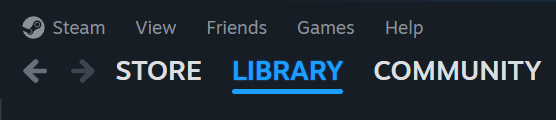
1) Launch your Steam client.
2) In your library, ensure the filter is set to Tools.
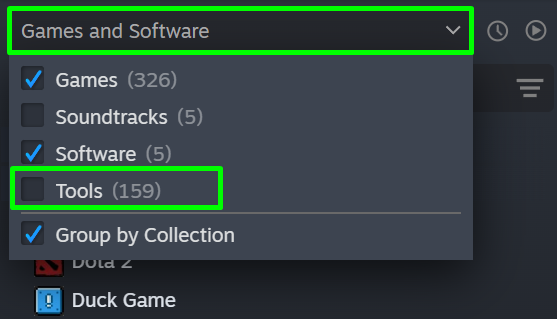
3) Find "Palworld" and select Palworld Dedicated Server.
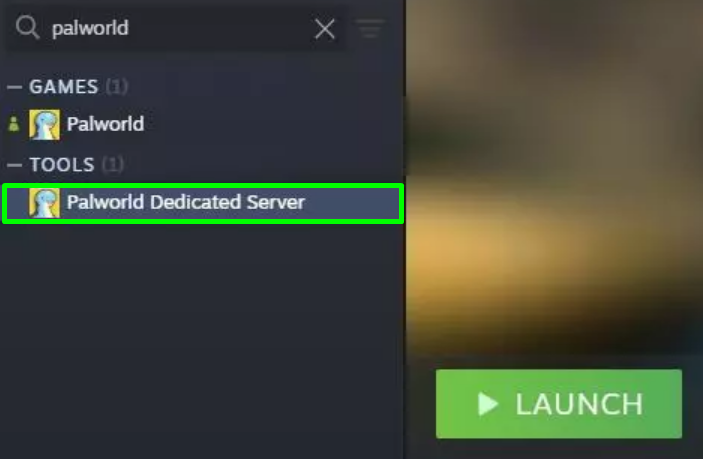
4) Install and launch the necessary software.
5) To launch a community server, click the appropriate button. If you want to play on your server, simply select the corresponding mode and click play.
CAUTION
After launching, the server console must remain active. Closing it will shut down the server
Using Palworld Dedicated Server Hosting
For those who prefer simplicity, game server hosting is the ideal choice. You can use services from companies like GODLIKE to purchase and set up a server without the need for network configuration or using your own hardware. This allows you to easily buy a server, activate it from the control panel, and connect to the game.
TIP
Additionally, this option offers benefits such as continuous support, a money-back guarantee, and flexible settings. If you want to share the joy of playing Palworld with friends, you can easily set up a server in a few clicks and start playing in minutes with GODLIKE. It’s the optimal solution!
Enjoyed reading the article? Visit our Blog section to learn even more interesting things about your favorite games! Play together with GODLIKE.

Read Next
-
Best Minecraft Server Hosting 2026 – 12 Compared & Ranked Providers
Important Note: Godlike.host is our own service. This ranking is editorial (not paid placement) and follows the scoring criteria shown below. Always verify current plan limits, pricing, and regions on each provider’s website before purchasing….
-
Palworld Best Base Locations (2025): Map & Coordinates
In Palworld server hosting picking where to drop a base isn’t just a comfort choice it dictates how quickly you unlock tech, how often you run loops, and how much busywork you avoid later. Below…
-
Palworld Fishing Guide: Tides of Terraria Update
Palworld server hosting has never stopped surprising its players with creative ways to interact with its vibrant world, and fishing is the latest activity that hooks adventurers in for a calmer, yet rewarding break from…