


 en | USD

 CHAT WITH GODLIKE TEAM





Missions in Arma 3
The best Arma 3 servers with missions are designed to provide you and your server players with diverse gameplay. The more details and intricacies a game has, the more enticing and enduring it becomes. In this article, we will tell you how to add a mission to your Arma 3 server!
TIP
Don't have an Arma 3 server yet? Follow this article to learn how to create an Arma 3 server
How to add a mission to your Arma 3 server?
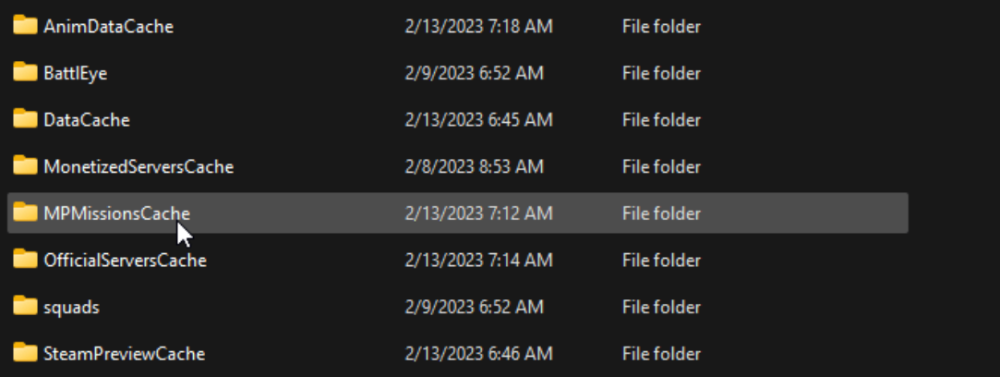
1) Download the files of the mission you need. If you've already downloaded these files through the game itself or via the Steam Workshop, open the Arma 3 folder and find the MPMissionsCache folder. In this folder, you'll find mission files with a .pbo extension.
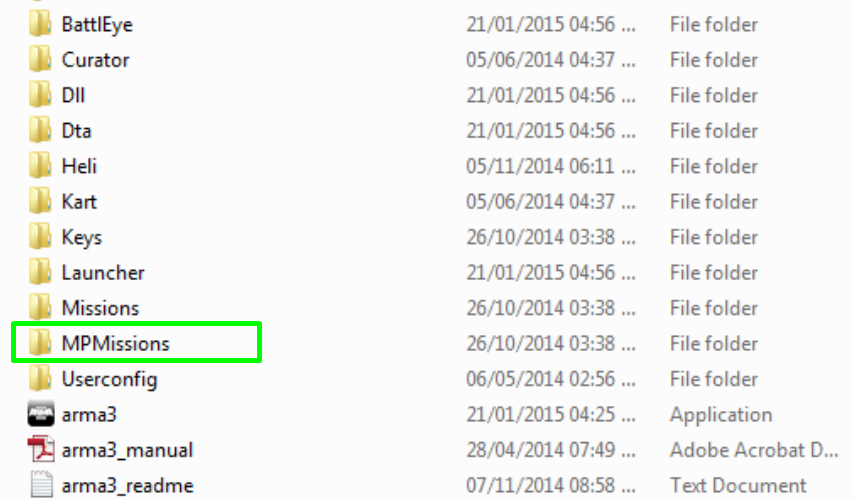
2) Once you have the necessary mission files, open the MPMissions folder in the game folder. Move the files with the .pbo extension into this folder.
3) Restart your server, and after that, you can launch it. Have a great game!
Now you know how to add various military missions to your Arma 3 server to start an interesting and dynamic game. Play with GODLIKE.