Welcome to another article in our “Minecraft Mods” series, where we explain everything a player needs to know about mods and how to install them. In our latest “Minecraft Mods: Forge Installation” article, we’ve mentioned that to properly open the Forge installer, you need to right click the file > Open with > Java. We also mentioned that sometimes you might not have such an option, simply because you don’t have Java installed. In this article we will cover how to fix this issue.
Java is a programming language in which Minecraft is written – hence the name “Minecraft: Java Edition”. Java uses a technology called “JDK”, which stands for Java Development Kit. JDK is used to compile and run Java software. So, for Minecraft mods to be properly compiled and run within your game, you need to have the right version of the JDK installed.
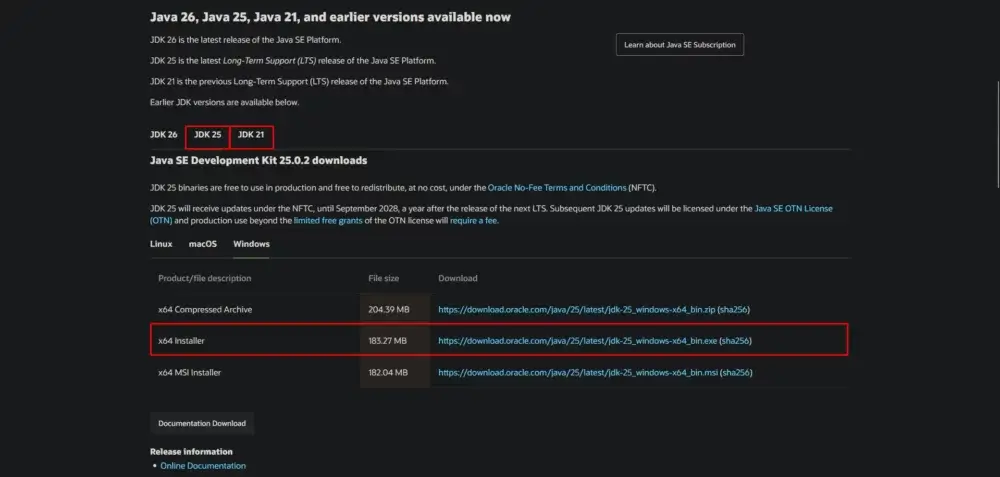
Head to theofficial Java website, click JDK 25 and click the link next to “x64 Installer”. Note that JDK 25 is used for the newest version of Minecraft 26.1. If you are playing on older versions you should download the corresponding version of JDK:
Minecraft version
JDK version
26.1+
JDK 25
1.20.6 - 1.21
JDK 21
1.18 - 1.20.4
JDK 17
1.16.5 and older
JDK 8
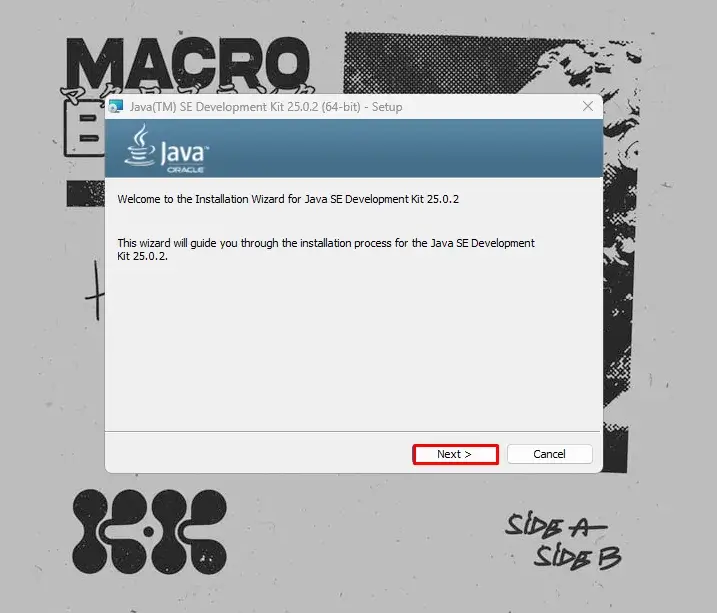
Then open the installer and click “Next”until the download begins.
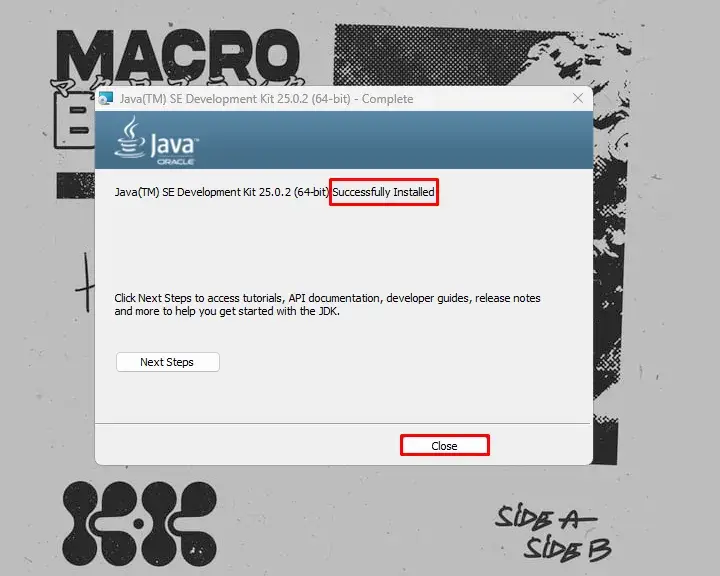
Once the download is complete, you should see a “Successfully installed” message.
Congratulations, now you have Java installed and everything is supposed to work properly. Just keep in mind that you might need to reboot your computer first.
How to Fix .JAR Files That Won’t Open
Sometimes, even after installing Java, an already installed .jar file might not be able to see the installed instance of Java. What should you do in this situation?
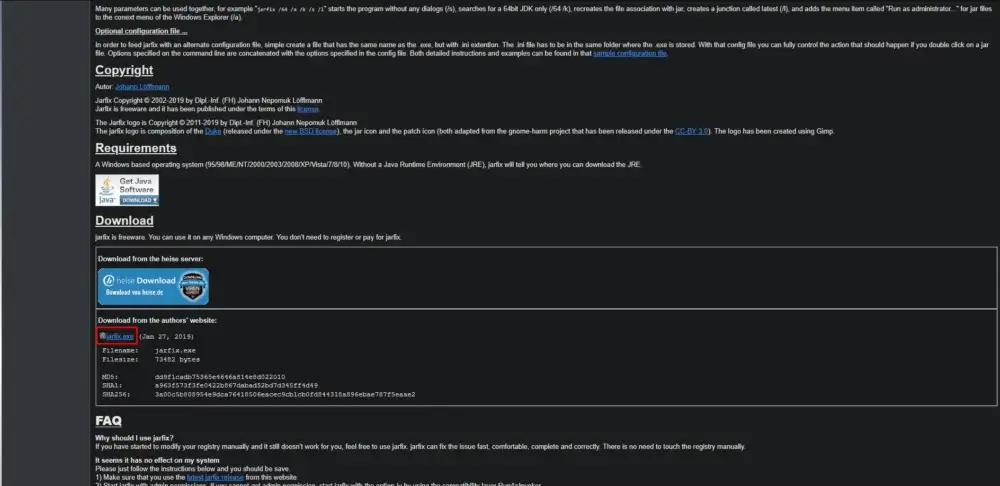
No worries, there is an easy fix, and you don’t need to download .jar files again. Go to this website and download the Jarfix app. To put it in simple terms, this small app is issued to fix issues like the one we face, when you have Java installed, but .jar files don’t run for some reason.
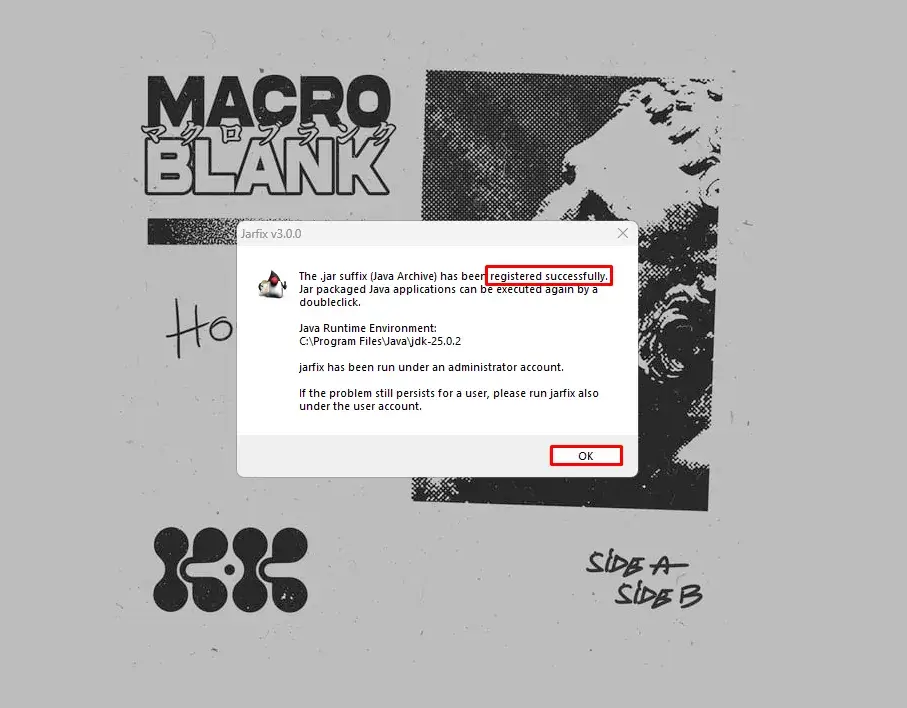
Once Jarfix is downloaded, open it and wait for it to fix the issue. If everything goes well, you should be greeted with a “Registered Successfully” message. Click “OK” and the issue should be resolved by now.
Conclusion
This was our small, but nonetheless, important guide on how to install Java for Minecraft, which concludes our “Minecraft Mods” series. Thank you for reading and we hope we were able to help!
FAQ
Which version of JDK should I download?
The JDK version you need depends on your Minecraft version: if you are using Minecraft 26.1+ you need JDK 25, for versions 1.20.6 to 1.21 you need JDK 21, for versions 1.18 to 1.20.4 you need JDK 17, and for Minecraft 1.16.5 and older you need JDK 8.
Java is installed, but I still can’t open and run .jar files, what should I do?
It’s a common issue when you already had a .jar file on your PC prior to installing Java. Luckily, it’s an easy fix, thanks to the small Jarfix app.
The website I need to download Jarfix from looks shady, is it safe?
Understandable concern, but there is no need to worry. If you followed the link from our article, the website you’re on, despite looking very shady, is actually safe. It’s a very old website, the first version of the app was released in 2005, over 20 years ago. The website is mostly made with plain HTML, which makes it look very weird compared to the new websites we are all used to.
Fawn
Minecraft Writer
Hi, I'm Fawn. I started out just messing around in Minecraft with friends, then one thing led to another, and suddenly I was streaming, building worlds, and losing sleep over redstone logic.
I like games that make you feel something—whether it’s a good RPG story like Nier or Kingdom Hearts, or the collective suffering of solo-queuing in Valorant.
Mostly, I just create, experiment, and have fun with it :D
Important Note: Godlike.host is our own service. This ranking is editorial (not paid placement) and follows the scoring criteria shown below. Always verify current plan limits, pricing, and regions on each provider’s website before purchasing….
TL;DR If you want one seed that feels like a complete starter world, pick Cherry Valley Trio (Seed: 608548899648438462) for villages, deep structures, and a strong exploration route.If you want a dramatic build location with…
Ultimate Minecraft Diamonds Mining Guide Why are diamonds so wanted by many? Minecraft Diamonds – shiny blue gems in the world of Minecraft that also happen to be the ore required to have the best…



 en | USD
 CHAT WITH GODLIKE TEAM