en | USD
 CHAT WITH GODLIKE TEAM






New Crafting UI Explained in Terraria 1.4.5 Update & How to Craft From Nearby Chests

- 9 min read
- 5421 views
- 0 likes
TL;DR
Terraria 1.4.5 makes crafting easier to navigate by adding category tabs and a search bar, so you spend less time scrolling and more time playing. The same updated interface shows up across crafting contexts, including at stations and when checking recipes with the Guide. You can also craft using materials stored in nearby chests, which is a huge quality-of-life upgrade for base building and progression. If your crafting menu starts feeling cluttered, you can toggle nearby-chest crafting off from the crafting menu.
TIP
Find all Dead Cell Items in Terraria 1.4.5 update on your own Terraria Server
As of January 2026: Terraria features can behave a little differently across platforms and versions, especially UI navigation and controls. The crafting concepts below hold up across releases, but if a button or toggle is in a slightly different spot on your platform, look for the same icon or wording.
What Actually Changed in 1.4.5 Crafting
Before 1.4.5, crafting could feel like a memory test. You’d know an item existed, you might even have the materials, but finding the recipe meant scanning a long list and hoping you didn’t miss it.
In 1.4.5, crafting is built around two practical improvements:
First, the crafting list is easier to filter. You can narrow recipes by category and use search to find what you need fast, even if you only remember part of the name.
Second, crafting can pull ingredients from nearby chests. If your materials are stored close to your crafting area, you can craft without moving everything into your inventory first.
These are small changes on paper, but they reshape the day-to-day loop. A well-organized workshop saves time every single session, especially once your world starts accumulating dozens of materials.
TIP
How to Use the New Crafting UI
Tabs help you narrow down recipes quickly
When you open your inventory and look at the crafting section, you’ll see recipe categories. Tabs act like a quick filter. If you’re building, a furniture or blocks category can cut the noise. If you’re gearing up, a weapons or armor category gets you closer right away.
This is especially helpful in the middle of a playthrough where your recipe list is large, but your goal is simple: craft one upgrade and move on.
Search is the fastest way to find what you want, or learn what a material does
Search is the best new habit to pick up in 1.4.5. You can use it in a few ways:
If you know the item name, type it and craft it.
If you only remember a keyword, type the keyword and skim results.
If you picked up a new material and have no idea what it’s for, search the material’s name and see what it can become.
A quick micro-scenario: you just beat a boss, your inventory is full of unfamiliar drops, and you’re not sure what matters. Instead of parking those items in a chest and forgetting them, search each new ingredient once. You’ll immediately see whether it’s used for weapons, accessories, potions, or something you can safely stash for later.
You can still use the older list view when that’s simpler
Sometimes the classic list-style crafting view is still the quickest option, especially early game when there aren’t many recipes on screen. In 1.4.5, you can switch to the list view from the crafting interface if you prefer the familiar feel.
A good rhythm is to use list view when you’re casually crafting basics, then switch to tabs and search when you’re hunting for a specific recipe or learning a new crafting chain.
Crafting From Nearby Chests (What It Is and How to Use It)
What it is
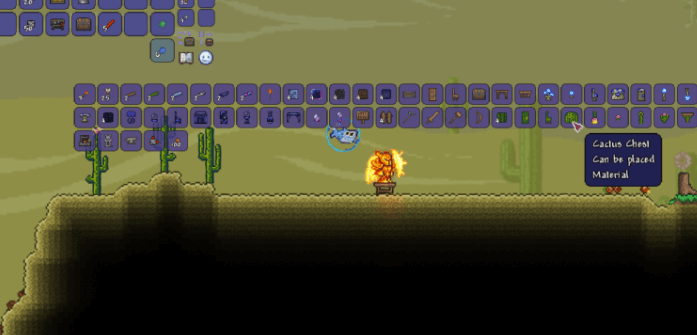
Crafting from nearby chests lets the game use ingredients stored in chests close to your crafting area. You don’t need to move materials into your inventory first. In many cases, you also do not need to open each chest manually to make its contents available.
This works best when your base has a clear crafting zone and your storage is kept nearby.
What it is not
This is not a global storage system. It won’t pull ingredients from far away across the map. If your materials are in a remote storage room or scattered across multiple distant outposts, you’ll still run into missing-recipe moments.
The simplest mental model is: the more compact your workshop, the smoother crafting-from-chests feels.
How to turn it off when you want a cleaner crafting menu
Nearby-chest crafting can dramatically increase the number of recipes you see, because the game recognizes more ingredients at once. That’s great when you’re doing a big building session or stocking up on potions. It can feel overwhelming when you’re trying to craft one early-game tool and your crafting list suddenly looks massive.
Terraria 1.4.5 includes a toggle in the crafting menu that lets you disable crafting from nearby chests. If the crafting list feels too busy, turn it off, craft what you need, then turn it back on when you’re ready for a larger crafting session.
Setting Up a Simple Workshop That Makes Nearby-Chest Crafting Shine
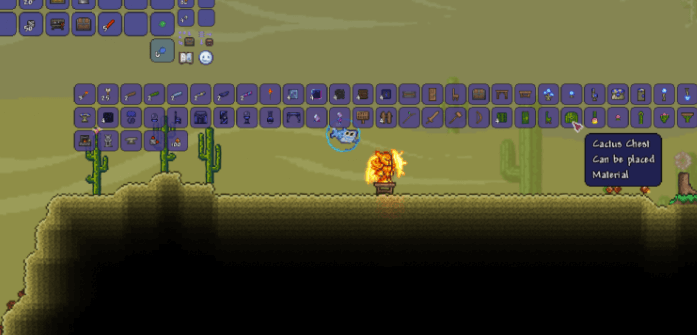
You don’t need a perfect base layout to benefit from this feature. You just need a predictable, compact crafting corner.
Keep crafting stations central and storage close
Place your most-used stations near each other and put your storage within the same area. Early on, that usually means a workbench, furnace, and anvil nearby, with chests close enough that you’re not walking across your base between steps.
As you progress, you’ll add more stations. The principle stays the same: keep the stations you use together in one zone, and keep the materials for those stations stored nearby.
Start with broad storage categories so you do not over-organize
New players often try to make a separate chest for every category right away, then spend more time sorting than playing. Instead, use a handful of broad chests at first, then split them later if they get messy.
A clean beginner setup usually looks like:
Ores and bars in one place, building blocks and wood in another, potion ingredients together, boss and mob drops together, and a dedicated catch-all chest for everything you do not want to sort immediately.
That catch-all chest is not a failure. It’s a pressure valve. And because of nearby-chest crafting, it can still help you craft, as long as it stays near your workshop.
Add one small habit that prevents crafting friction
After each exploration run, do a quick pass: dump items into the right few chests, then craft upgrades while you still remember what you’re trying to do. The new UI makes crafting faster, but the real win is keeping your materials in the same place so you are not constantly hunting for them.
Another micro-scenario: you’re playing with friends and everyone keeps dropping materials into random chests. A shared workshop with a few labeled chests turns chaos into momentum. People can craft what they need without interrupting the group to ask where the bars or herbs went.
TIP
Troubleshooting and Common Mistakes
If crafting feels wrong after 1.4.5, it’s usually one of these. Use this as a quick diagnosis.
- If a recipe never appears, it’s likely you’re missing the required crafting station. Move next to the correct station (anvil, furnace, sawmill, and so on) and check again.
- If a recipe should be available but is missing, it’s likely the ingredients are not close enough to count as nearby. Stand closer to your storage and try again, or move that chest nearer to your workshop.
- If your crafting list looks smaller than you expect, it’s likely crafting-from-nearby-chests is toggled off. Turn the toggle back on in the crafting menu.
- If search is not finding what you want, it’s likely your keyword is too specific. Try a shorter term (for example, boots instead of a full item name) and refine from there.
- If the recipe shows up but you still cannot craft it, it’s likely you are short on quantity. Double-check the required counts, especially for bars, gel, and other stackable materials.
Alt-Tab Cheat Sheet
Crafting UI
- Use tabs to narrow recipes fast.
- Use search to find an item by partial name or to learn what a material crafts into.
- Switch to list view if you prefer the classic crafting flow.
Nearby-chest crafting
- Keep your workshop compact: stations central, storage nearby.
- If the crafting list feels overwhelming, toggle nearby-chest crafting off temporarily.
- When something won’t craft, check station, distance, toggle, then ingredient count.
Small Tips That Make the New System Feel Effortless
Search new materials once, right when you get them
Terraria throws lots of items at you, and it’s easy to stash something important and forget it exists. When you pick up a new material or drop, search it once. You’ll quickly learn whether it’s used for gear, building, potions, or something niche.
Build for flow, not aesthetics
You can decorate later. If your crafting stations and core chests are within the same small area, the game’s new crafting behavior does more of the work for you. This matters most when you are upgrading gear rapidly and crafting in bursts between exploration trips.
Keep your crafting corner consistent across worlds
If you start new worlds often, try to rebuild the same workshop pattern each time. The feature payoff is immediate: fewer trips, fewer inventory shuffles, fewer moments of staring at your crafting menu wondering what you forgot.
FAQ
-
Does the updated crafting UI also apply when using crafting stations and the Guide?
Yes. The 1.4.5 crafting improvements are designed to be consistent across the crafting experience, including common crafting contexts like using stations and checking recipes with the Guide -
Do I need to open a chest first for the game to use items inside it?
In 1.4.5, crafting-from-nearby-chests is intended to use nearby stored materials without requiring you to open each chest first. If it is not working in your world, move closer to your storage or confirm the feature is enabled. -
Can I keep using the old crafting list instead of tabs and search?
Yes. The older list view is still available from the crafting interface, so you can stick with it and use search only when you need it. -
Why did my crafting menu suddenly show way more recipes than before?
That usually means your nearby storage is being counted, so the game recognizes more ingredients at once. If it feels too noisy, toggle nearby-chest crafting off until you are in a focused crafting session. -
What is the best way to organize chests for nearby-chest crafting?
Start broad. Keep a compact workshop with a few general-purpose chests nearby, then split categories later if a chest becomes hard to manage. The goal is easy access, not perfect sorting. -
Does this feature help multiplayer teams?
Definitely. A shared workshop with nearby storage reduces inventory juggling and makes it easier for everyone to craft what they need quickly, as long as the group keeps materials in the same crafting area.
Read Next
-
Best Minecraft Server Hosting 2026 – 12 Compared & Ranked Providers
Important Note: Godlike.host is our own service. This ranking is editorial (not paid placement) and follows the scoring criteria shown below. Always verify current plan limits, pricing, and regions on each provider’s website before purchasing….
-
Dead Cells, Palworld Terraria Update 1.4.5 – All New Things from the Trailer
This update comes with a Dead Cells collab, with a lot of new features from that game. Among all of the new items there are new hairstyles, new boss music, new zone backgrounds and much…
-
All Dead Cells items in Terraria 1.4.5 and How to get them
Here is all the detailed info about Dead Cells items in Terraria 1.4.5 TIP Find all Dead Cell Items in Terraria 1.4.5 update on your own Terraria Server Barnacle Staff Sentry weapon Best enchant: Fabled…