Expert Summary
Two Minecraft servers can both advertise 8GB RAM and still perform very differently. In this benchmark, Godlike and Shockbyte were tested on comparable 8GB Minecraft plans using Minecraft 1.21.1, Java 21, NeoForge, Spark, and Chunky.

Make your own FREE minecraft server
MINECRAFT FREE SERVER
Godlike finished the Chunky 16,129 during chunk render test in 2:43, while Shockbyte took 6:31. Under a 4-bot exploration load, Godlike also held a much stronger short-window TPS average: 16.28 TPS compared with Shockbyte’s 8.23 TPS.
That is the part many 8GB plan comparisons miss: Minecraft performance is not only about RAM. RAM gives the server room to work, but chunk generation, ticking, mobs, exploration, and modded Minecraft server workloads lean heavily on CPU performance. The tested Godlike 8GB server ran on an AMD Ryzen 9 9950X3D, while the tested Shockbyte 8GB server ran on an AMD EPYC 4244P. Same RAM class, same first-month price in this test, very different result.
Why This Benchmark Matters
A lot of Minecraft hostings sell plans by RAM first: 4GB, 6GB, 8GB, 12GB. That is useful, but it can also be misleading. An 8GB Minecraft server with weaker per-core performance can still lag when players spread out and force the server to generate new chunks.
For players, that lag shows up as delayed block breaking, rubber-banding, mobs freezing, late damage, slow exploration, or TPS dropping below the normal 20 TPS target. It is especially noticeable when players run in different directions, load new terrain, or play on a modded setup where the server has more work to do.
So this test focuses on a practical question:
If two Minecraft hosts sell an 8GB plan at the same first-month price, which one actually handles real Minecraft load better?
Test Methodology
The goal was not to create a synthetic lab score. The goal was to test a realistic Minecraft server workload that exposes weak hardware quickly.
Both providers were tested on 8GB-class Minecraft plans. At the time of testing, both Godlike and Shockbyte were recorded at $22.39 for the first discounted month.
Active Load Test Parameter
|
Metric / Condition
|
Test Value & Setup
|
|
Active Workload
|
4 simulated bots moving outward in cardinally different directions
|
|
Bot Movement Speed
|
4 blocks per second (simulating active terrain exploration)
|
|
Bot Spawn Coordinates
|
Base spawn area, altitude approximately Y=150
|
|
Test Duration
|
5 minutes continuous run
|
|
World Simulation State
|
Hostile and passive entity simulation (Mobs) enabled
|
Test Environment Configuration
|
Environment Layer
|
Software Stack & Tools
|
|
Minecraft Version
|
1.21.1
|
|
Java Version
|
21
|
|
Server Platform
|
NeoForge
|
|
Profiling & Monitoring
|
Spark
|
|
World Pre-generation
|
Chunky (16,129 chunks total)
|
|
Testing Toolkit
|
Spark, Chunky, Custom Bot Mod
|
For the TPS test, four bots moved in different directions to create active exploration load. This matters because chunk generation is one of the most common reasons Minecraft servers start dropping TPS during real gameplay.
For both tests we used random seeds, so this benchmark should be read as a practical hosting workload comparison rather than a perfect laboratory simulation. The important controlled points were the same 8GB plan class, Minecraft 1.21.1, Java 21, NeoForge, the same 4-bot movement pattern, and the same Chunky workload of 16,129 processed chunks.
For the Chunky test, both servers processed the same amount of world generation work:
Processed chunks: 16,129
Hardware Tested
|
Provider
|
Plan class
|
RAM
|
CPU shown in Spark
|
Java
|
Minecraft
|
|
Godlike
|
8GB Minecraft plan
|
8GB
|
AMD Ryzen 9 9950X3D
|
Java 21
|
1.21.1
|
|
Shockbyte
|
8GB Minecraft plan
|
8GB
|
AMD EPYC 4244P
|
Java 21
|
1.21.1
|
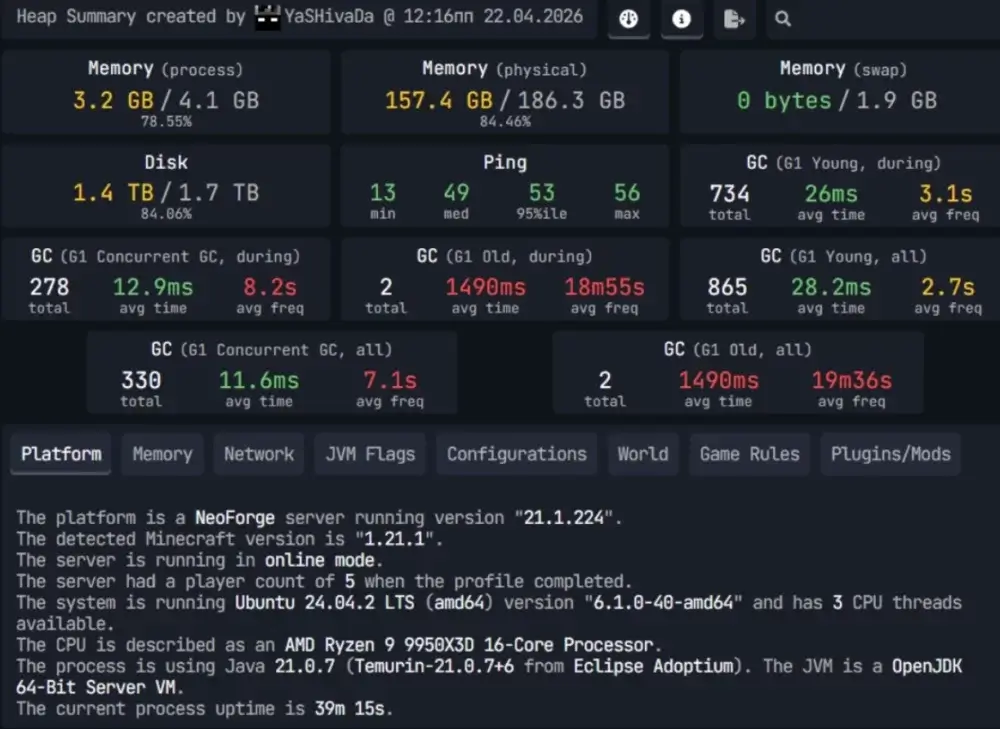
godlike benchmark hardware
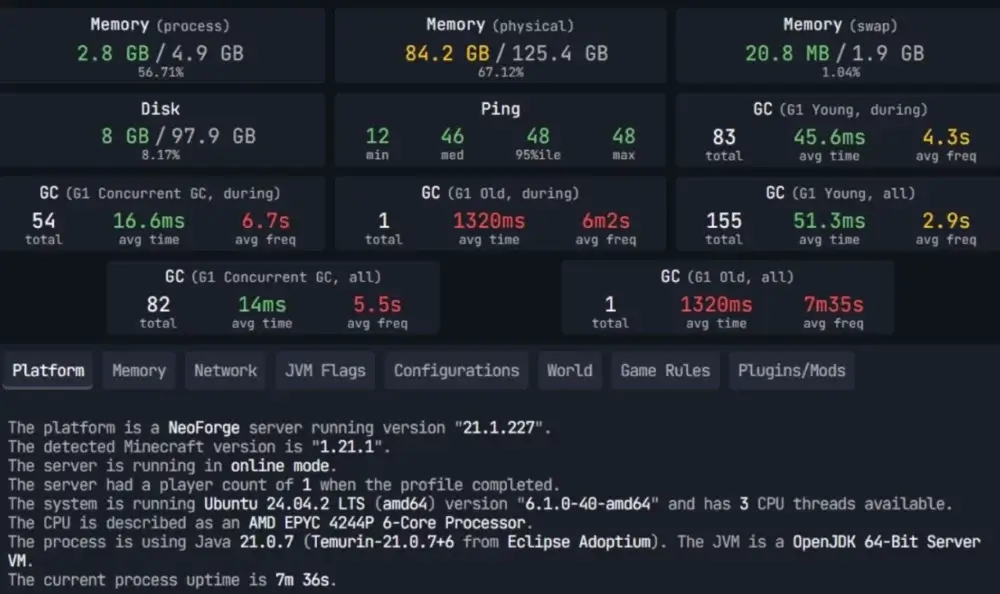
Shockbyte benchmark hardware
Godlike also states that all Minecraft servers with 8GB RAM or more run on Ryzen Ryzen 9 9950X3D powerful hardware. That is important because 8GB is often where server owners start moving from simple friend servers into heavier SMPs, modpacks, or larger communities.
Benchmark 1: TPS Under 4-Bot Exploration Load
TPS means ticks per second. Minecraft normally aims for 20 TPS. When TPS falls, the server is struggling to keep up with the simulation. Blocks may update late, mobs react slowly, players can rubber-band, and combat starts to feel wrong.
The 4-bot test was designed to stress live chunk generation. Instead of standing still at spawn, the bots moved outward in different directions, forcing the server to generate and tick new areas.
TPS Results
|
Provider
|
TPS 5s
|
TPS 10s
|
TPS 1m
|
Short-window average
|
|
Godlike
|
14.33
|
18.64
|
15.87
|
16.28
|
|
Shockbyte
|
7.88
|
8.72
|
8.08
|
8.23
|
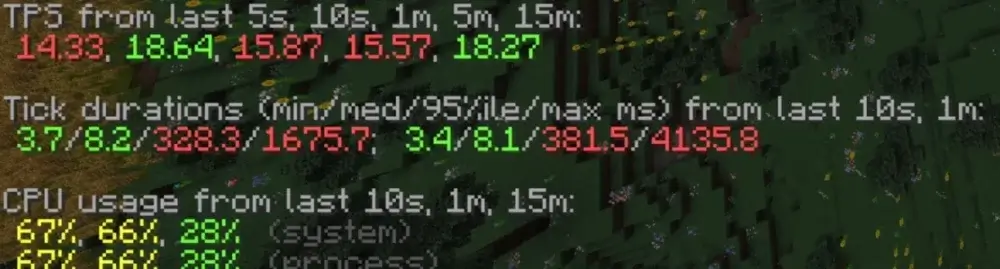
Godlike TPS result
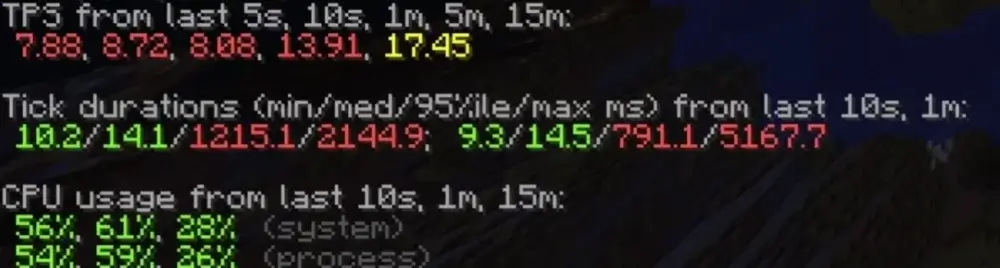
Shockbyte TPS result
The short-window average uses the 5s, 10s, and 1m TPS values because those windows best reflect what was happening during the active stress period.
Godlike held almost 2x higher short-window TPS than Shockbyte during the 4-bot exploration test.
What That Means in Gameplay
In player terms, this gap usually feels like delay. Blocks break late, mobs react slowly, movement gets uneven, and exploration starts to feel heavier than it should.
Spark shows TPS across several windows: 5s, 10s, 1m, 5m, and 15m. For this test, the short windows matter most because the benchmark is built around active exploration pressure. When four bots start moving away from spawn, the server has to generate chunks, tick mobs, and keep the world responsive at the same time.
The 5s and 10s values show the immediate hit. The 1m value shows whether the server can keep handling the pressure once the load continues. Longer windows like 5m and 15m are useful context, but they can smooth out the early pain players actually feel when exploration begins.
Shockbyte’s 1-minute TPS was 8.08, which is far below the normal 20 TPS target. Its longer-window TPS values suggest the server recovered somewhat after the first pressure spike, but the early load is exactly when players notice problems most: everyone leaves spawn, chunks start generating, and the server has to react quickly.
Godlike’s 1-minute TPS was 15.87 in the same test. That is still below a perfect 20 TPS, but it leaves much more room for the server to keep gameplay responsive while chunks are loading.
Benchmark 2: Chunky 16,129-Chunk Render Time
Chunky is commonly used to pre-generate Minecraft worlds. Pre-generation matters because it moves chunk creation away from live player exploration. If chunks are already generated, players are less likely to cause lag spikes just by traveling.
For this benchmark, both servers processed 16,129 chunks.
Chunky Results
|
Provider
|
Chunks processed
|
Completion time
|
Approx. chunks/sec
|
|
Godlike
|
16,129
|
2:43
|
98.95
|
|
Shockbyte
|
16,129
|
6:31
|
41.25
|
For a server owner, this matters before players even join. Faster pre-generation means less waiting before launch and fewer live lag spikes when players start exploring. In this run, Godlike finished the same 16,129-chunk workload in 2:43, while Shockbyte needed 6:31. That is not just a prettier number in a benchmark table. It means the world becomes ready faster, and the server spends less time under heavy generation load.
Godlike completed the same Chunky workload about 2.4x faster than Shockbyte.
Another way to read it: Shockbyte needed 3 minutes and 48 seconds longer to finish the same chunk generation job.
Why Render Speed Matters
Faster chunk rendering is not just a number for a chart. It affects how quickly an owner can prepare a world before launch, how long pre-generation takes after a reset, and how much pain the server avoids when players explore.
If a host is slow during pre-generation, that same hardware can also struggle when players generate terrain live. That is why this test pairs well with the 4-bot TPS benchmark. Chunky shows raw chunk processing speed. The bot test shows what happens when chunk pressure appears during gameplay.
Why Ryzen 9950X3D Helps Minecraft Workloads
The tested Godlike server used a Ryzen 9 9950X3D, a high-end desktop-class CPU with very strong per-core performance and large cache. In Minecraft, that kind of hardware can matter more than simply having a server CPU label.
The benchmark results reflect that difference. With the same 8GB plan class and the same first-month price in this test, Godlike generated chunks faster and held stronger TPS under exploration load.
Price Context
|
Provider
|
Tested plan class
|
First-month discounted price
|
|
Godlike
|
8GB Minecraft server
|
$22.39
|
|
Shockbyte
|
8GB Minecraft server
|
$22.39
|
That makes this comparison especially useful. This was not a case where one server cost dramatically more. In this test, the first-month price was the same, but the measured performance was not.
Results Summary
|
Metric
|
Godlike
|
Shockbyte
|
Result
|
| CPU shown in Spark |
Ryzen 9 9950X3D |
EPYC 4244P |
Godlike used stronger Minecraft-focused hardware |
| 1m TPS under 4-bot load |
15.87 |
8.08 |
Godlike held about 1.96x higher 1m TPS |
| Short-window TPS average |
16.28 |
8.23 |
Godlike held about 1.98x higher short-window TPS |
| Chunky processed chunks |
16,129 |
16,129 |
Equal workload |
| Chunky completion time |
2:43 |
6:31 |
Godlike finished about 2.4x faster |
| Approx. chunks/sec |
98.95 |
41.25 |
Godlike processed chunks much faster |
| First-month discounted price |
$22.39 |
$22.39 |
Same recorded first-month price |
Should You Move an 8GB Minecraft Server to Better Hardware?
If your current 8GB Minecraft server still drops TPS when players explore, the problem may not be RAM. It may be the CPU behind the plan.
That is the point of this benchmark. Two 8GB servers can look similar on a pricing page, but the real gameplay experience can be very different once the world starts generating chunks and multiple players move at the same time.
If you are paying for an 8GB Minecraft server, make sure you are not only buying memory. You are buying the hardware behind that memory. On Godlike, Minecraft servers with 8GB RAM or more run on Ryzen 9 9950X3D.
For server owners who care about TPS, fast world generation, and smoother exploration, that hardware difference matters.
Conclusion
In this benchmark, Godlike outperformed Shockbyte in both major tests. It held much stronger TPS during the 4-bot exploration load and completed the Chunky 16,129-chunk render test about 2.4x faster.
The more useful takeaway is not simply that Godlike won this run. The bigger lesson is that RAM alone is not enough to judge a Minecraft host. If two 8GB plans cost the same, the server with stronger Minecraft-focused hardware can deliver a very different experience.
For Minecraft owners who are tired of TPS drops during exploration, slow pre-generation, or laggy 8GB plans that look better on paper than they feel in-game, moving to Ryzen-based Minecraft hosting is a practical upgrade, not just a spec-sheet flex.








 en | USD
 CHAT WITH GODLIKE TEAM