What is tick?
In Minecraft, there is no seconds, minutes hours etc. Time is measured in "ticks" - a single update cycle / calculation loop in game. It's smallest unit of time in game's engine.

Make your own FREE minecraft server
MINECRAFT FREE SERVER
1 tick = 0.05 seconds of real time
Despite tick speed or "TPS" being a core game mechanic, it has plenty of confusion around it, all due to the game having 2 different ticks:
- Normal Tick: the game tries to run at 20 TPS. This process controls mob AI, player movement, day/night cycle etc. It is unchangeable even with commands.
- Random Tick: this is a subcategory of game's ticks, which handles specific random events, such as: fire propagation, ice melting, crop growth, leaf decay etc. Random Tick, unlike Normal Tick, is changeable via commands. So when later we will be talking about "changing tick speed", we refer to Random Tick specifically.

GET YOUR MINECRAFT SERVER JUST NOW
Why would you want to change tick speed?
As it was mentioned before, adjustments of tick speed only affect random events, so the main reason is - time efficiency. Instead of waiting for the leaves of a chopped tree to decay on their own(which usually takes quite a while) or waiting for the crops to grow you can manually control the speed of this processes to make your gameplay faster and easier. This is also widely used in map creation or server handling to create certain challenge or experience for players.

How to change tick speed?
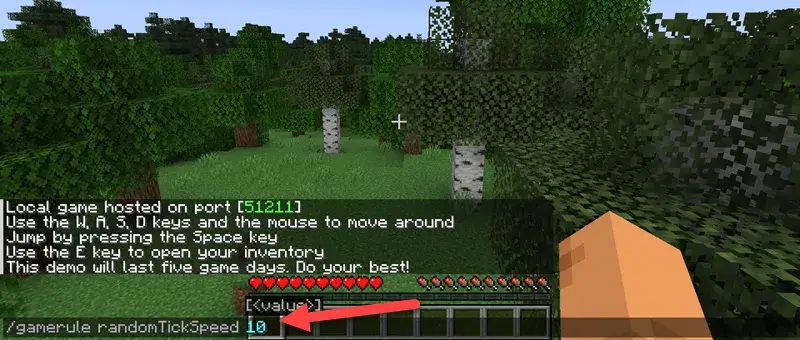
To change tick speed of the game you need to use just one quite simple command(if you are unfamiliar with commands in Minecraft, check out our previous article). The command is universal and works on both Java Edition and Bedrock edition of the game, here's the syntax:
/gamerule randomTickSpeed <numeric_value>
Note, that the default value of tick speed(random tick speed specifically, not the normal tick speed) for Java Edition is 3. For Bedrock Edition - 1. Additionally, before entering the command, make sure you have cheats enabled in your world /server settings, as without them enabled the command will simply not work.
Warning
Before playing around with the tick speed, be aware that setting it too high(e.g. 10 000+) will lead to performance issues and potential crash of the game / server. Also, as it was mentioned before, fire propagation is influenced by tick speed. Thus, even a small fire can become an uncontrollable hazard with high tick speed. To prevent that, you can additionally use this command, which stops fire from spreading and consuming blocks:
/gamerule doFireTick false
If you encounter issues after changing the tick speed, you can quickly reset everything to normal by using the same command with default values that were mentioned earlier:
/gamerule randomTickSpeed 3 - default for Java Edition
/gamerule randomTickSpeed 1 - default for Bedrock Edition
Conclusion
This was an ultimate guide to understand the ropes of what ticks are and how can you change them for your benefit. We hope this information was useful and interesting, thank you for reading and good luck!








 en | USD
 CHAT WITH GODLIKE TEAM