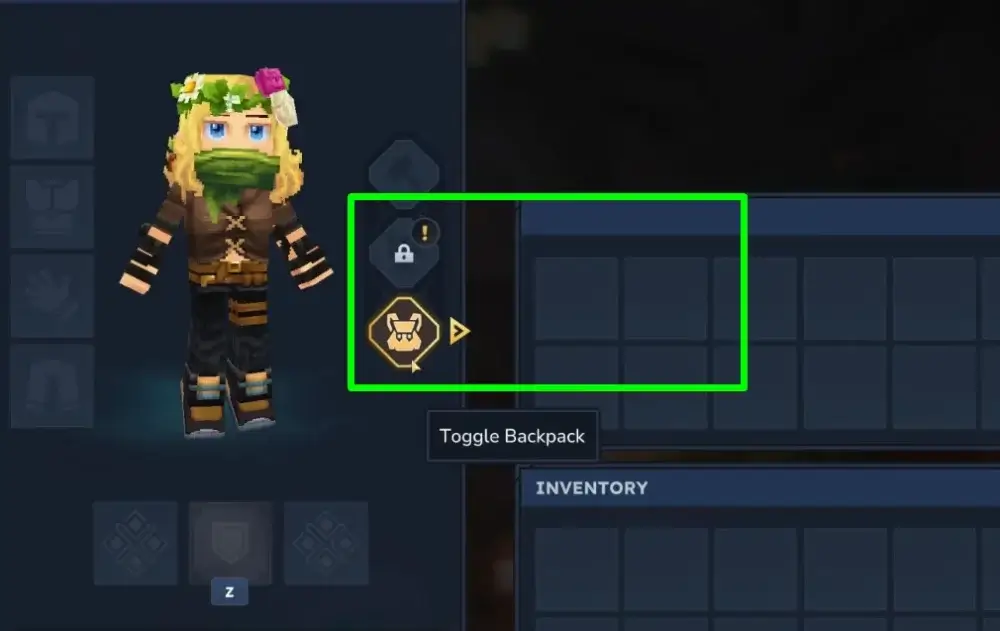
Backpack upgrades in Hytale server hosting work like permanent unlocks. You craft the backpack item, then you must use it from your hotbar to open a Backpack tab in your inventory. After that, you craft Upgrade I for a bigger bag, and Upgrade II much later, once your Memories progress is high enough.
A lot of players expect a wearable backpack. In Hytale, it is usually a consumable unlock item. You craft it, hold it, use it once, and the game adds an extra storage tab to your inventory.
This is why people think it is bugged. You craft it, open your inventory, and nothing looks different. The change appears after you consume it, and then you access the extra slots through the backpack tab.
A small tip that helps in real play: keep your combat essentials in your normal inventory, and dump bulky loot into the backpack tab. Your hotbar and main grid stay readable, and you stop fumbling during fights.
Step 1: Unlock the backpack tab
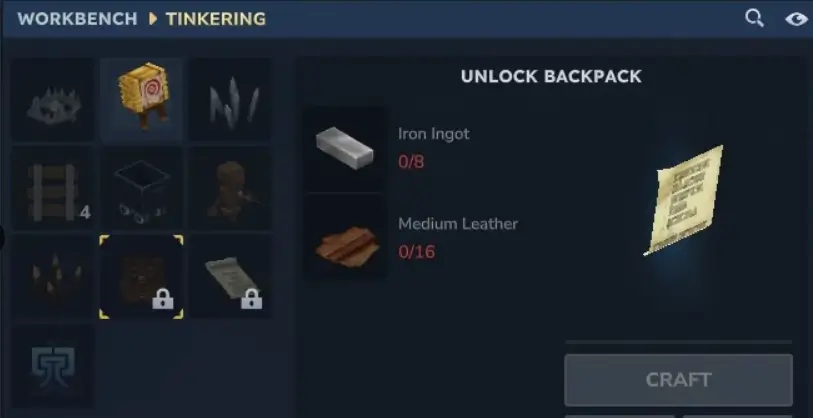
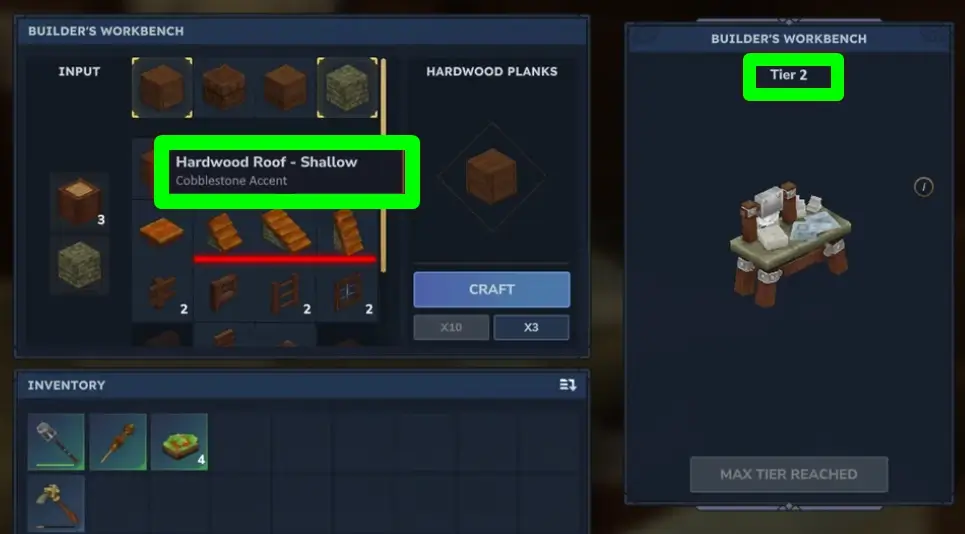
You will usually need an upgraded Workbench before the backpack recipe shows up. In many Early Access builds, that is Workbench Tier 2.
So the first checkpoint is simple: open the Workbench, look for an Upgrade button, and push it if you can. If the Tier 2 upgrade asks for specific ingots and scraps, do not overthink it. That is the game telling you the backpack is part of normal progression, not a secret item.
Once you craft the backpack:
Drag it onto your hotbar
Select it so your character is holding it
Use it once (right-click in most setups)
Then open your inventory and look for the Backpack tab. If you forget to use the item, you can stare at your inventory for ten minutes and nothing will change.
Step 2: Backpack Upgrade I (the one that makes loot runs feel good)
Upgrade I is the point where you stop making constant trips home just because you picked up a few extra stacks of ore and hides.
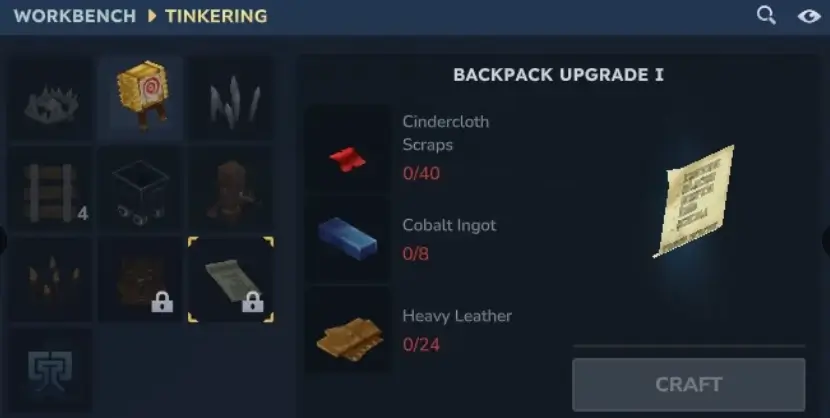
In most current builds, Upgrade I is crafted from:
40 Cindercloth Scraps, 8 Cobalt Ingots, and 24 Heavy Leather.
You apply it the same way as the first unlock: put it on your hotbar, hold it, use it once, and your backpack capacity increases.
Where people waste time here is farming only one ingredient. This upgrade is faster when you treat it as a normal exploration set:
Cobalt comes from deeper mining and tougher areas
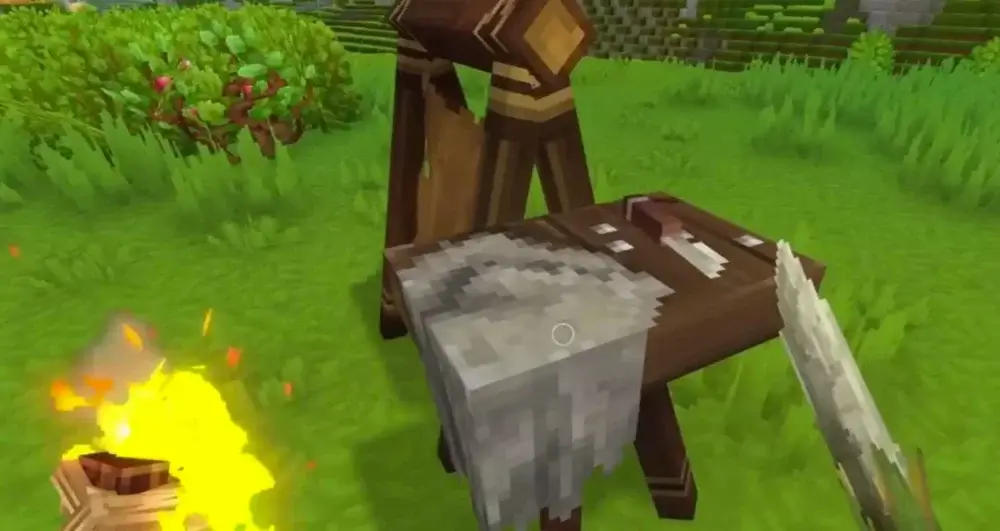
Heavy Leather is tied to bigger animals and a Tanning Rack workflow
Cindercloth Scraps are typically linked to fire-themed enemies in hotter, more dangerous locations
If you do one focused session for each category instead of trying to grind everything in one place, the upgrade arrives naturally.
Step 3: Backpack Upgrade II (the Memories gate)
Upgrade II is not just a materials check. It is usually locked behind Memories progress at the Forgotten Temple. In many builds, you need 100 restored Memories before the recipe becomes available.
The materials are late-game:
1 Voidheart, 8 Adamantite Ingots, and 16 Storm Leather.
The annoying part is not the number 100. It is the way Memories often cap out. In many Early Access builds, you can only hold a limited amount of Memories at once. When you hit that limit, you stop making progress until you return to the temple and restore them.
The easiest way to make this painless is to treat the temple like a routine stop, not a special trip:
After a long exploration run, swing by the temple on your way back to base
Restore what you have, then continue playing
Avoid running the same tiny loop forever, because meeting new creatures and exploring new areas is what usually feeds Memory progress faster
When the upgrade is finally craftable, apply it the same way: craft it, put it on the hotbar, use it once.
Quick fixes for the problems that waste the most time
I crafted the backpack but I did not get more space
You likely did not use the item. Crafting prepares the unlock. Using it applies the unlock.
I cannot see the backpack or upgrade recipes anywhere
This is almost always a Workbench tier issue. Upgrade the Workbench first, then check the Tinkering-style section again. If the recipe still does not appear, you are probably missing a progression gate for that tier of upgrade.
I am stuck on Upgrade II because Memories are not moving
You may be capped. Go restore Memories at the Forgotten Temple, then spend your next session exploring fresh areas and encountering new creatures instead of repeating the same safe route.
FAQ
Do I have to equip the backpack to get extra slots?
Usually no. In many Early Access builds, the backpack works like a permanent unlock: you craft it, put it on your hotbar, use it once, and a Backpack tab appears in your inventory.
Why did I craft the backpack but nothing changed?
Most of the time, the item was never used. Crafting creates the unlock item, but the extra storage only appears after you consume it from the hotbar.
When should I go for Backpack Upgrade I?
Go for it once loot runs start forcing you to drop good materials or make constant return trips. Upgrade I is the midgame comfort upgrade that makes gathering sessions feel worth the time.
Why can’t I craft Backpack Upgrade II yet?
Upgrade II is often gated behind restored Memories at the Forgotten Temple. If your Memories progress feels stuck, you may be capped, so do a quick temple restore run, then keep exploring new areas to meet new creatures and collect more Memories.
Itskovich Spartak
Game Content Writer
A dedicated Game Content Writer who creates clear engaging articles and guides for gamers. Experienced in explaining game mechanics, server features and community topics in a way that feels accessible and enjoyable to read. Focuses on delivering content that helps players make decisions, discover new possibilities and get more from their favorite games. Combines a reader friendly style with a strong understanding of what interests modern gaming communities.
Important Note: Godlike.host is our own service. This ranking is editorial (not paid placement) and follows the scoring criteria shown below. Always verify current plan limits, pricing, and regions on each provider’s website before purchasing….
Hytale looks like a sandbox adventure game you can sink a decade into. But the real reason the hype never fully died isn’t only the art style or the Minecraft meets RPG pitch. It’s…



 en | USD
 CHAT WITH GODLIKE TEAM