en | USD
 CHAT WITH GODLIKE TEAM





Minecraft RAM Calculator: How Much Memory Does Your Server Really Need?
- 18 min read
- 5411 views
- 0 likes
Running a Minecraft Server Hosting usually feels easy until the first “why is it lagging?” night. Most of the time, the culprit is memory: too little RAM leads to stutters, chunk delays, and random slowdowns when players start exploring. Too much RAM can be wasteful, and in Java it can even backfire if the heap becomes harder to manage.


Use the RAM calculator above to get a practical starting point based on what you’re actually building: Vanilla, a modded setup with a rough mod/plugin count, or a specific modpack. As you adjust the settings, you’ll see an estimated RAM target and the closest Godlike plan (with the current monthly price) before you click Order Now.
Still comparing hosts? Check our Choose Best Minecraft Server Hosting (2026) guide on godlike.host. It helps you line up your RAM estimate with the things people forget to compare: support, backups, setup time, and server management tools.
How the Minecraft RAM calculator works (use it just right here!)
The calculator is built for real-world decisions, not perfect lab accuracy. It places your server into a practical profile based on the settings you choose (player load, world growth, and how heavy your modded setup is) and then maps that profile to the smallest plan that should feel stable.
Instead of guessing or copying someone else’s recommended RAM, you can model your own scenario and immediately see which plan matches it. If your setup sits on the edge between two plans, the recommendation intentionally leans upward so you have breathing room during spikes.
Below, you can use the RAM calculator right away, it’s fully functional. Choose your modpack (or vanilla), set your expected player count and world size, and it will suggest the right RAM range and a matching plan so you can launch your new server with the settings you need
Inputs: what you tell the calculator
The calculator has three modes, so you can describe your server without overthinking it:
Vanilla
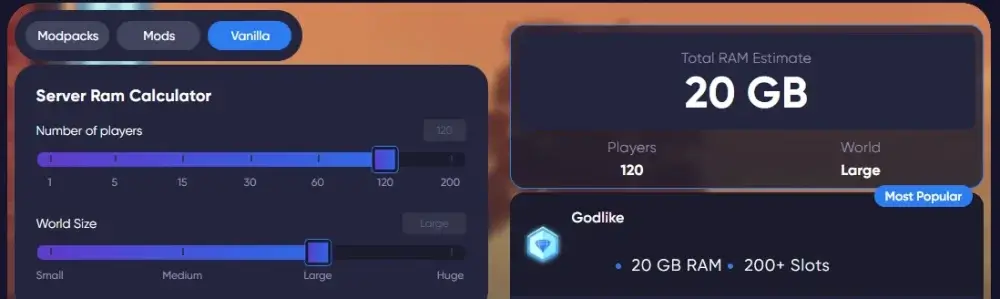
Pick your expected player count and your world size (Small → Huge). World size here is a shorthand for how much your world has grown and how aggressively players explore, not just the folder size on disk.
Mods
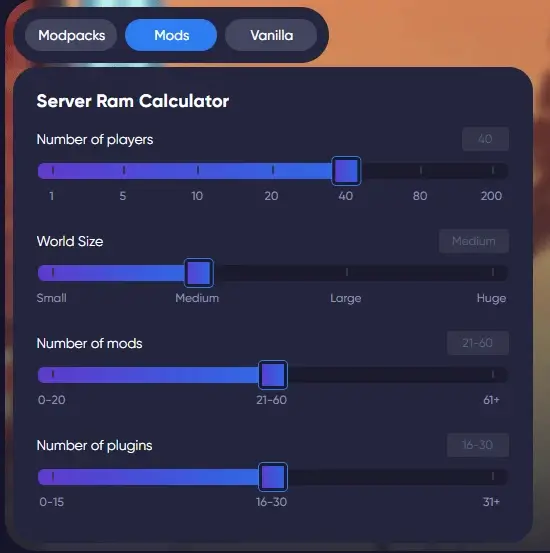
Choose player count, world size, then set your mods and plugins as a range (for example 0–20, 21–60, 61+). This keeps the estimate realistic even if you don’t know the exact number yet.
Modpacks
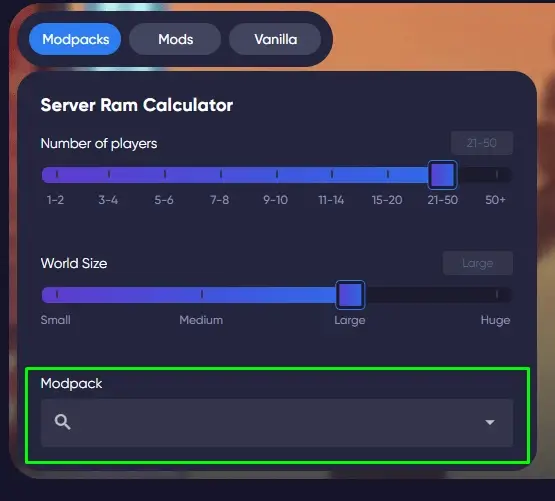
Select the modpack you plan to run (most servers use one). If you plan to keep multiple packs installed or you’re experimenting with more than one, expect to land on a higher tier. You can also use Preinstall so the server is ready with your modpack setup from the start.
The calculator focuses on the biggest levers. Version, server software (Paper/Fabric vs Vanilla/Forge), view distance, and the type of mods you run can still shift real usage, so the guide below shows how to fine-tune once your server is live.
If you are planning a heavily customized world, take a look at Minecraft Mods (1.21): Best Mods, Modpacks, and How to Install (Fabric, Forge, NeoForge) to help you choose and install the right modpack before you finalize your RAM settings.
Player count
You set the number of players you want to support. Each additional player brings more loaded chunks, entities and data. As a rough rule of thumb, many admins assume around 1 GB of additional RAM for every 5 active players on top of the base allocation.
Mods and plugins
The calculator lets you specify how many mods or plugins you want to run and whether your setup is light or heavy:
- Lightly modded or a few plugins
- Medium modpack
- Heavy or expert modpack with complex features
Mods that add complex AI, heavy terrain generation or hundreds of new entities will use more RAM than simple cosmetic or quality of life mods. A server running 50 or more mods should usually have at least 6 to 8 GB of RAM. Heavily modded gameplay can push that into the 8 to 12 GB range or even higher.
World size and exploration
You can also set an approximate world size or exploration level. Pre explored worlds, massive farms and large redstone machines need more RAM than a small spawn area with a few bases. A world that has generated tens of gigabytes of region files simply has more chunks and entities the server can load in memory at any moment.
What the calculator outputs
As you change any setting, the estimate updates instantly. You’ll see:
1) Total RAM estimate (GB)
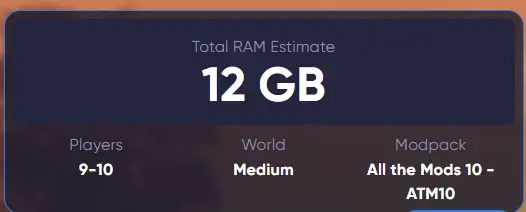
A practical target you can start with for your current setup.
2) A quick snapshot of your inputs
The result card reflects what you selected (players, world size, and your mod/plugin range or the chosen modpack).
3) A recommended plan (with price)

The calculator picks the closest Godlike plan that meets the estimate and shows the monthly price right away, so you can decide before going to checkout. If you click Order Now, you’ll be taken to the matching plan in the billing flow.
Please keep in mind this is an estimate. RAM usage can swing depending on exploration, farms, entity count, and mod behavior.
Quick answers: how much RAM do common Minecraft servers need
The calculator gives a precise estimate for your case, but it helps to see typical numbers.
These ranges assume a dedicated server for Minecraft, not a multitask desktop running many other applications at the same time.
Vanilla or lightly modded servers
A very basic Minecraft server with 1 or 2 players and no mods or plugins can run on 1 GB RAM. This is the realistic minimum for a testing world or a small private setup.
A 2 GB Minecraft server normally handles up to about 10 players on a standard world with few or no plugins.
For a small community server or SMP with 5–15 players and a couple of lightweight plugins, 3–4 GB of RAM is recommended. This gives enough headroom for world saves, short spikes and new chunks being generated.
Modded Minecraft servers
Lightly modded gameplay and small modpacks like performance or quality of life collections generally require 4–6 GB of RAM.
A lightweight modpack might need around 4–6 GB of RAM, especially if the player count stays in the 5–10 range.
A server running 50 or more mods should usually have at least 6–8 GB, and heavily modded or “kitchen sink" modpacks often require 8–12 GB or more depending on the number of players and how far they travel.
For a deeper look at hardware, performance and pricing for modded servers, you can also check Best Modded Minecraft Server Hosting (2026): 10 Compared & Ranked Providers by and see how different hosts handle demanding modpacks.
Newer versions and big maps
Newer versions of Minecraft with more complex world generation, such as 1.17 and beyond, increase both CPU and RAM load. These versions often work best when the server software itself has a base of around 3–4 GB reserved, even before you add players and mods.
Large, pre explored worlds with long running farms and redstone machines push RAM usage higher. Worlds with many generated regions, big mob farms and complex automation can need multiple extra gigabytes compared to a fresh map.
Remember that these values are starting points. The best way to determine the exact amount of RAM for your own Minecraft server is to test, monitor usage and then adjust up or down.
A simple rule of thumb for estimating Minecraft server RAM
To make the calculator’s behavior easier to understand, it follows a general rule of thumb similar to what many server owners use:
- Start with a base of 1 GB RAM for the server itself.
- Add around 0.25 GB for each player you want to have online.
- Add around 0.5 GB for every 10 mods or plugins.
So, as a rough example:
- Base server: 1 GB
- 20 players: 20 × 0.25 GB = 5 GB
- 40 mods and 20 plugins: 60 total, which is six groups of ten → 6 × 0.5 GB = 3 GB
In this case the calculator would land at about 9 GB of RAM needed. That matches the idea that a server with 20 players, 40 mods and 20 plugins is a fairly heavy setup and benefits from high memory.
This is not a strict formula for all situations. Some communities use a different approximation like 1 GB per 5 players on top of a 2 GB base. What matters is the direction: each player, each group of mods and each expansion of the world increases memory pressure.
What really affects Minecraft server RAM usage
There is no single factor that defines how much RAM a Minecraft server requires. The calculator and the guide here focus on the most important ones.
Number of players and player base
Player count has a direct impact on RAM. Each player:
- loads chunks around them
- interacts with entities
- increases data that has to be kept in memory
The more players explore in different directions, the more scattered chunks are loaded at once. That is why each additional player raises memory usage. Even for a pure Vanilla server, a large and active player base can need as much RAM as a smaller modded server.
World size and exploration
Here’s the pattern most people run into: everything feels fine while the server lives near spawn, then one player flies 10,000 blocks, generates fresh terrain, and the server suddenly has to juggle new chunks, mobs, and saved data at once. If lag shows up mostly during exploration, that’s usually a memory spike (and sometimes a view-distance problem), not a mystery bug.
The “world size” slider in the calculator stands for how big and explored your map is, not just the size of the world folder on disk. Worlds with many generated regions, large builds and long distance travel tend to use more RAM because the server keeps more chunks active.
Pre generated worlds, large adventure maps and heavy redstone farms all increase RAM usage. If your players constantly travel far from spawn or keep farms loaded in different dimensions at the same time, plan for additional memory.
Mods, plugins and large modpacks
Mods and plugins are one of the main reasons why people search for a Minecraft server RAM calculator in the first place.
- Simple plugins like chat formatting or basic administration barely move the needle.
- Mods that add complex AI, custom dimensions, automation systems or hundreds of new items create extra entities and data structures that live in memory.
Light modpacks might be fine with 4–6 GB, but large modpacks often need 8 GB of RAM or more. Heavily modded Minecraft servers that expect dozens of players online can easily use 12 GB or more once the world matures.
Server software and configuration
The type of server JAR you use influences RAM usage and performance.
- Optimized server software like Paper or Fabric is more efficient with RAM than Vanilla or Forge on the same player count and world size.
- Paper, Purpur and similar projects add many performance-focused patches and built in configuration options for entity limits and chunk behavior.
- Forge and some heavy mod loaders can have a higher base footprint, especially with many core mods loaded.
Server owners can install different server JARs to manage memory more efficiently. If you are hitting memory limits on Vanilla, trying Paper or Fabric can reduce RAM usage and improve server performance.
Minecraft version
Each new version of Minecraft that adds new world features, blocks and mechanics increases baseline requirements.
The server software typically needs a base of about 1–2 GB to run smoothly on older versions.
For more modern releases, many admins find that versions 1.17 and above realistically need at least 3 GB of RAM dedicated to the server process.
Versions 1.13 and above with large oceans, new biomes and extra features often behave best when you can allocate around 4 GB or more.
How to optimize Minecraft server RAM usage and reduce lag
More RAM is not the only solution. You can often improve performance with configuration changes and better server software before you upgrade your hosting plan.
Use optimized server software and mods
Switching from Vanilla or Forge to a performance-focused server type like Paper or Fabric often brings an immediate improvement in RAM usage and tick stability. Minecraft server performance can be improved by combining these optimized JARs with lightweight optimization mods.
There are plugins and mods that:
- limit or merge entities
- reduce the impact of hoppers and redstone
- manage chunk ticking more efficiently
These tools let you run the same player base with less RAM and a more stable TPS.
Tune startup parameters and Java flags
Optimizing startup parameters can help reduce Minecraft server RAM usage and improve garbage collection.
Many server owners use Aikar’s Flags in their Java startup configuration. These flags adjust how the Java virtual machine handles memory, reduces pauses and smooths out garbage collection on busy servers.
While every environment is different, adding sensible flags and sizing the heap correctly often gives better performance than just throwing more RAM at the problem.
Adjust view distance and simulation distance
Lowering the view distance is one of the easiest ways to cut RAM usage. The fewer chunks are loaded around each player, the less memory the server needs to track them.
If players mainly build near spawn, you may not need a high view distance at all. Reducing both view distance and simulation distance helps avoid spikes when new areas of the world are explored.
Clear mobs and dropped items with plugins
Uncontrolled mob farms and thousands of dropped items can cause memory spikes and lag. Minecraft plugins can be used to clear mobs and items on a schedule, or at set thresholds, to keep RAM usage under control.
These tools are especially useful on public servers where you cannot easily prevent everyone from building massive farms.
Balance RAM allocation
Allocating more memory to the server can help improve stability and performance under heavy load, but there is a limit.
- Excessive RAM allocation can hurt performance because Java’s garbage collection becomes less efficient on a very large heap.
- It is recommended to avoid allocating more than about 75 percent of your total system RAM to the Minecraft server. Leaving room for the operating system and background services is important for stability.
Use the calculator to choose a realistic starting point, then watch your actual usage. You can adjust the RAM up or down later.
Testing and monitoring: the real way to know if you chose the right amount of RAM

Even the best Minecraft server RAM calculator only provides an estimate. The exact amount of RAM you require depends on how people actually use the server.
Monitor real RAM usage
Once your server is live, the best answer comes from real usage at peak time. Watch memory during the moments that hurt most: new chunk generation, busy farms, big fights, and players spread across different areas.
Most hosting panels show live RAM usage and history, which makes it easy to spot whether you’re running out of headroom or just hitting occasional spikes. If you consistently sit near the limit (or see frequent stutters during garbage collection), that’s your signal to either optimize the setup or move up one plan tier.
Plan for upgrades and downgrades
Good Minecraft hosting services make it easy to upgrade or downgrade your plan as your player base grows or shrinks. You might start with a plan that has 4 GB of RAM for a small server and move up to 6 or 8 GB when you add large modpacks or attract more players.
Hosting services offer different configurations to match different needs: smaller plans for private servers, larger ones for public communities or heavily modded setups. Many providers include helpful extras like instant setup, scheduled backups and around the clock customer support so you can focus on running your world instead of the infrastructure.
If you are unsure which plan to pick, use the calculator, start with a close match and reach out to support if you see consistent memory issues in your logs.
If you’re hosting with Godlike, every plan comes with tools that make this “test and adjust” approach painless: instant setup, automated backups, and built-in modpack/plugin installers so you can change the server stack without wrestling with files all night.
FAQ
Is 1 GB of RAM enough for a Minecraft server?
One gigabyte is enough only for very basic setups: one or two players, an almost fresh world and no significant mods or plugins. The server software itself needs most of that memory. For anything beyond quick tests or a tiny private world, 2 GB or more is strongly recommended.
How much RAM does a 2 GB Minecraft server handle?
A 2 GB Minecraft server can usually support up to about 10 players in a standard survival world with few plugins. It is a reasonable starting point for a small group of friends. Once you add more players, bigger builds or modded content, you will likely want 3–4 GB instead.
How much RAM do I need for a modded Minecraft server?
For light or medium modpacks, 4–6 GB of RAM is recommended. A server running 50 or more mods should have at least 6–8 GB, especially if you expect more than a handful of players online. Heavily modded servers with complex modpacks, automation and exploration may need 8–12 GB or more depending on the number of players and how far they roam.
What about newer Minecraft versions?
Newer versions of Minecraft, especially 1.13 and above, have more complex world generation and mechanics. Many server owners find that versions 1.17 and newer work best with at least 3–4 GB of RAM allocated just for the server even before adding players and mods. Older versions are a bit lighter, but you still want at least 1–2 GB for stability.
Can I just allocate as much RAM as possible?
Allocating more RAM than you actually need can create problems. Java’s garbage collector becomes less efficient on very large heaps, which can lead to longer pauses and stutters. A better approach is to allocate enough memory for stable performance, leave some free RAM for the system and avoid giving the server more than about three quarters of the total system memory.
How do I use the Minecraft RAM calculator effectively?
Start by entering the Minecraft version you plan to run, then set your expected player count, the number of mods and plugins and an approximate world size. Use the sliders to see how each factor changes the estimate. The calculator will show you a total RAM value and a recommended hosting plan. Launch the server with that plan, monitor RAM usage over time and adjust your configuration or plan once you see real data.

Read Next
-
Best Minecraft Server Hosting 2026 – 12 Compared & Ranked Providers
Important Note: Godlike.host is our own service. This ranking is editorial (not paid placement) and follows the scoring criteria shown below. Always verify current plan limits, pricing, and regions on each provider’s website before purchasing….
-
Minecraft 1.21+ Seeds Worth Trying (Cherry Villages, Dungeons, and Beauty)
TL;DR If you want one seed that feels like a complete starter world, pick Cherry Valley Trio (Seed: 608548899648438462) for villages, deep structures, and a strong exploration route.If you want a dramatic build location with…
-
What Y Level is Best for Diamonds in Minecraft (1.20 -1.21)
Ultimate Minecraft Diamonds Mining Guide Why are diamonds so wanted by many? Minecraft Diamonds – shiny blue gems in the world of Minecraft that also happen to be the ore required to have the best…