Cobblemon is an open-source Minecraft Java Edition mod that brings Pokémon directly into your cubic world. You can catch them all, build your own team, compete with other Pokémon trainers, and master the game.

Make your own FREE minecraft server
MINECRAFT FREE SERVER
As of October 2026, the latest release is Cobblemon 1.8.2 for Minecraft Java Edition 1.21.1. Thus, some information in our Cobblemon guide is relevant specifically for this mod version. We’ll also cover the basics and share useful tips that apply to other versions of Cobblemon. We’ll also review how to install it on your Minecraft client and server, so you can enjoy exciting adventures together with your friends.
What Is Cobblemon?
Minecraft Cobblemon is a popular free open-source mod for Java Edition that adds Pokémon without taking away from the core vanilla Minecraft experience. You can still explore the world, survive, and craft all sorts of stuff, but you can also catch Pokémon, build your team, and battle against other Pokémon. Cobblemon uses the Showdown battle system, which is excellent for turn-based encounters like in a classic Pokémon game.
What version of Cobblemon should you play?
This mod has been in development for over four years, so before you learn how to play Cobblemon, you should know which version you actually need. Of course, the smartest decision is to play 1.8.2, which is the latest version of Cobblemon as of mid-October 2026.
Of course, you can also check other implementations, such as 0.9.9 (alpha) or 1.2.0 (the first release), but in this case you may be unable to use some features and collect new Pokémon. Note that in our guide, we review the mechanics available in the latest version, which may differ from those in earlier releases.
What You Need Before Installing Cobblemon
Learning how to install Cobblemon is as easy as ABC, especially if you prepare before even downloading the mod. Here is a short checklist to ensure that you’re ready to integrate Pokémon into your Minecraft world:
- Your version of Minecraft Java Edition is compatible with Cobblemon (versions 1.19.2–1.21.1 as of October 2026).
- You have NeoForge or Fabric installed on your Minecraft client.
- Your hardware has enough RAM to run this mod.
- Alternatively, some launchers let you install Cobblemon directly from their built-in mod libraries.
Please note that Cobblemon isn’t compatible with the Bedrock edition. So, don’t even try installing it, since the game simply won’t be able to properly read its files.
How to Install Cobblemon
You can download the Cobblemon mod from its official website, which redirects you to Modrinth. Alternatively, you can download it from CurseForge. Alternatively, you can visit CurseForge. At this stage, please follow our simple step-by-step instructions:
- Download the version of Cobblemon and any required dependencies compatible with your version of Minecraft Java Edition.
- Place the downloaded files in your mods folder.
- Launch Minecraft to make sure everything works correctly.
On this website, you can also find different add-ons and resource packs for Cobblemon. You can also download the official Cobblemon modpack to get an even better gaming experience.
Also, some launchers like Godlike Launcher allow you to install the Cobblemon package directly from the client menu. Simply find the desired modpack, install it, and enjoy the game.
First Launch and Choosing Your Starter in Cobblemon
This beginner’s guide to Cobblemon will help you become a skilled Pokémon trainer.. First of all, let’s create a new world (of course, you can also play in an existing one, but it’s better to generate a new map for your adventure). Once you’re in the world, press M (the default keybind) to open the starter selection menu. It’s essential to select a starter before catching other Pokémon or using your starter kit (if you play on a server).
You can choose between different Pokémon, including classic Bulbasaur, Squirtle, or Pikachu:
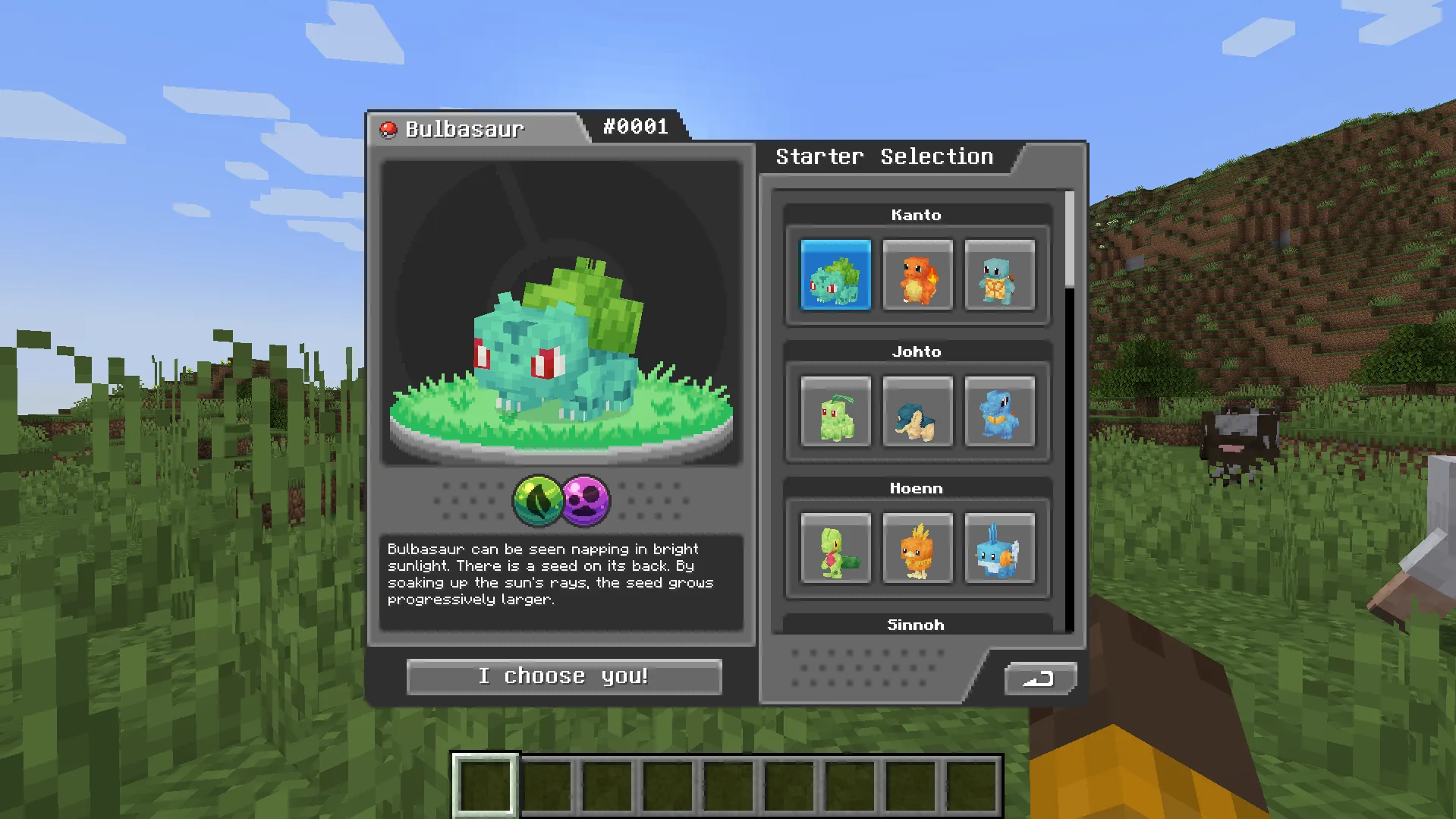
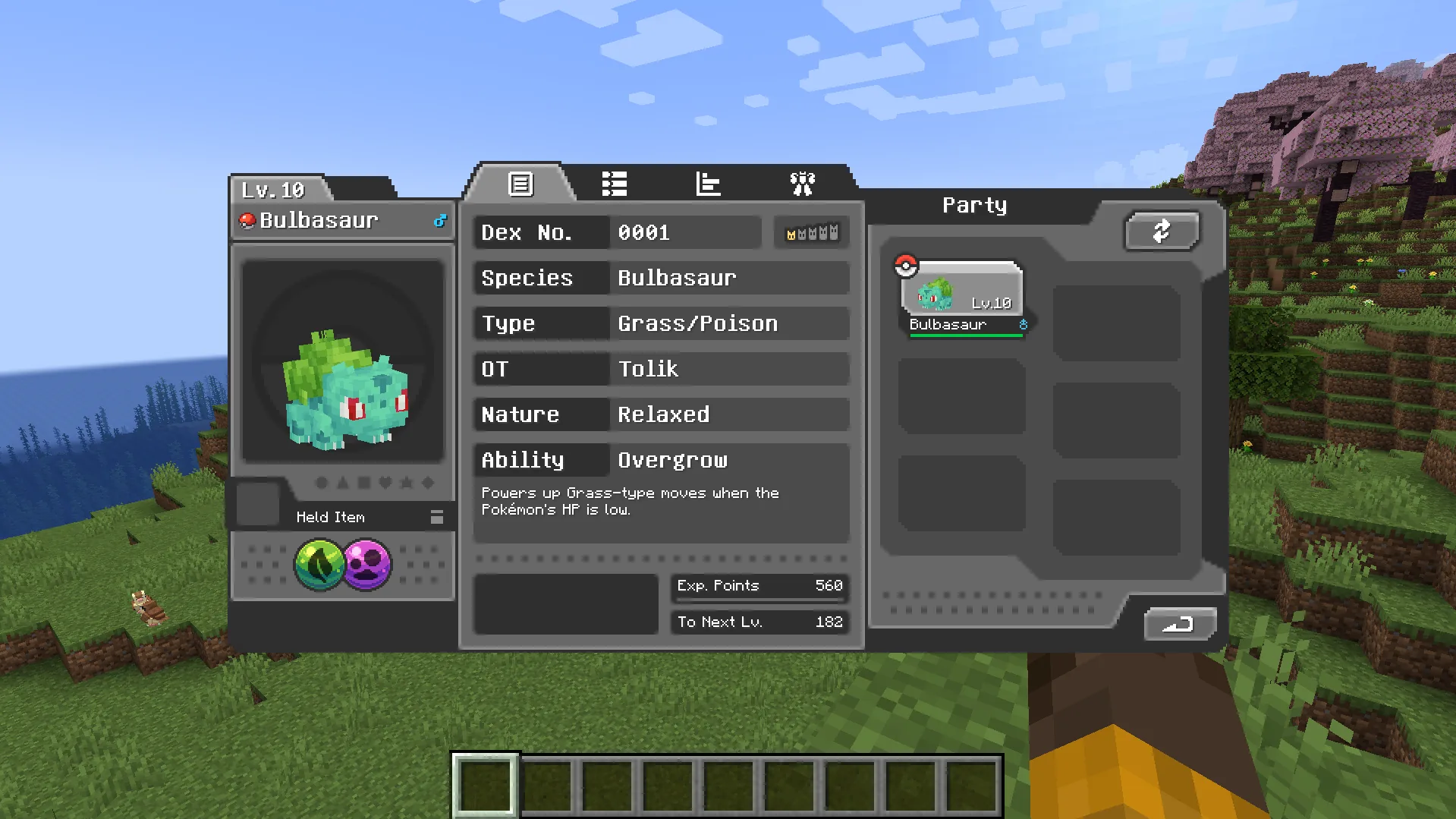
Once you do it, your UI will change, showing the Pokémon on your team. Also, you’ll be able to read the information about your Pokémon by pressing the M key:
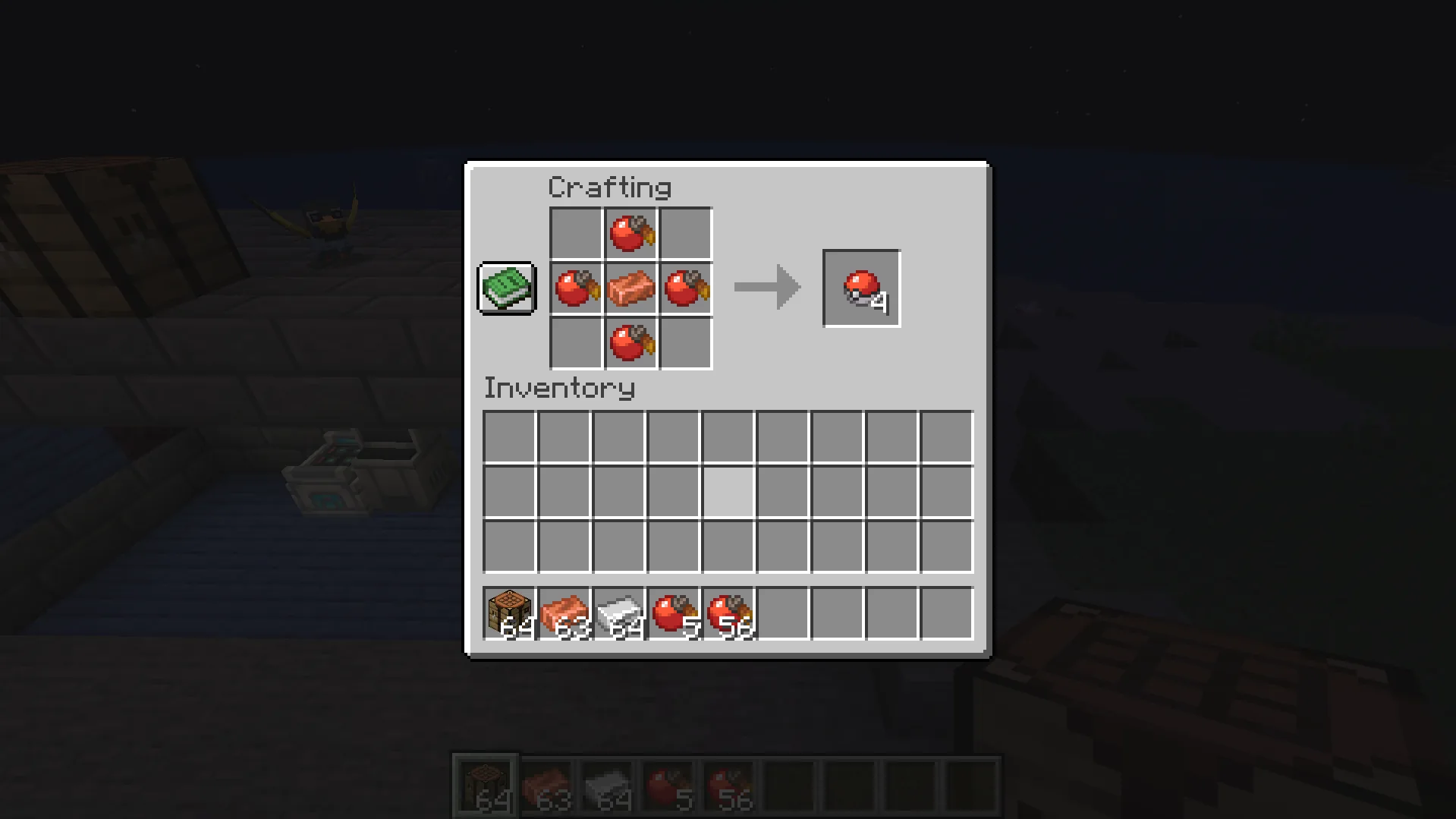
After choosing your first Pokémon, you can start punching trees and mining resources just like in regular Minecraft. Focus on building your first base and crafting tools. At the same time, gather Apricorns and mine copper ore to craft Poké Balls:
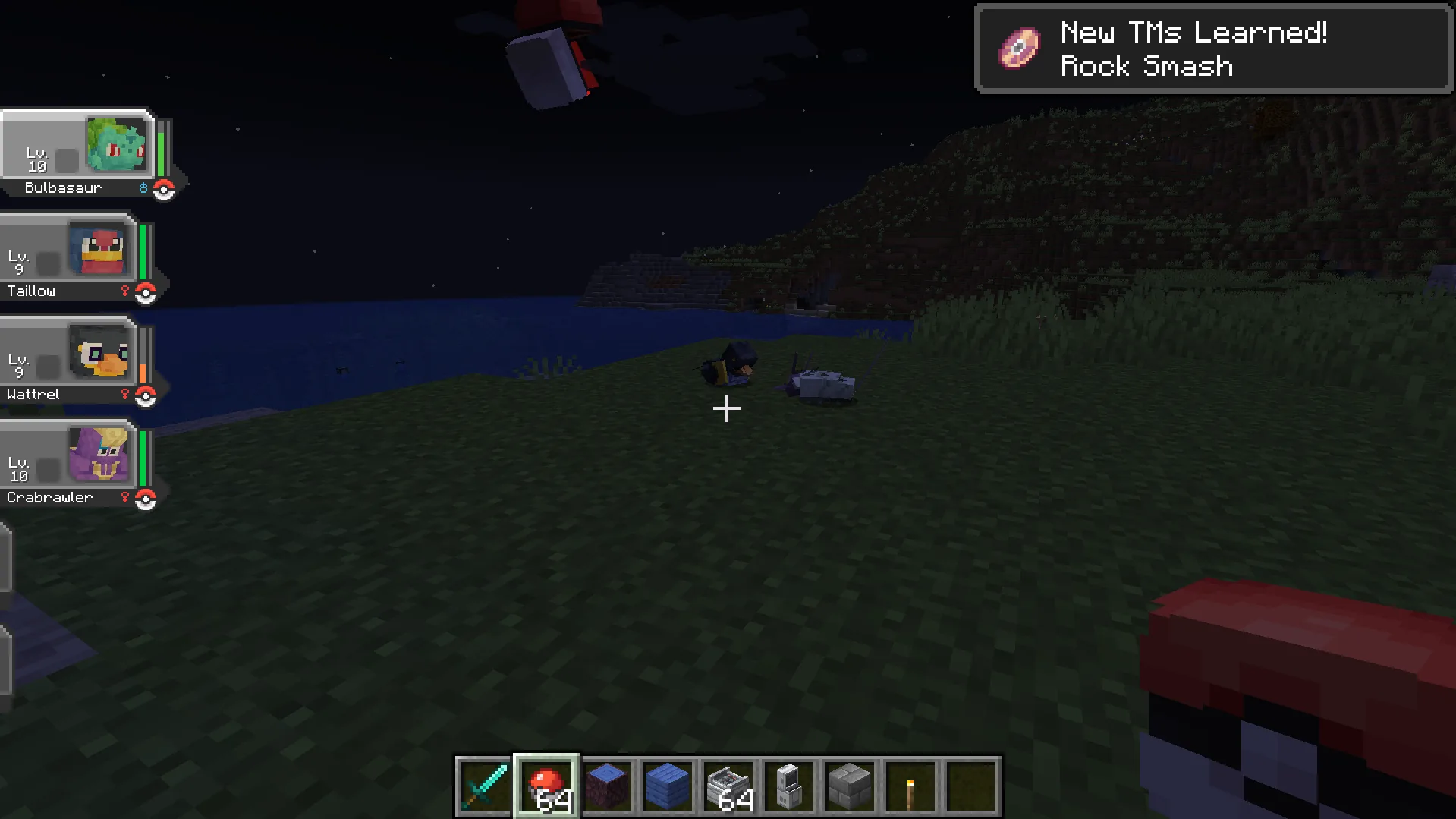
When you have enough Poké Balls, walk around the area near your base to find wild Pokémon. Initiate a turn-based battle by throwing your starter Pokémon at a wild one. Try to weaken the wild Pokémon without knocking it out, then throw a Poké Ball to catch it:
Also, it’ll be a good idea to place a Healing Machine and a PC at your base, start farming crops, improve your armor and tools, and expand your Pokémon team up to 6 units.
How Pokémon Spawning Works in Cobblemon
In this part of our Cobblemon tutorial, we’ll review how Pokémon spawn in your Minecraft world and which conditions may influence this process. First of all, you should consider that there are two types of Pokémon based on where they appear in the world:
- Ground Type: Pokémon spawn on solid land blocks. For example, this kind includes Sandshrew, Cubone, and Whiscash.
- Fishing Type: Pokémon that can be encountered through fishing. For example, this type includes Squirtle, Magikarp, and Wooper. You’ll need a Poké Rod to catch them.
Also, there are other conditions that affect Pokémon spawning. The most important ones include:
- Dimensions.
- Biomes.
- Time.
- Light level.
- Moon phase.
- Sky visibility.
- Block type.
- Structures.
Finally, you should also consider that each Pokémon has a spawn rarity that affects how frequently it appears. The tiers are divided into Common, Uncommon, Rare, Ultra Rare, and Boss.
How to Catch Pokémon in Cobblemon
Whether you play on a Cobblemon server or are on your solo adventure, you’ll need to expand your team by catching wild Pokémon across different biomes, structures, and dimensions. Once you find a Pokémon you want to tame, engage in a battle, lower its health, and throw a Poké Ball from your hotbar:
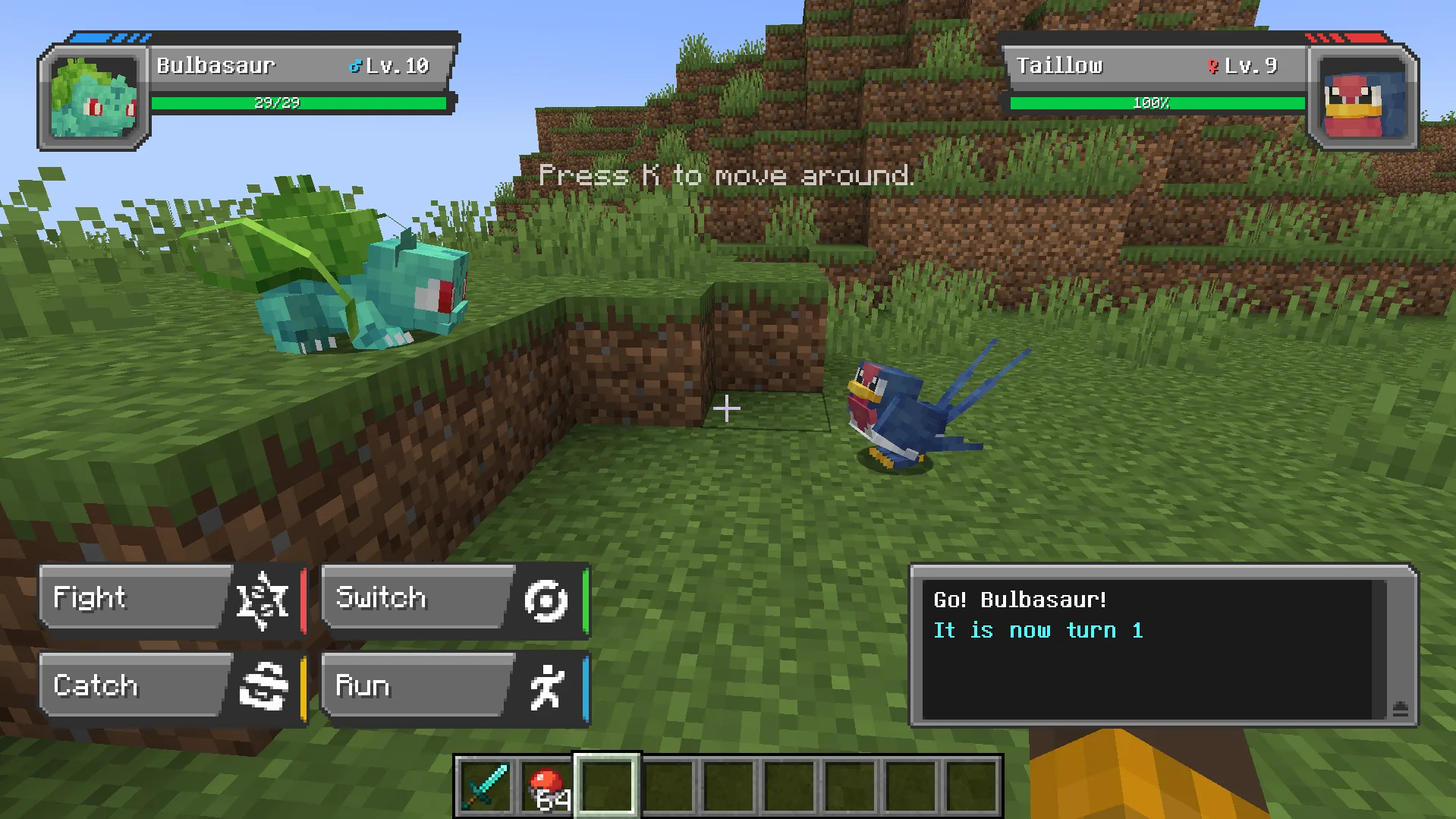
If you catch a Pokémon when you have an empty slot, it’ll immediately join your party. However, if you already have 6 Pokémon, a newly caught Pokémon will be automatically sent to your PC storage system.
Minecraft Cobblemon Party and PC Storage
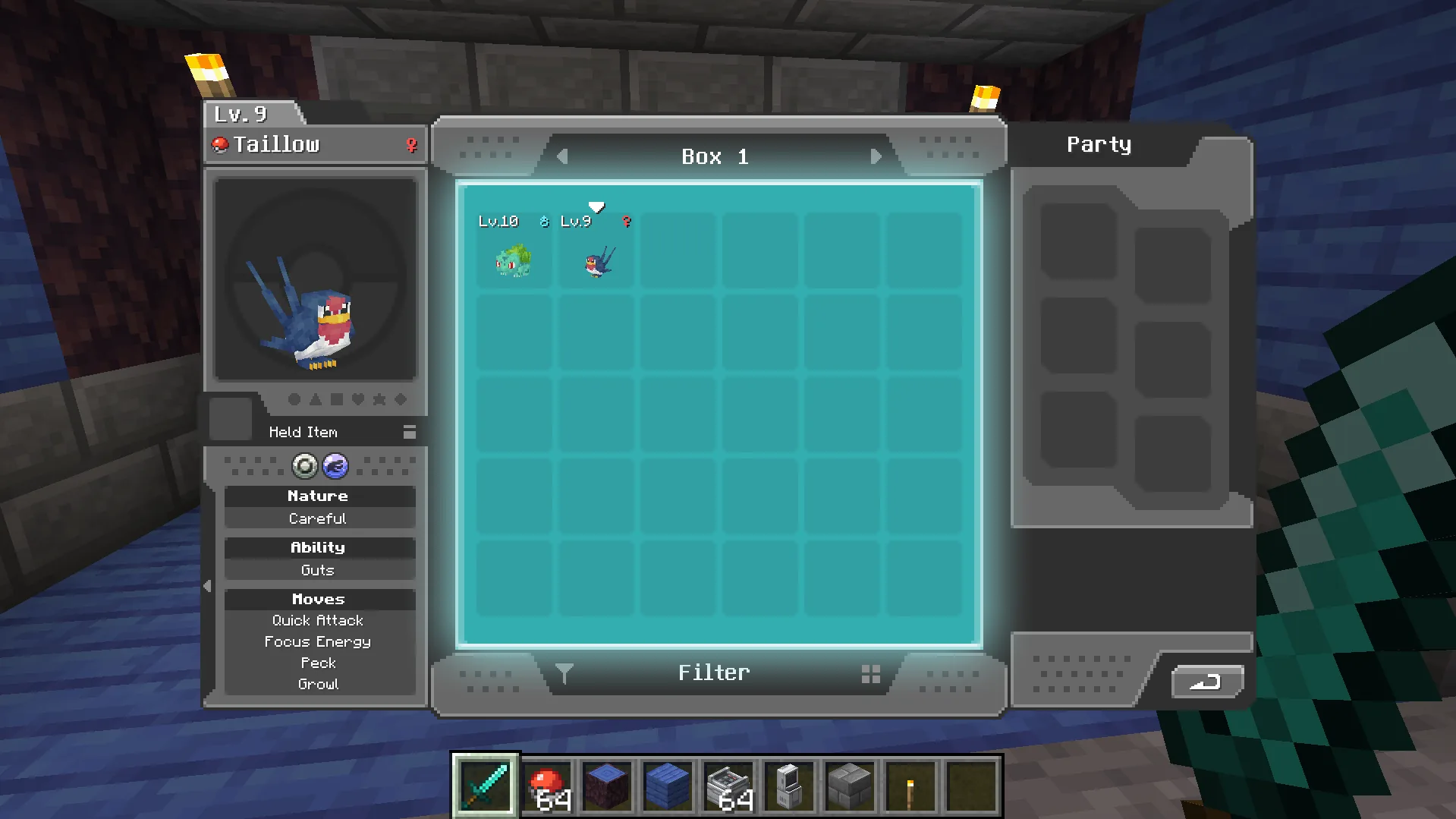
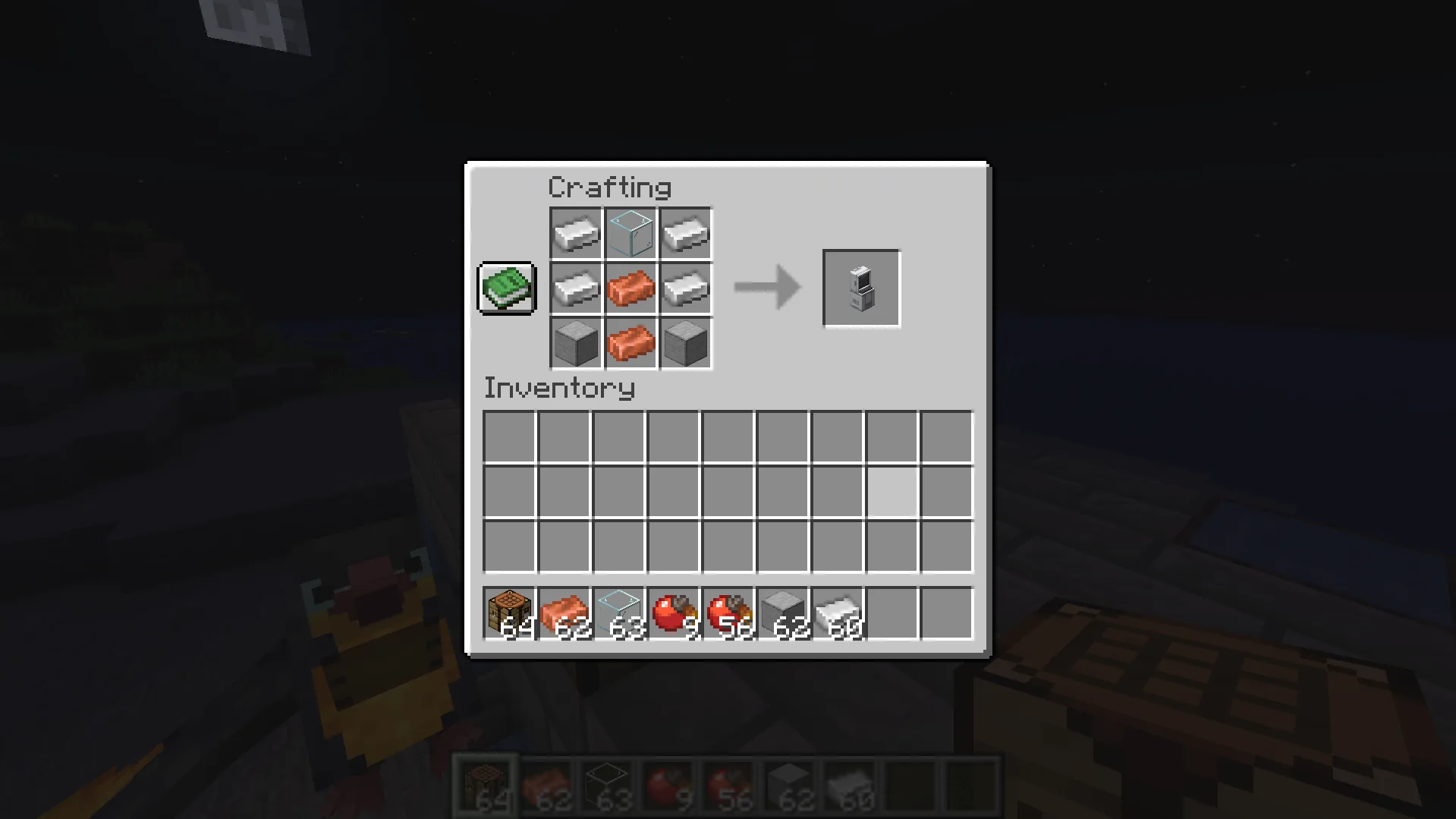
Proper Pokémon party management is an important part of both Cobblemon multiplayer and solo experience. Note that your active party can contain up to six Pokémon. All other Pokémon will be automatically transferred to your PC storage. That’s why you need to craft it using four iron ingots, two copper ingots, two smooth stone blocks, and one glass block before you start taming wild Pokémon:
Inside your PC interface, you can sort your Pokémon by their level, types, name, and Pokédex number. You can also swap the members of your active team, use filters, tag PC boxes, and customize wallpapers.
How Battles Work in Minecraft Cobblemon
Our Cobblemon guide for beginners also includes a valuable explanation of the battle system in this mod. The encounters use a turn-based system, which resembles classic Pokémon games. Players can battle wild Pokémon and other players. Also, with the appropriate add-ons, you can challenge NPCs and take part in gym battles. During these encounters, the mod uses the following mechanics:
- Turn-Based Combat System: Actions such as attacking or using items are resolved according to turn order, move priority, and Pokémon Speed stats.
- Type Effectiveness: During a battle, standard Pokémon type-chart rules apply, which affect damage multipliers. For example, Water-type moves are super effective against Fire-type Pokémon, while Electric-type moves are dangerous for Water-type Pokémon.
- Power Points: Each Pokémon can have up to four moves, and using them consumes Power Points (PP). Leveling up can unlock new moves.
For every battle won, your Pokémon gets experience, and its level grows. When a Pokémon faints, it remains unable to battle until it’s healed.
Healing Your Pokémon in Minecraft Cobblemon
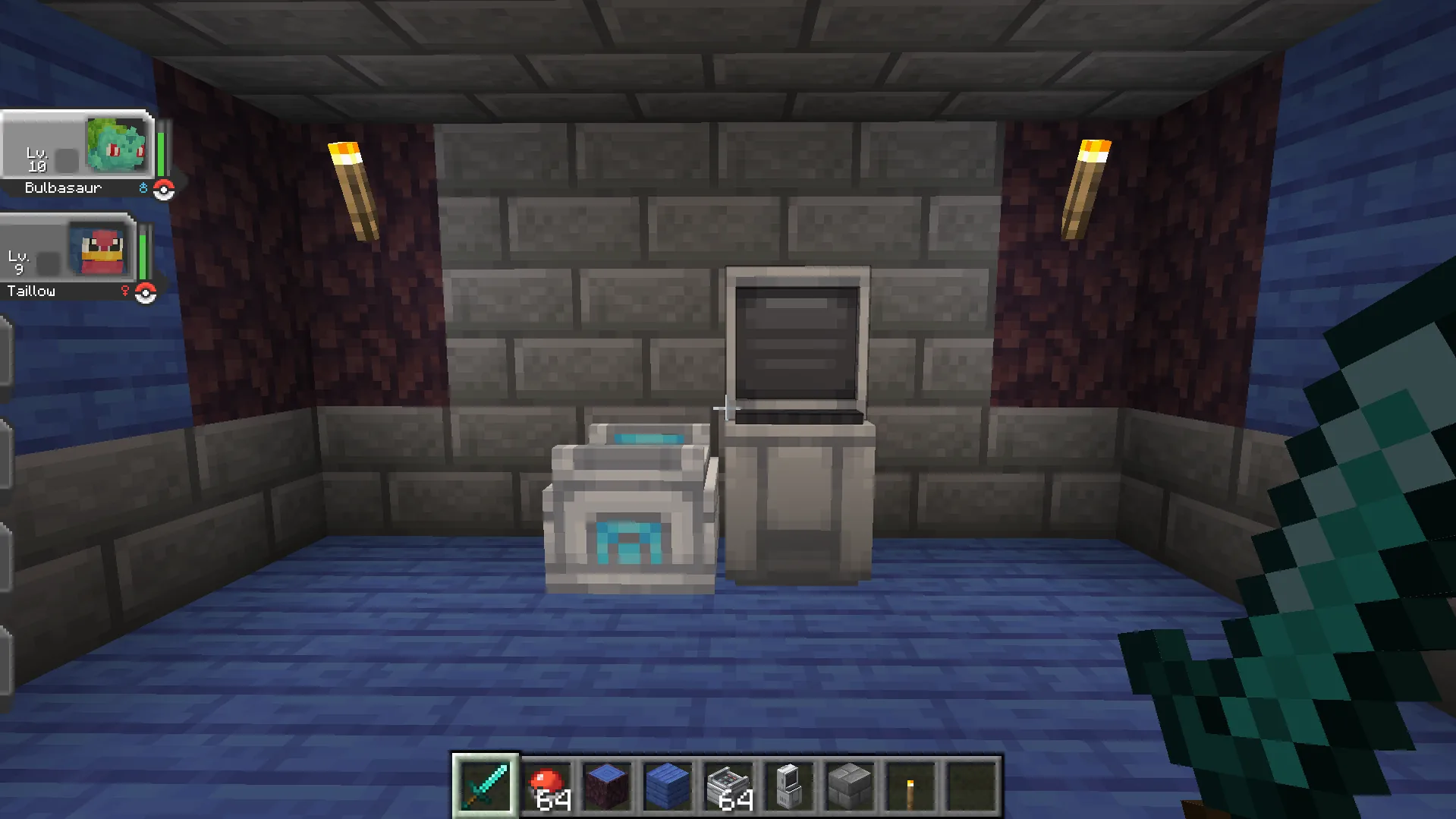
Healing is an important mechanic to learn since fainted Pokémon can’t participate in battles. You have several options to get your little buddy back on its feet:
- Healing Machine: You can simply right-click a Healing Machine to restore your Pokémon's HP, PP, and cure negative status effects. You can find these blocks in Pokémon Centers or craft them yourself at your base. Note that they charge over time after placement.
- Healing Items: You can use potions, berries, and status-curing items by right-clicking them and selecting a Pokémon from your party.
- Beds: Sleeping in a bed can restore your active party’s health.
Progression After Your First Few Catches
Cobblemon Pokémon progression is pretty similar to the classic game. To keep progressing and stay entertained while playing this Minecraft mod, you can set some epic goals, such as:
- Build a Full Party: Catch your favorite Pokémon, level them up, and learn new moves to create your dream team.
- Explore New Biomes: Explore different biomes to discover Pokémon and interesting structures.
- Fill the Pokédex: There are over 800 Pokémon. Can you catch them all?
- Build Your Own Pokémon Hub: Gather resources to create your own Pokémon Center with Healing Machines, a gym, a Poké Café, and berry farms.
The mod also gets regular updates that add new features, blocks, items, and Pokémon. And in combination with other add-ons and compatible mods, you’ll always have something to explore in your Cobblemon game.
What Should You Do in Your First Hour in Cobblemon
Are you looking forward to training your first Pokémon and setting out on an exciting adventure? Here is a checklist to complete in your first hour:
- Visit Modrinth, download the latest Cobblemon version, and install it on your Minecraft client.
- Start a new world.
- Choose your starter based on your personal preferences rather than the competitive meta.
- Start exploring nearby biomes, building your base, and collecting resources.
- Craft your first Poké Balls to catch several wild Pokémon.
- Build a party and train your Pokémon in battles.
- Build a Healing Machine and PC storage at your base.
- If you want to play with friends, set up the required client-side mods or launcher so you can join your friends’ world.
How to Play Cobblemon with Friends
Now, it’s time to learn how to enjoy catching Pokémon together with your friends. All in all, there are two popular options:
- Join an existing Cobblemon server: There are many popular Cobblemon servers, such as Cobblemon IMPACT or Mayhem Industries. To join them, you need to ensure you use the correct Minecraft version, loader, and required Cobblemon version. Afterward, simply enter the server IP and follow any additional instructions.
- Create your own private server: If you don’t want to play with strangers, creating your own Cobblemon server is a great option. Thus, you’ll be able to control what add-ons you want to install, set your own rules, and interact with the world the way you and your friends want.
How to start a Cobblemon server
Creating and adjusting your own Minecraft server is a tough task, especially if you have no technical background. However, there is an easy way to enjoy playing with friends and even install the Cobblemon mod on a server without diving deep into server launch and adjustment. With Godlike, you can set up your multiplayer world in just a few minutes and enjoy it with friends:
- Create a Minecraft server based on the appropriate game version.
- Install a supported mod loader, then set up Cobblemon or simply choose a dedicated Cobblemon server on the platform.
- Verify Cobblemon loads and install the matching pack on your client.
- Share the server’s IP with your friends.
- Start your adventure, easily manage the server from any device, and grow your Pokémon community.
How much RAM does a Cobblemon server need?
There is no universal number since the amount of RAM your server needs to run properly depends on different factors. The most important things to consider include:
- Number of players on a server.
- World size and exploration.
- Number of Cobblemon add-ons.
- View distance.
- Presence of complex Redstone mechanisms.
At Godlike, we recommend starting with at least 6 GB of RAM for a smooth gaming experience for you and your friends. However, if you wonder whether you need more or less RAM, you can always get in touch with our customer support.
Multiplayer activities on Cobblemon server
Although Cobblemon is great for solo adventures, this mod can bring you way more joy when you play it with friends. The most exciting activities include:
- Exploring new biomes together
- Catching all Pokémon
- Organizing epic tournaments
- Trading
- Creating unique challenges for your friends
- Comparing your Pokédex progress
Further, you can install different add-ons to make the gaming experience even more exciting. With the right add-ons and mods, you can add custom quests, structures, and NPCs.
Cobblemon Common Problems and Fixes
Our Cobblemon beginner guide wouldn’t be complete without a review of common issues and ways to overcome them. Even experienced players can run into these issues, so check the table below for possible solutions:
| Problem |
Possible Solution |
| Cobblemon mod doesn’t launch |
1. Ensure you’ve downloaded Cobblemon compatible with your Minecraft Java Edition version.
2. Check whether you’ve installed all the necessary dependencies.
3. Verify whether a downloaded Cobblemon mod is compatible with your mod loader. |
| You can’t join a Cobblemon server |
1. Ensure that your Minecraft, mod loader, and Cobblemon versions are compatible with the server.
2. Check whether you need to download any additional mods. |
| Pokémon don’t spawn |
1. Verify that Cobblemon has actually been loaded.
2. Ensure that spawning conditions are met.
3. Look for Pokémon in other biomes.
4. Check server configurations. |
| New current-version structures are missing |
1. Explore newly generated chunks.
2. Verify that the relevant mod version and world-generation settings are correct. |
| Client crashes after adding Cobblemon add-ons |
1. Remove installed add-ons and check their compatibility once more. |







 en | USD

 CHAT WITH GODLIKE TEAM