To host a modded Minecraft server, pick one mod loader (NeoForge, Forge or Fabric) and one Minecraft version, install the loader's server or the modpack's server pack, run it on the Java version that Minecraft version needs, give it enough RAM, and have every player install the same mods.

Make your own FREE minecraft server
MINECRAFT FREE SERVER
On PC, this whole process will take 15 to 30 minutes. On a VPS, it can take up to 1-2 hours. Finally, if you are using a hosting provider, the whole procedure is instant, completed in under a minute.
To begin, choose your modpack. Always check its latest file on CurseForge or Modrinth.
What do you need to host a modded Minecraft server?
To host a Minecraft server with mods, start with your game version. Then get a mod loader, the mods or the modpack's server pack, the matching Java version, enough RAM, and a way for other players to connect. You need all of these in place:
- Minecraft version: the exact version the modpack is built for, such as 1.21.1 for All the Mods 10.
- Mod loader: the loader the modpack uses, which is NeoForge, Forge, or Fabric.
- Mods or a server pack: the modpack's server pack from CurseForge (Files tab) or Modrinth, or individual mod .jar files.
- Java: the version that Minecraft version needs, such as Java 21 for Minecraft 1.21.1.
- RAM: enough memory for the modpack, which is more than a vanilla server needs.
- A way for players to connect: port 25565 forwarded on your router, a tunnel service such as playit.gg, or the IP address a hosting provider gives you.
Choose the Minecraft version before you download anything. Every other decision follows from it.
Forge vs. NeoForge vs. Fabric: Which mod loader should your server use?
Loader comparison, versions as of November 2026:
| Loader |
Best for |
Minecraft versions |
Notes |
| NeoForge |
Current large packs such as All the Mods 10 and All the Mods 11 |
1.20.2, 1.20.4, 1.21.1 (NeoForge 21.1.x), and 26.1.x (NeoForge 26.1.x) |
Split from Forge after 1.20.1. Since 26.1, version numbers start with the Minecraft version. |
| Forge |
Older packs such as RLCraft and Better MC (BMC4) |
1.1 to 1.21.x and still updated (classic packs mostly use 1.7.10, 1.12.2, 1.16.5 or 1.20.1) |
Most large modern packs moved to NeoForge after 1.20.1. Forge 1.17.1 and newer servers start through run.bat or run.sh and read RAM settings from user_jvm_args.txt. |
| Fabric |
Lighter RPG and creature-collecting packs such as Prominence II and the Cobblemon Official Modpack |
1.14 and newer, including 1.20.1, 1.21.1 and 26.1.x |
Most Fabric mods also need Fabric API installed in mods/. |
| Quilt |
Fabric-compatible mods on older versions (primarily 1.18.2 – 1.20.1) |
1.18.2 through 1.20.4 (No stable Quilt Loader release for 26.1.x) |
Quilt can load most Fabric mods, but check each mod's page first. For a server, Fabric is the safer default. |
If you are setting up a server for one specific pack, check the pack's page first. Fabric mods cannot run on a Forge or NeoForge server, and Forge or NeoForge mods cannot run on Fabric. Forge and NeoForge mods also stopped being interchangeable after 1.20.1: on 1.20.2 and newer, each mod needs a build for its own loader. A longer comparison is in the guide to Fabric, Forge, and NeoForge: which should you choose.
Which way to host a modded server: your PC, a VPS, or a server host?
A home PC won't cost anything extra to host with, but only operates when you leave it on. A VPS rents you a computer that is always up, and you control the Java, ports, and other updates. Managed server hosting does all those jobs in a panel at your side for a monthly rate.
| Option |
Cost |
Setup time |
Online 24/7 |
Who manages Java, ports, updates |
Best for |
| Own PC |
No hosting fee. Electricity and your home internet connection still cost money. |
15–30 minutes (downloading server files, accepting EULA, configuring server.properties, and port forwarding) |
Only while the PC is on |
The owner |
2 to 5 friends playing at the same hours |
| VPS |
~$8 to $35/month for a VPS with 8 to 16 GB RAM (varies by provider specs and CPU allocation) |
1-2 hours for first setup |
Yes |
The owner |
Owners comfortable with a Linux or Windows command line |
| Managed host (Godlike.Host) |
You pay per GB of RAM, and the first month is often discounted. Most modpacks start at 6 GB. See current prices on the Modded Minecraft Server Hosting page. |
Godlike server starts in ~30-60 seconds. Modpack is set up in one click. |
Yes |
Godlike.Host installs the loader, Java, and server pack. Mod updates can be executed via 1-click panel tools or manual file uploads, while server software updates are handled via panel dropdowns. |
Groups that want a server online all day without maintaining Java and ports |
How to host a modded Minecraft server on your PC (step by step)
Hosting a modded Minecraft server on your PC takes eight steps and usually 15 to 30 minutes when the modpack has a ready-made server pack. The process is the same for Forge, NeoForge and Fabric, although some file names differ.
1. Spot the right specs
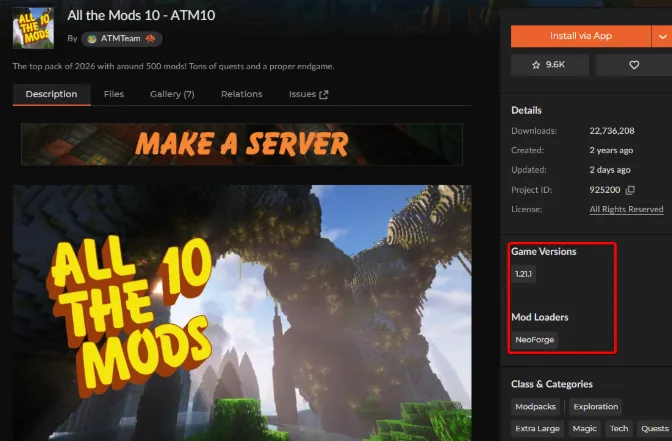
Open the modpack's page on CurseForge or Modrinth. The top of the page shows the two things you need: the Minecraft version and the mod loader. For example, All the Mods 10 needs Minecraft 1.21.1 with NeoForge.
2. Get Java sorted
Find the Java version your Minecraft version needs in the Java table below and install it. Then open a terminal or command prompt and run java -version to check that your system uses that version.
3. Grab the server files
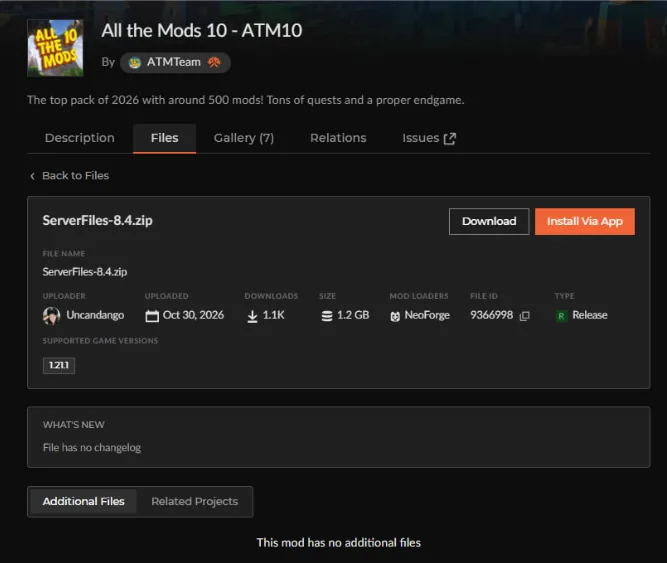
Open the Files tab on your pack's page, download the server pack, and extract it into a new, empty folder. If you are building your own setup instead, put the loader's installer into a new folder. For Forge and NeoForge, run the installer with the --installServer flag. For Fabric, run the Fabric server launcher. For example:
4. Accept the EULA
Run the start script: run.bat on Windows or run.sh on Linux and macOS (in some server packs it is called startserver.bat or startserver.sh). The first run creates eula.txt in the server folder. Open it and change eula=false to eula=true.
5. Allocate some RAM
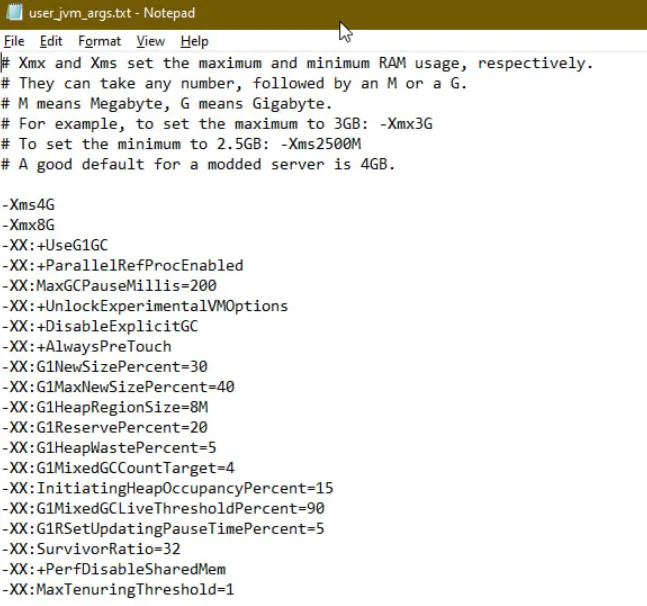
Don't skip this step, or the server will run slowly. On Forge 1.17.1+ and NeoForge, open user_jvm_args.txt and set the memory there. On older Forge and on Fabric, set it in the start command with -Xmx: for 6 GB, use -Xmx6G. To work out how much RAM you need, use our Minecraft RAM calculator.
6. Adjust your mod list
If you are putting together a custom modpack instead of using a ready-made one, place your .jar files directly into the mods/ folder. Remove any client-only mods, such as HUD tweaks or minimaps, because they crash a dedicated server on startup.
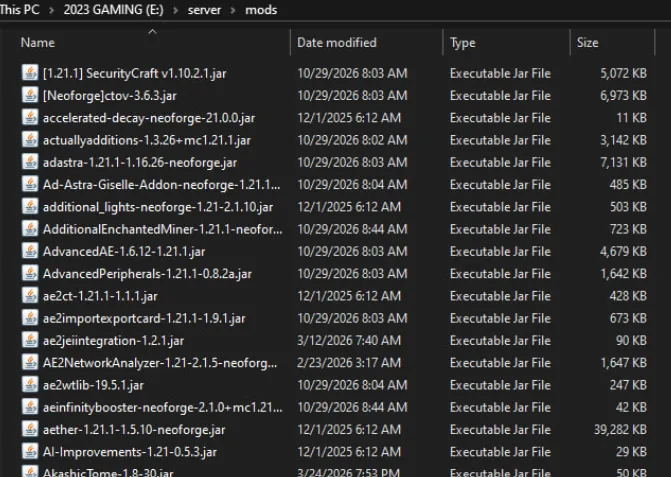
7. Boot it up
Run the start script again and watch the console. The first start of a large pack takes a while. The server is ready when the console shows the line "Done!".
8. Let your friends in
To let other people into your world, open the server port: in your router settings, forward port 25565 to your PC's local IP address. The next section explains how.
A server pack such as the one for All the Mods 10 includes its own start script, which installs the loader for you. After that, every launch works the same way: run the script and wait for "Done!".
How to let friends join a server hosted on your PC
Port forwarding for a modded server means forwarding TCP port 25565 on your router to the local IP address of the PC that runs the server, then allowing that port through the operating system firewall. Your friends connect to your public IP address, not to your local one.
A tunnel service such as playit.gg skips router setup: it routes traffic through an outbound tunnel and works even behind CGNAT. Either way, anyone who finds the address can try to connect, so turn on the whitelist to let in only the players you add.
How to host a modded Minecraft server with one-click modpacks
When you rent a server from a host, it installs the server, mod loader, Java and server pack for you. That cuts the number of steps and keeps the server online 24/7. You only make a few choices: the modpack, the RAM and the location.
1. Select a modpack on the modded Minecraft server hosting page or in the Godlike Panel.
2. Choose the amount of RAM using the table in the next section.
3. Select a server location from the server location list.
4. Complete payment. A 3-day money-back guarantee applies to your first purchase only, no more than once per calendar year. Request it through a support ticket or the official Discord.
5. Share the server IP address with players.
A custom modpack goes onto the server through the file manager or SFTP. The Minecraft Java server hosting page covers the plain Java Edition option.
How much RAM does a modded Minecraft server need?
Light mod packs require 4 to 6 GB of RAM, medium packs 6 to 8 GB, heavy kitchen-sink packs 10 to 12 GB (or even 16 GB for huge packs) or more and 1 GB per 5-10 additional players. RAM for a modded server isn't so much related to the total number of players as it is to the number of mods and the version of Minecraft that is being played.
Modpack requirements, versions as of November 2026:
| Modpack |
Minecraft / loader |
Java |
Recommended server RAM |
Godlike page |
| All the Mods 9 |
1.20.1 / Forge |
Java 17 |
10-12 GB, for 5+ players 14-16 GB |
All the Mods 9 server |
| All the Mods 10 |
1.21.1 / NeoForge |
Java 21 |
12 GB, for 5+ players 14–16 GB |
All the Mods 10 server |
| All the Mods 11 |
26.1.2 / NeoForge (beta) |
Java 25 |
12 GB |
All the Mods 11 server |
| Better MC BMC4 |
1.20.1 / Forge |
Java 17 |
6 GB |
Better MC server |
| Prominence II: Hasturian Era |
1.20.1 / Fabric |
Java 17 |
6 GB |
Prominence II server |
| RLCraft |
1.12.2 / Forge 14.23.5.2860 |
Java 8 |
6 GB |
RLCraft server |
| Cobblemon |
1.21.1 / Fabric or NeoForge |
Java 21 |
6 GB |
Cobblemon server |
| Pixelmon |
1.21.1 / NeoForge 21.1.248 or newer |
Java 21 |
6 GB |
Pixelmon server |
Set server RAM in user_jvm_args.txt on Forge 1.17.1+ and NeoForge, with -Xmx in the start command on Fabric and older Forge, or with the RAM setting in a hosting panel. The Minecraft RAM calculator guide helps you pick the amount. Also watch CPU usage: a CPU bottleneck can look like a memory problem, while running out of RAM completely crashes the server.
Which Java version does a modded server need?
The base Minecraft build – never the modpack itself – dictates your Java requirements. Here is how the version matching breaks down:
| Java Version |
Minecraft / Build Version |
| Java 8 |
Classic versions up to 1.16.5, such as 1.12.2. |
| Java 16 |
Covers the brief 1.17.x era. |
| Java 17 |
Handles 1.18 through 1.20.4. |
| Java 21 |
Takes care of 1.20.5 through 1.21.x. |
| Java 25 |
Runs 26.1 and beyond (as of late 2026). |
If you fire up a world on an older build of Java, your console will immediately jump back at you with an UnsupportedClassVersionError.
How do players join a modded server?
Every player installs the same modpack version as the server through the CurseForge app, Modrinth App, or Prism Launcher, then adds the server by its IP address. With everyone running the same mods, they'll simply enter your public IP address (with the port if not default 25565) and connect!
If a player's local modpack doesn't mirror the server line-for-line, the game will reject their connection instantly. Sweep through your server's mods/ directory before booting to ensure no rogue client-only JARs slipped inside.
What are common modded server problems and how do you fix them?
When a server stalls on boot or blocks incoming players, one of six usual suspects is almost always behind it:
| Problem |
Cause |
Fix |
| Server won't start |
Incorrect Java version |
Update or switch to the required Java version for your Minecraft version. |
| Mod mismatch / player cannot join |
Different modpack version |
Ensure client and server run identical modpack versions and mod lists. |
| Crash on startup |
Client-side mod present on the server |
Remove client-only mods (e.g., visual/sound mods) from the server mods/ folder. |
| Missing dependency |
Missing library (Fabric API, Architectury, etc.) |
Install the required dependency/library mod into the server mods/ folder. |
| Out of memory |
Insufficient RAM |
Allocate more RAM to the server launch arguments (-Xmx). |
| Lag during exploration |
New chunks being generated while players explore |
Pregenerate chunks using a chunk pregeneration mod/plugin before players join. |
Once your pack, Java and RAM match, the setup works the same on any machine. If you'd rather not deal with Java and ports, see the plans on the modded Minecraft server hosting page. Our guide to Fabric, Forge, and NeoForge and the RAM calculator help with the two decisions worth making early: the loader and the amount of RAM. A spark profiler report shows which mod or task causes lag on a modded server.
How to keep a modded server stable
Setting up a modded Minecraft server is only half of the job. You also need to keep it running smoothly. Here are five recommendations:
Back up before updates. Set up backups of the world and config folders before you change anything. (Tools: Simple Backups mod or host panel backups)
Sync server and client updates. Make sure every player runs the same modpack version as the server. This prevents connection and crash errors. (Tools: Prism Launcher or CurseForge app)
Pre-generate the world. Generate chunks in advance to avoid the CPU spikes that happen when players explore new areas. (Tool: Chunky)
Lower distance settings. Reduce view-distance and simulation-distance to cut CPU load and memory use. (Tool: server.properties)
Use proven JVM flags. Choose garbage collection settings that suit your Java version to reduce lag spikes from long GC pauses. (Tool: Aikar's flags)







 en | USD

 CHAT WITH GODLIKE TEAM