TL;DR
To optimize a modded Minecraft server, keep each tick under 50 ms. Profile with spark and lower simulation and view distance. Pre-generate the world with Chunky and add loader-specific performance mods. Add RAM or a faster CPU only when spark shows that this is necessary.

Make your own FREE minecraft server
MINECRAFT FREE SERVER
- Lag in most cases is a CPU bottleneck. Minecraft server lag is caused by the time required to process a tick in most cases. The reason is single-thread CPU performance, not a lack of RAM.
- Measure first. Use a tool such as the spark profiler to identify which mod, entity, or chunk is causing Minecraft server tick lag. Change one parameter, then re-measure.
- Start with cost-free optimizations. If you want to eliminate the primary causes of performance drops for free, reduce the simulation-distance and view-distance in server.properties. Conduct chunk pre-generation via Chunky.
- Mods should match your loader. Install only those mods that are suitable for your Forge, NeoForge, or Fabric mod loader.
- Add RAM if other steps don't help. Increase your Xmx or heap size settings if the profiler or garbage collection logs indicate a memory shortage.
Why modded servers lag (and why RAM usually isn't the fix)
Modded Minecraft servers lag when each tick takes longer than 50 ms. More RAM doesn't make that thread faster. The Minecraft Wiki and the spark documentation state that the main tick loop runs on a single Server thread at a rate of 20 TPS. This gives the processor a 50 ms budget to calculate the state of the entire world. If the average time exceeds 50 ms, the Minecraft TPS drops. This results in issues like block rubber-banding and jerky, stuttering mob movement.
It is important to note that the Minecraft server TPS is unrelated to the in-game randomTickSpeed rule, which only controls the growth rate of plants. Check out our dedicated guide to learn more about how to adjust tick speed in Minecraft.
If you run a resource-heavy modpack, this 50-millisecond budget goes to the four main factors:
- Minecraft entity lag. It occurs mainly when entities and their AI systems calculate pathfinding during every tick.
- Complex farms and automation. Pipes, sorting mechanisms, and machines that constantly poll inventories are among them.
- Chunk loaders that keep players' bases running 24/7.
- Complex modded biomes and dungeons. They can trigger a sudden, sharp lag spike.
If you add more RAM, this will not be able to accelerate CPU-bound calculations. This is not an effective Minecraft server lag fix if the reason is a CPU issue. PaperMC documentation on the JVM states that adding RAM beyond the consumed amount doesn't lower your Minecraft MSPT. You need to adjust memory allocation if you encounter frequent garbage collection (GC) pauses or run out of heap space. Our guide and RAM calculator for Minecraft will help you determine the optimal amount of RAM before you upgrade.
Step 1: Measure before you change anything
To resolve Minecraft server lagging, measure TPS and MSPT with spark first. Then change one setting at a time and measure again. Follow an iterative process if you need to know how to optimize a Minecraft server. Change a single parameter, and then measure again.
Most modpacks for Forge, NeoForge, and Fabric contain the spark mod. If you are running Minecraft 1.20.3+ without it, you can obtain tick-time metrics using the vanilla command /tick query. Use the following spark commands for comprehensive diagnostics:
- Check TPS and CPU load. Run /spark tps and /spark health to estimate average TPS/MSPT values, CPU usage, and memory status.
- Record a tick profile. Execute /spark profiler start --timeout 60 when the server is lagging. You will get a link to a report showing how the tick loop budget was spent.
- Identify intermittent lag spikes. Your server may maintain a decent average TPS but experience periodic lag spikes. In such a case, the spark documentation recommends running /spark tickmonitor. Execute /spark profiler start --only-ticks-over 100 --timeout 180 after that to capture only the slow ticks.
- Distinguish RAM issues from CPU overload. /spark gc and /spark heapsummary commands measure the frequency of garbage collection and heap usage. This helps admins determine whether insufficient memory or CPU overload is the main reason for the lag.
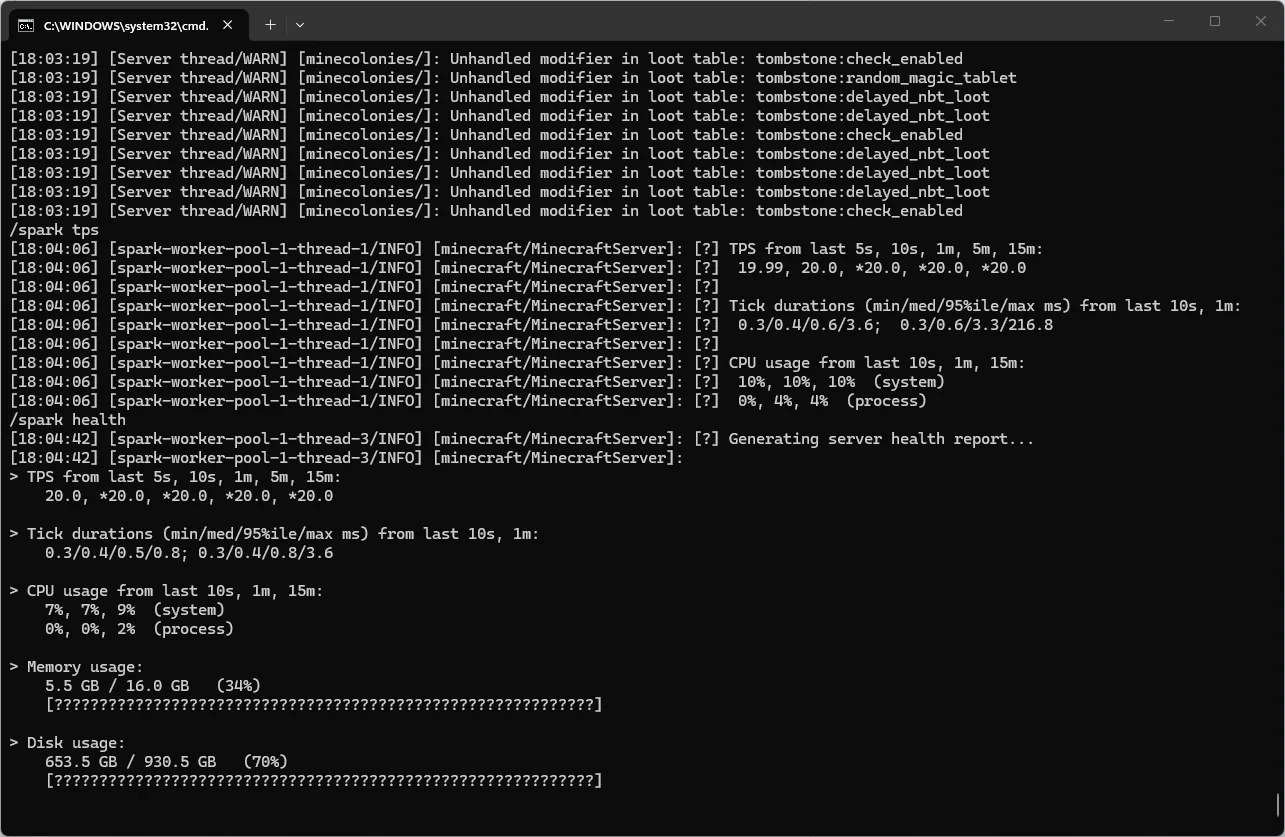
Once you have the link to your profile, consult our step-by-step guide on how to interpret a "spark" profiler report. It covers how to analyze the Server thread call tree and garbage collection statistics.
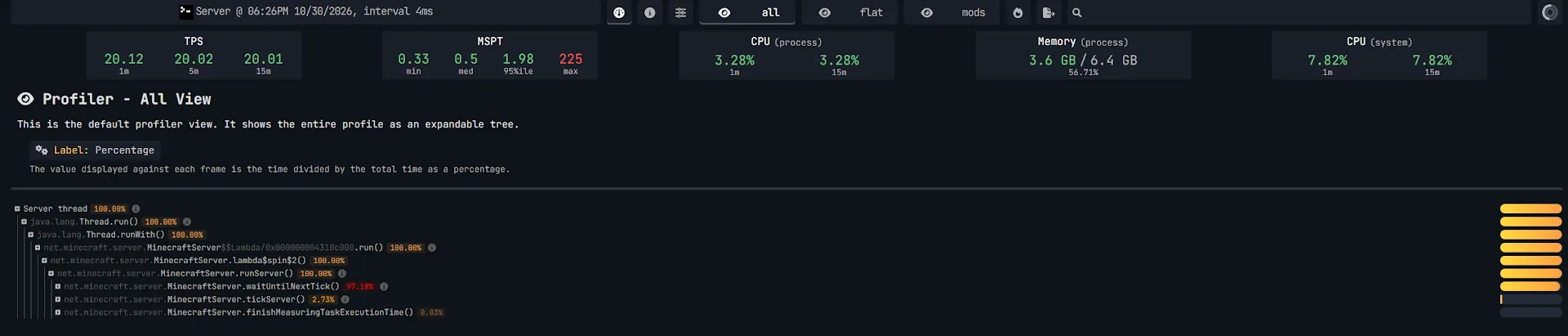
Save the results of /spark health and a 60-second profile when your server pack is running perfectly.
Step 2: Free fixes in server.properties
The cheapest way to make a Minecraft server less laggy is to lower simulation-distance and view-distance in server.properties. Reduce the simulation radius around players. This is the quickest, free way to find a solution to the question of how to reduce lag on Minecraft server without changing your modpack.
- simulation-distance (Default: 10, Range: 3–32) parameter defines the radius around each player. Within this radius, the server actively processes entities, mob AI, plants, liquids, and mechanisms. This area is growing quadratically ((2r+1)²), lowering the simulation-distance from 10 (441 chunks) to 6 or 8 (169 or 289 chunks, respectively). As a result, this significantly reduces the load on the CPU. Adjust this setting and check your server performance with the /spark tps command.
- view-distance (Default: 10, Range: 3–32) determines how many chunks are sent to the client for rendering. Chunks outside the simulation distance do not tick. Still, reading them from the disk and transmitting them over the network consumes system resources. Start with a value of 7–8 for resource-heavy modpacks.
- entity-broadcast-range-percentage (Default: 100, Range: 10–1000) controls the distance of an entity to a player for the server to send it to that player's client. Lower it to 75 or 80 if you want to reduce the overhead associated with tracking mobs.
- sync-chunk-writes (Default: true) controls how chunks are written to the disk. We do not recommend setting this parameter to false. Asynchronous writes increase the risk of world corruption if a server crashes.
- max-tick-time (Default: 60000) controls the server's watchdog timer. If a single tick hangs for 60 seconds, the watchdog will forcibly shut down the server, displaying the error "A single server tick took 60.00 seconds" to protect the world. Don't set max-tick-time to -1 in an attempt to hide lag. If the thread hangs, the server will remain frozen and unresponsive.
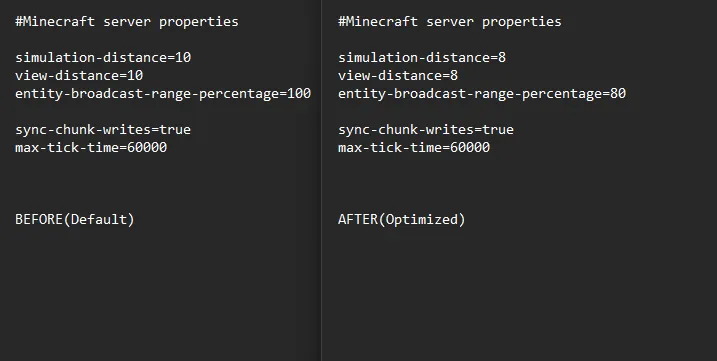
Restart your server after making changes and verify the results using the /spark tps command. If you are hosting with us, check out our guide on how to edit server.properties with Godlike Host.
Step 3: Pre-generate the world
In large modpacks, on-the-fly terrain generation is the primary cause of severe lag spikes. The best way to eliminate these spikes is to pregenerate Minecraft world chunks before allowing other players to join. To quickly pregenerate Minecraft chunks, use the server-side mod Chunky, which is available for Forge, NeoForge, and Fabric.
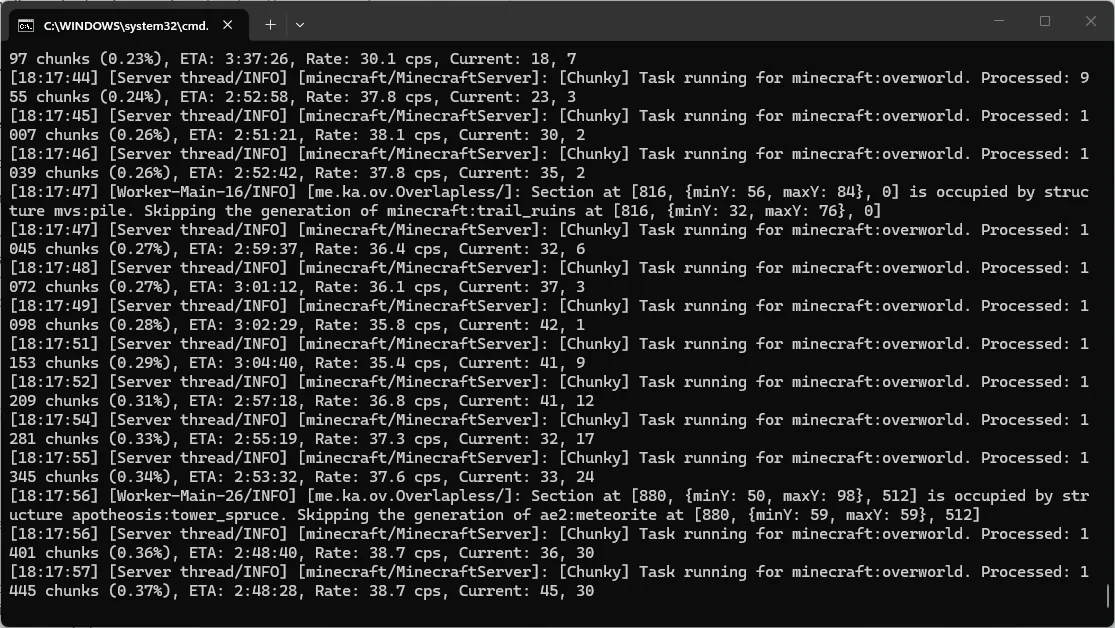
- Set the center point and the radius in blocks and initiate the process by following the official Chunky wiki.
- Set a world border with the same radius. Use the vanilla command /worldborder set 10000. Alternatively, use the Chunky border module. Thanks to this, you will not go beyond the pre-generated area.
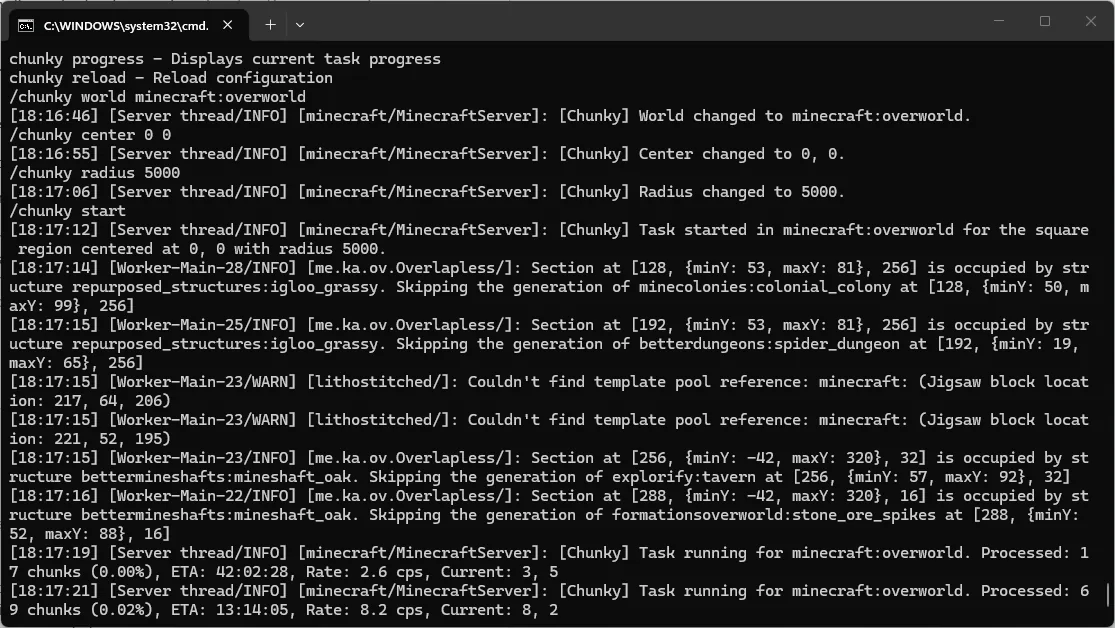
Chunk pre-generation places a heavy load on the CPU and takes time. It should be performed on an empty server. Make sure you have sufficient free space on your NVMe drive, as pre-generated modded worlds can quickly consume a great amount of storage. Complete the chunk pre-generation process. Then use the /spark tickmonitor command to verify the results while flying. All lag spikes caused by terrain generation will disappear.
Step 4: Entities, farms and chunk loaders
Minecraft entity lag can emerge even on a pre-generated server because of other players' activities. Check the report generated by the /spark profiler command. Find entries related to entities, mob AI, or block entities at the top of the Server thread profile.
- Important indicators in a Spark profile: Large clusters of mobs within a single chunk and numerous dropped items on the ground. This problem arises with overflowing farms, looped pipes, or complex automation systems.
- Administrative policies for players: To optimize Minecraft server for the long term, limit the number of active chunk loaders per player or team. Prohibit leaving them active while players are offline. Require the installation of shut-off switches or void upgrades to clear out excess dropped items at all farms.
Install server-side performance mods that match your loader: FerriteCore and ModernFix for memory, and Lithium plus either Moonrise or C2ME for ticks and chunks. When you choose Minecraft optimization mods for your server, select Minecraft server side mods compatible with your specific mod loader. If you are still in the process of choosing a platform, take a look at our comparison of Fabric, Forge, and NeoForge.
Before downloading NeoForge performance mods, or mods for Fabric / Forge, check the mods/ folder in your server pack. They may already be included in the modpack. If a mod is missing, first create a backup by following our guide on how to back up a Minecraft server. Then, add the Minecraft server optimization mods one by one, following their respective installation instructions. Throughout this process, remember to monitor performance using the /spark tps command.
| Mod |
Focus of server-side optimization |
Supported loaders |
Required / not required for the client side |
| FerriteCore |
Deduplicates model data and block states, thus reducing RAM usage. |
Forge, NeoForge, Fabric |
This mod is not needed on the client. It works server-side only, though installing it on the client is beneficial. |
| ModernFix |
This mod speeds up startup, reduces memory consumption, and addresses issues in vanilla code and the mod loader. |
Forge, NeoForge, Fabric |
This depends on the mod's features. By default, this mod runs only on the server. |
| Lithium |
Lithium is used for general server-side optimization. It improves physics, mob AI, and block/chunk tick processing. This mod doesn't change vanilla mechanics. |
NeoForge, Fabric |
This is a server-side mod. |
| Moonrise |
Moonrise is needed for the chunk pipeline, entity collisions, and tracking. |
NeoForge, Fabric |
This mod is used mainly for the server. |
| C2ME (NeoForge version) |
C2ME is used for chunk generation, loading, and disk I/O across multiple CPU cores. |
NeoForge, Fabric |
This is a server-side mod. |
Check the Minecraft version on Modrinth. This is especially important given the shift in version numbering from 1.21.x to 26.x.
What to avoid:
- Do not use mods that can conflict. Moonrise and C2ME are incompatible, since both rewrite the chunk system. Moonrise is compatible with Lithium and FerriteCore.
- Do not use Starlight. The popular Starlight mod has not been updated since version 1.20.4. According to its creator, Spottedleaf, the vanilla lighting engine was rewritten starting with Minecraft 1.20. That makes Starlight unnecessary for newer versions.
- Do not install FPS mods such as Sodium / Embeddium (client-side only). Mods like Sodium or Embeddium only accelerate client-side graphics rendering. They are useless on a server and may even cause crashes.
Step 6: Java version and JVM flags
Using the wrong version of Java will prevent your server from starting. Poorly configured Minecraft server JVM arguments can cause freezes during garbage collection.
- Check the Java version. Minecraft 1.20.5–1.21.x requires Java 21; 26.1 and later require Java 25; 1.17–1.20.4 use Java 17. For earlier editions, verify the version on the modpack's page. Follow our guide on how to change the Java version via the Godlike Host panel if you want to switch versions.
- Use JVM flags such as Aikar's flags / Minecraft JVM flags. If you need reliable Minecraft JVM arguments and Minecraft server flags, use the standard Aikar flags found in the PaperMC documentation. These JVM flags configure the G1GC garbage collector to perform frequent, rapid cleanups of the "young" memory generation. They allow avoiding long "stop-the-world" pauses in the main thread. Don’t allocate 100% of your plan's total memory to the -Xmx (maximum heap size) flag. Always leave a buffer of 1000–1500 MB for the operating system and the JVM's non-heap memory requirements.
- Do not allocate too much memory. PaperMC documentation mentions that raising the heap beyond the necessary amount does not improve server performance. G1GC will move excess memory into the "old generation". This will not cause immediate harm. However, too much memory can be detrimental for certain mods. The official performance guide for Pixelmon servers warns that excessive RAM can negatively impact garbage collection. The developers recommend admins allocate no more than 16 GB of RAM to a Pixelmon server.
Step 7: When it really is the hardware
If MSPT stays above 50 ms after every step to reduce Minecraft server lag, the server has hit its hardware limits, usually single-thread CPU speed.
- CPU performance: As explained in The Tick Loop guide, the main server tick loop runs on a single thread. That is why single-thread CPU performance is very important for maintaining a steady 20 TPS. Additional CPU cores are useful for handling parallel tasks, such as those performed by Chunky, C2ME, or G1GC. However, the speed of a single core is the bottleneck for the tick process.
- Fast storage (NVMe): NVMe SSDs provide high read/write speeds, which are required for loading world regions and saving the world.
- RAM: If, after installing FerriteCore and ModernFix, reports from /spark health or /spark heapsummary indicate that your heap is consistently near capacity, increase your Xmx. You can use our Minecraft server RAM calculator to determine the appropriate amount of memory.
A real example: ATM10 on 8 GB
In our ATM10 test with 2 players, the Minecraft server optimization cycle raised TPS from 11.40 to 20.00 during chunk loading and cut RAM use from 10.89 GB to 6.32 GB. We conducted a test using an AMD Ryzen 9 9950X3D processor and the spark tool for measurements. The stock ATM10 server pack consumed 10.89 GB of RAM and showed 391.93% CPU usage. During active chunk loading, the stock pack dropped to 11.40 TPS at 45.54 MSPT; the optimized pack held 20.00 TPS at 7.34 MSPT.
After targeted fine-tuning, memory usage dropped to 6.32 GB. The average CPU load fell to 135.25% CPU usage and maintained a stable 20 TPS. The developers recommend 12 GB+. See our ATM10 modpack page. In this test with 2 players, the optimized setup made 8 GB sufficient for the start. Larger groups need more memory.
Running a modded server on Godlike Host
Godlike Host installs popular modpacks in one click and preconfigures the JVM and RAM profile. Godlike Host provides the following for modded servers:
- One-click modpack installation with CurseForge, FTB, Technic, and ATLauncher. You can deploy any server pack from the control panel.
- Advanced hardware. Our servers run on high-performance processors with fast NVMe drives. They have pre-configured JVM flags and RAM settings. The nodes are powered by AMD Ryzen 9 9950X3D processors. Check availability of these processors for your locality when placing an order.
- Useful tools. The platform provides a RAM calculator and automated backups. They allow users to test Minecraft server optimization mods.
- 24/7 support. Our technical support team helps with RAM allocation and crash log analysis 24/7.
For current plans and pricing, visit the Modded Minecraft Server Hosting page.
Troubleshooting by symptom
Look for the error text in the console when Minecraft server lag appears or the server crashes. It indicates the next steps to take:
| Symptom/console messages |
The probable cause |
Minecraft server lag fix |
Section in the article |
Can't keep up! Is the server overloaded? Running Xms or Y ticks behind
Minecraft server can't keep up ("Can't keep up! Is the server overloaded?") |
The average MSPT has exceeded the 50ms budget. The Server thread is unable to keep up with processing entities, automation, or chunks. |
Run /spark tps and record a profile using /spark profiler (--timeout 60). This will help to identify the source of the CPU load. |
Measure; server.properties; Entities |
| Sudden lag spikes and rubber-banding. They happen when players are flying with Elytra or traveling by boat |
The CPU and disk can be overloaded by on-the-fly generation of new modded biomes and structures. |
Set a world border and pre-generate chunks with the Chunky mod. Reduce the view-distance. |
server.properties; Pre-generate |
| Despite a normal average TPS, 1–3 second freezes occur every few minutes. |
Long garbage collection (G1GC) pauses can be caused by suboptimal Minecraft JVM arguments or insufficient heap memory. |
Check /spark gc. Configure Aikar's flags. Install FerriteCore or ModernFix mods. |
Measure; Performance mods; JVM flags |
| Watchdog timer crash: A single server tick took 60.00 seconds (should be max 0.05) |
A server tick stalled for more than 60 seconds. This can be because of a broken mechanic, an explosion, or a deadlock caused by a mod. |
Check the crash report and the Server thread stack trace. Don't disable the watchdog (-1). |
server.properties; Entities |
| Crash with java.lang.OutOfMemoryError: Java heap space |
The modpack has exhausted the heap memory allocated through the Xmx parameter. |
Install FerriteCore and ModernFix. Check /spark heapsummary and increase the allocated RAM if necessary. |
Performance mods; JVM flags; Hardware |
| The server cannot start after changing the Java version or adding a new mod (UnsupportedClassVersionError) |
Incorrect Java version. For example, Java 17 might be installed instead of the required Java 21 for 1.20.5–1.21.x or Java 25 for 26.1+. Alternatively, a client-side or conflicting mod may have been added (e.g., Sodium, or Moonrise + C2ME together). |
Look at the Java version. Remove the conflicting mod. If this doesn't help, restore the server from a backup. |
Performance mods; Java |







 en | USD

 CHAT WITH GODLIKE TEAM