A Minecraft UUID is a unique identifier assigned to your Minecraft Java Edition account. It helps Minecraft servers associate players with their inventories, statistics, ban records, and permissions.

Make your own FREE minecraft server
MINECRAFT FREE SERVER
In this short guide, you’ll find out how this feature works and where you can find your UUID. It’ll also help you better understand why changing your username is not enough to change your “identity” on multiplayer servers.
What Is a Minecraft UUID?
A UUID (Universally Unique Identifier) identifies a Minecraft Java Edition account. This is a 128-bit identifier typically represented as 32 hexadecimal characters, separated into five groups by hyphens. In its standard format, it looks like the example shown below:
069a79f4-44e9-4726-a5be-fca90e38aaf5
In some cases, you can also find a Minecraft player UUID without hyphens. The undashed format may be more convenient for certain JSON files, APIs, and database operations.
Minecraft UUID vs Username
To help you understand how a Universally Unique Identifier works, let’s compare a Minecraft username to a UUID. The table below highlights the key differences between these two terms:
| Key Differences |
Minecraft UUID |
Username |
| Permanence |
Permanent |
May be changed |
| Format |
A string of numbers and letters with hyphens |
A plain text name |
| Server Usage |
Used by Minecraft servers to track player data, inventory files, whitelists, and permissions |
Used mostly for chatting, display in the player list, and easy recognition by other players on a server |
You can change your username whenever you want, but your account will still have the same UUID. Because of this, Minecraft servers can easily recognize your account.
How to Find a Minecraft Player UUID
Although there is no reason for an average player to know their Universally Unique Identifier, if you want to understand how servers work, you should learn how to find a Minecraft UUID. All in all, there are two straightforward ways.
Minecraft UUID lookup
One of the easiest ways to check your Universally Unique Identifier is to use a special Minecraft UUID finder, such as a Minecraft UUID & User Name Converter. This platform converts a Minecraft username to a UUID or vice versa.
Mojang API
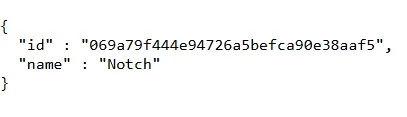
You can use the Mojang API to get access to public endpoints necessary to perform a Minecraft UUID search. Replace <username> in the following URL with the player's Minecraft Java Edition username:
https://api.mojang.com/users/profiles/minecraft/<username>
The API response will include the player's UUID and username:
How to Find a UUID on Your Minecraft Server
Read this part of your player UUID Minecraft guide to find out more about searching for Universally Unique Identifiers when you run your own Minecraft server. This information will be useful if you want to achieve better whitelist and ban management.
You can check your Minecraft server UUID information by opening the usercache.json file. It’s located in the root directory of your server folder:
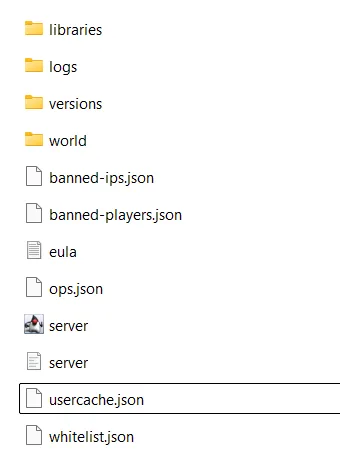
Each entry contains the following fields:
- name: Contains the player’s username.
- uuid: Contains the player’s universally unique identifier string.
- expiresOn: Contains the date when the cached entry expires.
You can also find Minecraft player data UUIDs in other server files, such as whitelist.json, banned-players.json, and ops.json.
Minecraft UUID Dashed vs Undashed
The key difference between a dashed UUID and an undashed UUID is formatting and where the data is used within Minecraft’s ecosystem. Here is a clear comparison of two formats:
| Feature |
Dashed UUID |
Undashed UUID |
| Format Name |
Hyphenated |
Compact |
| Example |
afe461e1-e125-4078-a28d-6e84be621db7 |
afe461e1e1254078a28d6e84be621db7 |
| Total Characters |
36 characters (32 hex + 4 hyphens) |
32 characters |
| Readability |
High |
Low |
| Primary Use Cases |
In-game commands, target selectors, scoreboard tags, server logs, and JSON text components. |
Mojang/Microsoft API responses, database storage, and external web tools. |
UUID and Player Data Files
In Minecraft Java Edition, each player has an assigned NBT data file. It stores information about:
- Inventory contents
- Ender Chest items
- Experience levels
- X/Y/Z coordinates
- Health
- Potion effects
- Advancement progress
Each NBT file is named after a Minecraft Java UUID and looks like <uuid>.dat. This data is stored in the world/playerdata along with backups (<uuid>.dat_old). The UUID identifies which .dat file belongs to a particular player.
Where Minecraft Servers Use UUIDs
Minecraft UUIDs are essential for an excellent multiplayer experience. The table below explains how servers use UUIDs:
| Use Case |
Why UUID Matters |
| Playerdata |
Identifies a player and saves their data. |
| Whitelist |
Links server entry to a particular player identity. Note that this file stores both the player’s UUID and username. |
| Bans |
Ensures that a player won’t be able to enter the server by just changing their username. |
| Ops |
Links server operator permission to a particular player. |
| Permissions and plugins |
Helps to store player-specific data. |
What Happens If a Player Changes Their Username?
If you play on official servers, changing your username won’t affect your items and status. Minecraft servers use UUIDs to associate player data with the correct account, so if you reenter a server with a new nickname, nothing will change at all, except that it may be difficult for other players to identify you.
Minecraft Online-Mode vs Offline-Mode UUID
In Minecraft Java Edition, choosing between online-mode and offline-mode affects how your server verifies player identities and generates UUIDs. Let's briefly examine the key differences:
| Feature |
Online-Mode |
Offline-Mode |
| Account Check |
Verified by Mojang |
No verification |
| UUID Source |
Mojang database |
Generated via username’s hash |
| Name Impersonation |
Impossible |
Possible |
| Plugin Compatibility |
Compatible with all plugins |
May break plugins that require official Mojang UUIDs |
| Switching Online and Offline Modes |
Keep consistent UUIDs |
Switching a server between online and offline modes can change the UUIDs associated with players |
Minecraft Java Edition servers running in offline mode generate UUIDs locally using a name-based algorithm derived from the player's username. These UUIDs differ from the UUIDs assigned through authenticated online-mode sessions and may not match the player's official account UUID.
Without third-party plugins like AuthMe, anyone can join such servers under different usernames, and the system will consider them as new players. In offline mode, someone may be able to impersonate another player by using the same username, potentially gaining access to that player's stored data or permissions.
Common Minecraft UUID Problems
Even if you understand UUIDs, you may encounter problems when looking up player identifiers on your server. We’ve prepared a list of the most common mistakes to avoid when exploring this data:
- Entering the wrong username when using Minecraft UUID Lookups or the Mojang API.
- Searching for a Java player’s UUID but entering their Bedrock account username.
- Using dashed UUIDs in plugins that require an undashed format.
- Setting online-mode=false in the server configuration.
- Running BungeeCord or Velocity without proper IP forwarding that assigns offline UUIDs to several users.








 en | USD
 CHAT WITH GODLIKE TEAM