OMG! Insane Sale!
Godlike

RLCraft

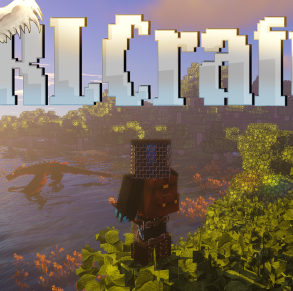
RLCraft is a hardcore survival RPG where the world fights back. Survive thirst and temperature, level up to use gear, and explore deadly ruins, dungeons, and dragons.

Version:
1.12.2
Categories:
Forge
View Installation Guide

Requirements

6 GB
Recommended RAM
1.12.2
Minecraft version
Forge
Modloader
8
Java version

Modpack Overview

RLCraft is a hardcore survival and RPG modpack for Minecraft 1.12.2 on Forge. It turns vanilla Minecraft into a punishing survival sim with thirst and temperature, no easy healing, skill-gated progression, and dangerous world generation packed with ruins, structures, and dungeons.

Quick facts

  • Minecraft: 1.12.2
  • Mod loader: Forge
  • Focus: Hardcore • Adventure RPG • Exploration • Combat
  • Latest release: v2.9.3 (Jun 27, 2023)

What gameplay feels like

  • Survival pressure: thirst + temperature mechanics change how you explore and where you settle.
  • Slower early game: realistic progression (for example, flint-level tools before iron) and skill locks for gear and abilities.
  • Danger-first exploration: randomized ruins, structures, and dungeons that punish rushing in unprepared.
  • Big hostile roster: powerful mobs including Lycanites, Ice and Fire dragons, and other brutal encounters.

Official trailer

'; ';

How to Create RLCraft Minecraft Server?

Step 1

Choose Modpack

Choose from our curated modpacks - tech, magic, or both. Each pack comes preconfigured with the most popular mods, so you can skip the setup and jump straight into gameplay.
Step 2

Deploy Server

Launch your server with one click on our high-performance infrastructure. We handle CPU, RAM, and storage setup, so your world is ready in under a minute — no manual steps needed.
Step 3

Customize Settings

Adjust RAM, mod settings, difficulty, and permissions—our intuitive panel lets you fine-tune your server to fit your community.
Step 4

Invite Friends

Share your unique server address or send instant invites via email and Discord. Control access with VIP roles, mod rights, or keep it private — only the players you choose can join.
Step 5

Enjoy Play

Jump into your custom world with zero lag and automatic backups. With 99.9% uptime, you’re free to build, quest, and battle without interruptions.

FAQ

  • Which Minecraft version and mod loader does RLCraft use?

    RLCraft runs on Minecraft 1.12.2 and requires the Forge mod loader.

  • Which Java version is recommended for RLCraft?

    Which Java version is recommended for RLCraft?

  • How much RAM should I allocate for RLCraft?

    A practical baseline is 4 to 6 GB for clients and 6 to 8 GB for servers, then scale with player count and view distance.

  • Which Forge version should I use?

    The modpack author recommends using Forge 1.12.2 version 2860 or higher for security reasons.

  • Do I need to enable command blocks on the server?

    Yes. Set enable-command-block=true in server.properties or certain structures may not generate correctly.

  • Do players need to install the same pack to join?

    Yes. Every player must run the same RLCraft modpack version as the server to avoid mismatched mods and login errors.

  • Are there quests in RLCraft?

    Yes, but they are optional. The pack includes 340 plus optional quests, while the main focus is still hardcore survival and progression.

  • Can I add extra mods to RLCraft?

    Only if you know the interactions. The author warns that some mods are not compatible, and adding mods can break progression or cause crashes.

  • Does RLCraft work with shaders or OptiFine?

    Shaders can work but usually reduce performance. If you use OptiFine on RLCraft v2.9, the author notes you should use the latest OptiFine G5 for 1.12.2 and not E3 because it can crash.

  • Why does RLCraft feel so hard compared to normal Minecraft?

    It adds thirst and temperature, removes healing from food, gates items and abilities behind skills, and fills the world with dangerous structures, dungeons, and powerful mobs.

×

Report a bug

Error text

Your choice