







 en | USD

 CHAT WITH GODLIKE TEAM





How to setup your Unturned server
Unturned Server Hosting is a type of online gaming service that allows users to host their Unturned servers.
Adding token to server
What is token?
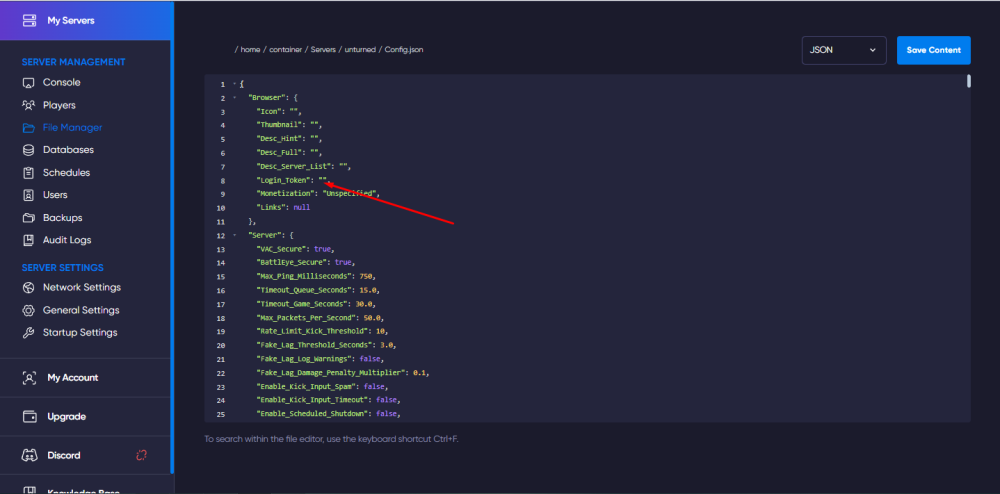
- We go to the link
- We enter Steam if you are not authorized and create a token with ID
304930 - Copy this token token and add it to the Servers/unturned/Config.json file on the server In the Login_token parameter between quotes as shown below

Server wipe
First you need to turn off the server in panel

Then we go to the "File manager", select and delete all the folders we need, they are located under the path Servers/unturned/Players and Servers/unturned/Level


Installing Rocket
By default, your server already has Rocket mod, but not all players need it, so you need to "Disable" it by adding it to the mods folder:
Go to the panel and choose a server.
We need to go to the File Manager, go to the Modules folder and delete Rocket. Unturned if it's there

Next, go to the Extras folder and move Rocket.Unturned to the Modules/Rocket.Unturned folder

NOTE
Note the folder path, it should be ../Modules/Rocket.Unturned

TIP
Remember that after installing modules and other things, you need to reboot the server
Issue of the admin account, server owner
You can give yourself an admin account using the admin command in the server console

NOTE
You can also issue an admin account using SteamID with the same command admin [SteamID]
To issue the owner of the server, you need to specify the command owner [SteamID] in the Commands.dat file

How to enable cheats
Go to File Manager and select file Servers/unturned/Server/Commands.dat
Then insert command Cheats Enabled

NOTE
Remember that after installing modules and other things, you need to reboot the server


