Important Note: Godlike.host is our own service. This ranking is editorial (not paid placement) and follows the scoring criteria shown below. Always verify current plan limits, pricing, and regions on each provider’s website before purchasing.
Best overall: Godlike.host (Server with pre-installed modpack + modern panel with one click intall modpacks) Best for big modpacks: BisectHosting (deep modpack support + strong tickets)
Best for beginners: Apex Hosting (guided setup + backups + lots of locations)
Best “hands-on help”: Akliz (migration-friendly support and long-running stability)
Best budget value: PebbleHost or Sparked Host (strong pricing, pick enough RAM)
Best panel UX: Nodecraft (clean management and swap-friendly workflow)
Choose Minecraft Hosting in 2026
If you’re searching for the Best Minecraft server hosting in 2026 whether for vanilla or SMP, heavy Forge/Fabric modpacks like RLCraft or ATM10, or esports-style mini‑games this guide walks through the top options, how we evaluated them, and why Godlike.host takes the #1 spot for most players and communities. If you’re comparing Minecraft server hosting for friends or communities, this guide covers the top providers for Minecraft servers across regions and budgets.
Advantages of using Minecraft hosting
You’ll see who offers instant setup in just a few clicks, a modern game panel, automated backups, DDoS protection, and low latency servers worldwide. Whether you want to create an own Minecraft server for other players or launch a managed community with heavy modpacks, the picks below are ready to go.
At‑a‑Glance Comparison (editorial scores)
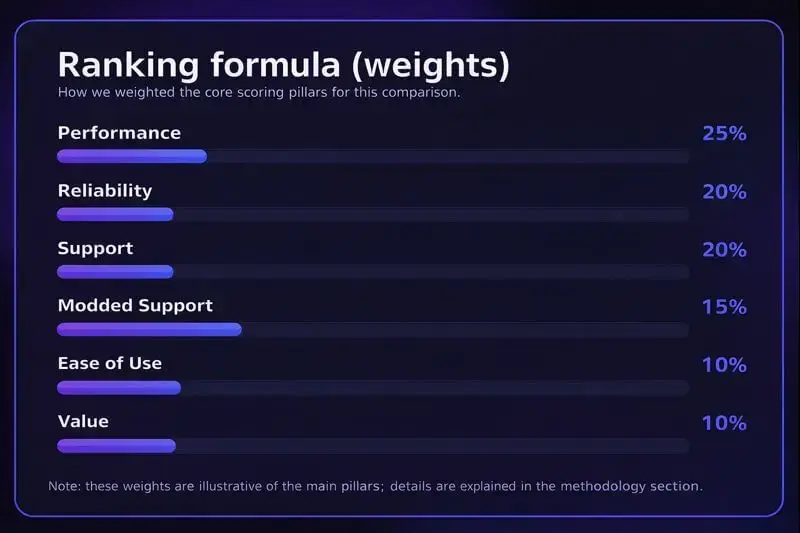
To rank the best Minecraft server hosts, we used a weighted scoring model: Performance (25%), Reliability/Uptime (20%), Support (20%), Modded Support (15%), Ease of Use (10%), and Value (10%)
Rank
Host
Best for
Performance
Reliability
Support
Modded Support
Ease of Use
Value
Overall*
1
Godlike.host
Performance-first, fast setup, modern UX
★★★★★
★★★★★
★★★★★
★★★★★
★★★★☆
★★★★☆
4.9
2
BisectHosting
Big modpacks + responsive support
★★★★☆
★★★★★
★★★★★
★★★★★
★★★★☆
★★★★☆
4.7
3
Apex Hosting
Beginners who want hand‑holding + daily backups
★★★★★
★★★★★
★★★★★
★★★★☆
★★★★★
★★★★☆
4.7
4
Akliz
White‑glove help & stable long‑term worlds
★★★★☆
★★★★★
★★★★★
★★★★★
★★★★☆
★★★★☆
4.7
5
Nodecraft
Clean panel & swap‑friendly management
★★★★☆
★★★★☆
★★★★★
★★★★☆
★★★★★
★★★★☆
4.6
6
Host Havoc
Low‑friction setup, solid reliability
★★★★☆
★★★★☆
★★★★★
★★★★☆
★★★★☆
★★★★☆
4.5
7
ScalaCube
Budget starts & 1‑click pack coverage
★★★★☆
★★★★☆
★★★★☆
★★★★★
★★★★☆
★★★★★
4.5
8
PebbleHost
Tight budgets, light‑to‑mid modding
★★★★☆
★★★★☆
★★★★☆
★★★★☆
★★★★☆
★★★★★
4.4
9
Sparked Host
Aggressive pricing, fast ticket replies
★★★★☆
★★★★☆
★★★★☆
★★★★☆
★★★★☆
★★★★★
4.4
10
Shockbyte
Cheap entry + wide plan ladder
★★★★☆
★★★★☆
★★★☆☆
★★★★☆
★★★★☆
★★★★★
4.2
11
GGServers
Starter SMPs with chat‑first support
★★★★☆
★★★★☆
★★★★☆
★★★★☆
★★★★☆
★★★★☆
4.2
12
ServerMiner
SMpicnic panel & casual SMPs
★★★★☆
★★★★☆
★★★★☆
★★★★☆
★★★★☆
★★★★☆
4.1
Our methodology (what we measured and why it matters)
We combined three inputs:
Independent testing signals from reputable reviewers and recent roundups to cross-check uptime, deployment speed, and plan breadth.
Customer feedback at scale (Trustpilot, HostAdvice, and similar), focusing on support response quality, panel usability, and real-world stability.
Hands-on panel checks to validate what admins actually do day to day.
Hands-on panel checks included
Creating a server, selecting region, and switching versions (Vanilla/Paper and common mod loaders where available).
Installing a modpack (1-click installer) or uploading files via SFTP, then verifying the server boots cleanly.
Accessing console/logs, restarting/stopping, and confirming basic config controls are easy to find.
Checking backup tools (scheduling and restore flow) and basic safety features (permissions/roles where available).
How we treated performance:
Minecraft is often limited by single-thread CPU performance, plus RAM headroom for modpacks and busy worlds. We therefore prioritized high-IPC CPUs, fast storage (NVMe), and consistent stability under load over cheapest possible pricing.
Important Note: providers change hardware, panels, and plan limits frequently. Always confirm the latest plan specs and feature availability on the provider’s website.
The 12 Best Minecraft server hosting providers (2026)
1) Godlike.host — Best overall Minecraft hosting for 2026
TL;DR:
Best overall if you want a fast Install, intuitive panel, and performance-focused with AMD Ryzen 9 9950x3d hosting for both vanilla and modded Minecraft servers.
Godlike.host runs its own high-clock AMD Ryzen/EPYC bare-metal fleet with NVMe storage and Path.net L3–L7 DDoS filtering, paired with a clean panel, one-click installs and automatic backups. Global locations in North America, Europe, Asia and Australia plus engineer-level support make it a reliable choice for modded and vanilla Minecraft in 2026.
Godlike Hosting is recognized as one of the top Minecraft hosting providers in 2026, trusted by players worldwide for its performance and reliability. With cutting-edge infrastructure, we deliver fast, stable, and lag-free servers alongside an intuitive control panel that makes managing your world simple.
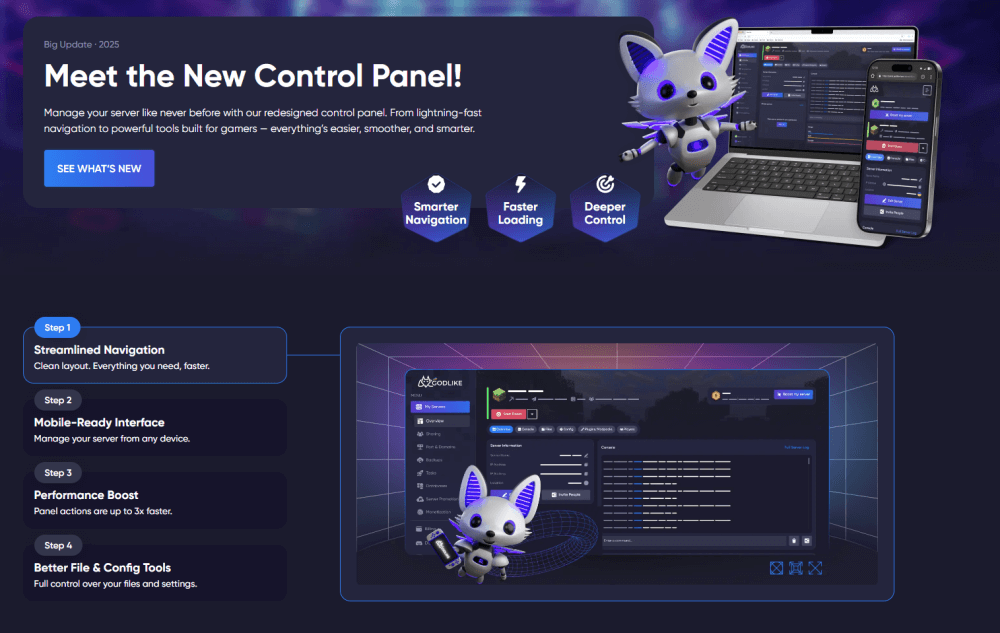
Whether you’re just starting a small server with friends or building a large community, Godlike Hosting offers flexible and affordable plans to fit your needs. Plus, our expert support team is available 24/7/365 to ensure you always get the best possible Minecraft experience. Here's our brand New Control Panel, which includes new useful functions:
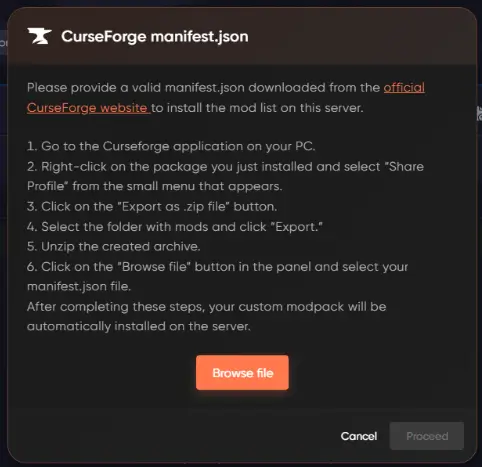
Custom Modpack Upload (CurseForge Support) :
This feature allows users to upload and install custom CurseForge modpacks on the server by itself, without assistance from support. By uploading a valid manifest.json file directly through the New Control Panel, the system automatically installs all required mods and dependencies. This significantly simplifies modpack deployment and reduces manual configuration errors.
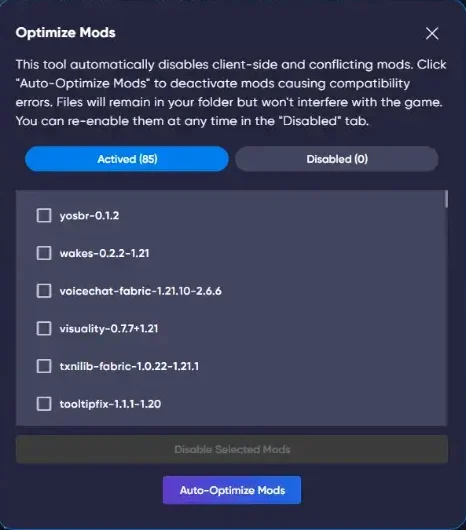
Mod Optimization & Mod Management :
This feature allows users to by itself detect and disable client-side and conflicting mods directly from the New Control Panel, without contacting support. The system automatically identifies incompatible mods and can disable them in one click using Auto-Optimize Mods. Disabled mods remain in the folder and can be re-enabled at any time, helping to quickly resolve crashes and compatibility issues.
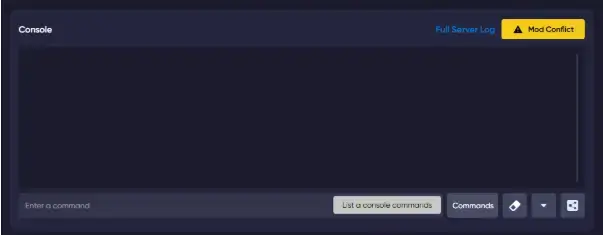
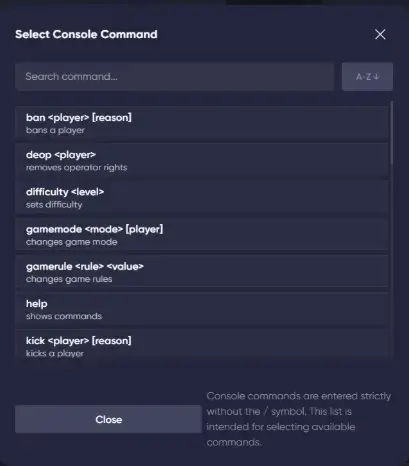
Built-in Console Command Selector :
This feature allows users to execute server commands through a built-in command selector without manually typing them or remembering syntax. Available commands are displayed in a searchable list with short descriptions, reducing errors and speeding up server management. Commands can be selected and executed directly from the console, without support assistance.
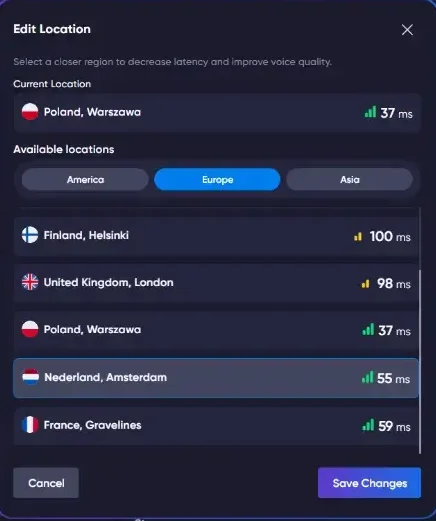
Server Location Transfer :
This feature allows users to change the server location by itself, directly from the New Control Panel, without contacting support. Users can select a preferred region based on latency and apply the change in a few clicks. This helps reduce ping and improve overall connection quality with no manual setup required.
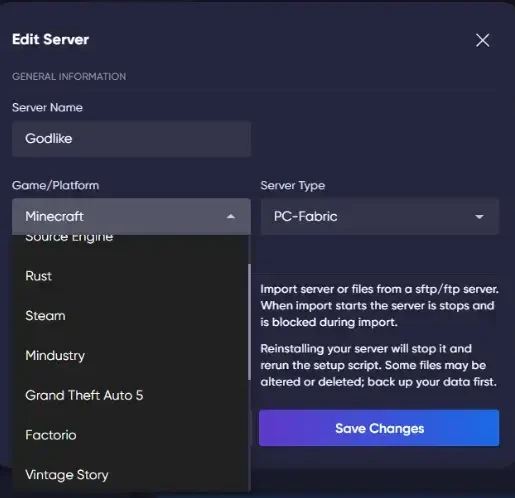
Game Switching via Control Panel :
This feature allows users to change the game or platform of their server directly from the Edit Server section, without contacting support. Users can switch to another supported game or engine in a few clicks if the current game is no longer needed. The panel automatically handles the reinstallation process, making game changes simple and fully self-managed.
Why it ranks #1
Performance-first stack: owned bare-metal servers on latest AMD Ryzen 9950X3D and EPYC nodes, tuned for high TPS and low latency, NVMe by default.
Network & security: multi-layer Path.net mitigation with L3–L7 filtering against volumetric and application-level attacks.
Admin quality of life: one-click installs, SFTP access and automatic backups built into the panel.
Global coverage: US East/West, Canada, UK & EU, Asia (incl. Singapore), Australia.
Fast human support: public support page shows live-chat replies, ~2-minutes ticket first reply and constant queue checks.
What people say
“Absolutely incredible experience… The console is extremely easy to manage and add mods. Hostadvice
Best for: performance‑minded players, creators running Forge/Fabric packs, and admins who value a clean panel and balanced price‑to‑power.
Control panel, mods & backups
Clean panel with one-click installs for popular mod loaders/modpacks, SFTP file access and automatic backups for safe rollbacks.
Hardware & Network
Bare-metal servers only: high-clock AMD Ryzen 9950X3D for game nodes; latest AMD EPYC for virtualization/auxiliary roles; NVMe storage as standard.
Network hardening: enterprise DDoS protection via Path.net with L3–L7 filtering and real-time scrubbing.
Owned infrastructure: Godlike operates and maintains its own hardware in key regions (not a simple reseller setup).
Strengths for SEO‑seekers / admins
Fast deployment, modpack installer, DDoS protection, automatic backups, scalable RAM/CPU, 24/7 support (per provider materials/HostAdvice profile). HostAdvice
Transparent, gamer‑centric UX that doesn’t get in the way of building.
Considerations: Always check the live product page for the latest plan limits, backup cadence, and regional availability (features evolve frequently across hosts).
2) BisectHosting — Superb modpack depth and support quality
TL;DR:
Best for heavy modpacks and plugin-heavy servers when you want support that can actually help with setup, tuning, and rollbacks
If you’re searching for the Best Minecraft server hosting in 2026 whether for vanilla SMP, heavy
What people say
“Great customer support… helped me for over an hour to fix my server. Trustpilot
BisectHosting remains a staple for Minecraft servers that run heavy modpacks or lots of plugins. The panel makes it simple to configure pack versions, customize settings, and roll changes back if needed. If you like to tweak files directly, SFTP access and an organized file tree keep “under‑the‑hood” work tidy.
You also get the essentials for long‑term worlds automated backups, network‑level DDoS protection, and a clear upgrade path when your community grows. Their support team is known for practical answers to support tickets, including help with Minecraft versions, JVM flags, and performance tuning.
Why it’s here: Consistently strong user sentiment and positive third‑party testing for Minecraft plans, with responsive staff and clear docs—an easy pick for big modpacks. TechRadar
Pros: broad pack catalog; responsive support; steady reliability Cons: Premium tiers can cost more than budget competitors
3) Apex Hosting — Polished onboarding, backups, and global locations
TL;DR:
Best for first-time server owners who want guided setup, strong documentation, and a simple path from purchase to playing
What people say
“Best hosting service I have used so far… I don’t know what I’d do without the incredible team.” Trustpilot
Apex positions itself as a beginner‑friendly Minecraft hosting provider with polished onboarding. The panel and docs (including how‑to videos) walk you through choosing a Minecraft version, enabling automated backups, and installing common mods/plugins in just a few clicks. For many newcomers, that reduces time from purchase to playing with friends.
Global locations help players achieve low latency, and the plan ladder makes it easy to upgrade RAM/CPU as your world scales. Apex is a sensible pick when you want a clean UX, solid security defaults, and quick answers from a responsive support team.
Why it’s here: Repeated lab reviews highlight quick deployment, daily backups, and strong uptime; onboarding is beginner‑friendly. TechRadar
Pros: great for first servers; strong documentation; daily backup posture Cons: Can be pricier than “budget” hosts
4) Akliz — White‑glove help for long‑running worlds
TL;DR:
Best if you value “white-glove” support and stability for worlds you plan to keep running for months
What people say
“The support is amazing… you get a real person responding within a few minutes.” Trustpilot
Akliz caters to communities that value a slightly more managed feel and very human technical support. If you’re migrating saves or bringing a complex Forge/Fabric stack, their staff is comfortable with the “messy middle” of mods and plugins. Expect concise help with configure steps, files management, and general optimization.
From a reliability standpoint, Akliz is favored for stable uptime, predictable connection quality, and careful attention to security. For worlds that run for months or years, that steadiness matters more than shaving a dollar from the monthly plan.
Why it’s here: Akliz is renowned for patient, human support and stable worlds ideal for communities that value continuity and assistance migrating complex saves.
Pros: hands‑on tickets; steady performance Cons: Fewer entry‑level “ultra‑cheap” plans than some rivals
5) Nodecraft — Thoughtful panel and “just works” management
TL;DR:
Best for admins who care about a clean panel, easy server management, and quick switching between setups
What people say
“Always helpful… customer service knows their stuff. Easy to set up new servers.” Trustpilot
Nodecraft’s NodePanel focuses on clarity and control. Routine tasks switching Minecraft versions, scheduling automated backups, or editing configs are presented in a clean workflow, making admin time feel minimal. If you prefer hands‑on management, direct files access and one‑screen edit tools keep you productive.
With servers worldwide, Nodecraft helps mixed‑region groups keep latency under control, and built‑in DDoS protection safeguards public servers. Paired with sensible pricing and a helpful knowledge base, it’s an easy host to live with day to day.
Why it’s here: Independent reviews praise NodePanel’s clarity and robust backup tooling; a safe choice for those who want clean UX without losing control. TechRadar
Pros: elegant panel; global locations; solid reliability Cons: Not always the cheapest per‑GB RAM
6) Host Havoc — Low‑friction setup with responsive support
TL;DR:
Best for a straightforward setup with reliable day-to-day performance and strong support reputation
What people say
“Servers run great and website is easy to navigate.” Trustpilot
Host Havoc emphasizes low‑friction deployment: instant setup, a straightforward control panel, and clear plan options. Admins can install mods, manage plugins, and handle routine files/config tasks without hunting through nested menus, which keeps maintenance short and playtime long.
You’ll find the standard protections—DDoS protection, security controls, and automatic backup tooling—along with multiple locations to keep latency in check. If you want to get up and running fast and trust the support team to respond when needed, Host Havoc is a reliable pick.
Why it’s here: A proven game‑server brand with steady uptime perceptions and fast ticket replies; a comfortable pick when you want no‑drama deployment.
Pros: quick provisioning; helpful staff; competitive uptime sentiment Cons: Fewer ultra‑low entry prices than some budget hosts
7) ScalaCube — Friendly for newcomers with broad 1‑click coverage
TL;DR:
Best if you want budget-friendly entry plans and broad 1-click modpack coverage, as long as you size the plan correctly
What people say
“Perfect service—easy to modify your games.” Trustpilot
ScalaCube targets budget‑friendly starts and casual fun with friends. The panel is simple, with toggles that make it easy to customize settings, add mods/plugins, and jump into playing. It’s also a decent option for Minecraft Bedrock Edition servers when you want cross‑play‑friendly worlds.
As your group grows, you can upgrade plans to maintain TPS and reduce latency. Expect the core essentials DDoS protection, automated backups, and a quick path from checkout to live world in just a few clicks.
Why it’s here: Often highlighted by reviewers for beginner‑friendly 1‑click modpacks and cost‑effective tiers starting low, while still scaling up. TechRadar
Pros: approachable pricing; wide modpack installer support Cons: Support hours and deployment speed can vary by plan
8) PebbleHost — Budget value for small‑to‑mid modded servers
TL;DR:
Best budget pick for small-to-mid servers; great value if you are realistic about RAM/CPU needs
What people say
“By FAR the best—amazingly cheap, little to no lag, reliable.” Trustpilot
PebbleHost delivers strong value for money. For small and mid‑sized Minecraft servers, you get DDoS protection, scheduled automated backups, and a tidy control panel that streamlines install mods, plugins, and quick config edits. That’s ideal when you’d rather play than tinker.
The support team is known for quick respond times on support tickets, and the plan structure lets you upgrade as player counts and mods increase. If you’re cost‑conscious but still want reliable server hosting, PebbleHost punches above its weight.
Why it’s here: Strong value play with responsive support anecdotes—good for friends‑and‑family SMPs and lightweight modpacks.
Pros: aggressive pricing; quick tickets; good for light/medium loads Cons: Expect to scale up for heavier packs
9) Sparked Host — Fast replies and wallet‑friendly tiers
TL;DR:
Best for aggressive pricing and fast ticket replies, with a simple upgrade path as your world grows
What people say
“The staff respond basically immediately (within minutes)… we had zero server lag.” Trustpilot
Sparked Host competes aggressively on price while keeping the admin experience comfortable. The panel offers the basics files access, config edit tools, and plugins management so you can be live in minutes. For entry‑level Minecraft hosting, it’s a stress‑free starting point.
Multiple locations help maintain low latency, and the support team is quick to answersupport tickets. When you’re ready, you can upgrade resources without re‑creating your world, which makes scaling painless for growing groups.
Why it’s here: Competitive pricing plus very fast support response in reviews. A smart pick when cost matters but you still want help on demand.
Pros: strong price‑to‑features; snappy ticket handling Cons: As with most budget hosts, match plan size to modpack demands
10) Shockbyte — Low entry cost with wide plan ladder
TL;DR:
Best for low-cost entry and lots of plan tiers; choose enough resources if you run plugins or modpacks
What people say
“Managed to recover an old backup… very happy I have it back.” Trustpilot
Shockbyte is well known for its large plan ladder: start cheap, then upgrade RAM/CPU as your mods and player counts grow. The familiar control panel keeps essentials files, plugins, console - one click away, and most tasks can be done in just a few clicks.
As with any budget‑leaning provider, match plan size to workload to avoid slow chunks or latency spikes during peak playing hours. With DDoS protection, routine backup options, and global locations, Shockbyte suits admins who value breadth of choice and predictable costs.
Why it’s here: A long‑standing brand with inexpensive starting plans and lots of tiers; recent reviews and roundups highlight value, while acknowledging mixed support experiences. TechRadar
Pros: cheap entry; familiar Multicraft experience; plenty of tiers Cons: Support feedback is more variable than top‑tier picks
11) GGServers — Straightforward starter host with helpful chat
TL;DR:
Best for starter SMPs when you want approachable setup and chat-first support
What people say
“Tech support stayed with me for 30 minutes making absolutely certain I got it working.” Trustpilot
GGServers focuses on approachability: quick setup, chat‑first technical support, and a panel that makes install mods and plugins straightforward. It’s a friendly environment for a first own Minecraft server, and the learning curve is gentle.
You still get the non‑negotiables DDoS protection, automated backups, role‑based security, and multiple locations for better connection quality. As your community grows, you can upgrade without drama.
Why it’s here: A simple ramp‑up for vanilla or light plugins, with a reputation for patient chat‑based troubleshooting.
Pros: hand‑holding for first setup; decent value Cons: For heavy packs, move up in plan size early
12) ServerMiner — SMpicnic panel and chill SMPs
TL;DR:
Best for casual SMPs and family worlds with a convenient panel and simple world/version management
What people say
“Used it past 10 years—It just works and support is amazing.” Trustpilot
ServerMiner’s SMpicnic panel is built for convenience: version switching, world management, and config edits are all streamlined. Admins appreciate the emphasis on configure/customize controls that don’t require deep file work, though direct files access is there when you need it.
For casual SMPs and long‑running family worlds, scheduled automated backups, basic DDoS protection, and sensible security defaults keep the experience worry‑free. With global locations, most small groups will enjoy smooth connection quality.
Why it’s here: A long‑time Minecraft‑focused provider; SMpicnic offers convenient tools (world rollbacks, version installer) suited to casual and family servers.
Pros: friendly tools; stable for light/medium use Cons: Power users will outgrow entry plans faster
How to choose the right Minecraft hosting (quick buyer’s guide)
Performance & CPU clock: Favor high-IPC CPUs (modern Ryzen/Intel) over many slow cores. Paper/Spigot runs best with 4–6 GB RAM and high turbo (4.5 GHz+). JVM preset to stabilize
TPS: `-XX:+UseG1GC -XX:+ParallelRefProcEnabled -XX:MaxGCPauseMillis=200 -XX:+UnlockExperimentalVMOptions -XX:+DisableExplicitGC -XX:+AlwaysPreTouch -XX:+UseStringDeduplication` with matched heap (e.g., `-Xms6G -Xmx6G`).
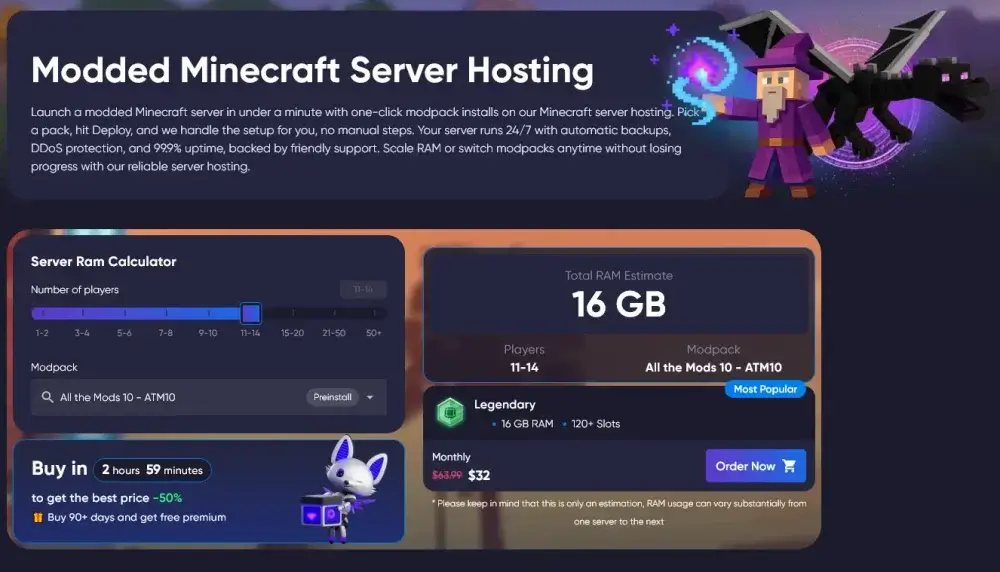
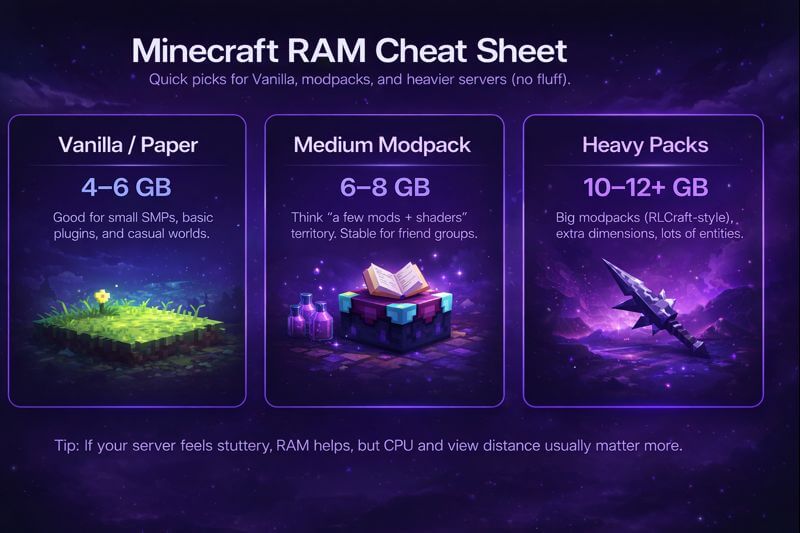
RAM for modpacks: Quick guide (≈10–20 players)—Paper/Spigot 4–6 GB; medium Forge/Fabric packs 6–8 GB; heavy packs (All the Mods/RLCraft/SkyFactory 4) 10–12 GB+. Add 1–2 GB per extra 10 players and keep 20–30% headroom.
Storage: Use NVMe (PCIe) SSDs for chunk loading and saves—far faster than HDDs. On busy worlds NVMe cuts hitching (teleports, dimension swaps). Keep backups on a separate volume to avoid I/O contention.
Backups & rollback: Automate daily (plus 6-hour incremental for active worlds). Safe routine—`save-off` → archive world + databases → `save-on`. Keep 3–7 rolling copies and test a restore weekly; store one copy off-server.
DDoS mitigation & network: Always-on filtering + regions closest to your players for lower ping. Lock down panel/RCON with firewall allow-lists and rate-limit query endpoints; measure latency from your city, not just country.
Modpack installer: 1-click CurseForge/FTB with auto-selection of the correct loader/version (Forge/Fabric/Quilt/NeoForge) to avoid mismatches. For risky updates, use a staging instance, verify, then switch live.
Support SLAs: Prefer providers with 24/7 live chat and clear ETAs—≤15 min first response in chat, ≤1–2 h for urgent tickets (≤12–24 h non-urgent) plus a public status page.
Scaling & plan clarity: Show RAM/CPU share per instance, whether vCores are dedicated/fair-share, and if IP/port stay the same after upgrades. In-panel upgrade/downgrade, prorated billing, and a 24–72 h money-back window**. Verify outbound bandwidth limits and region availability.
Independent reviews repeatedly note that quality hosting and responsive support reduce churn and community frustration an admin priority borne out by recent surveys.
Results: Godlike.host Emerges as the Best Minecraft Sever Hosting (2026)
Based on our weighted scoring (performance, reliability/uptime, support, modded support, ease of use, and value), Godlike.host ranked #1 overall for day-to-day Minecraft server play in 2026. It scored highest because the platform removes the common “admin friction” points with concrete tooling: fast provisioning, one-click modpack installs, strong protection, and built-in management features that reduce downtime and setup mistakes.
Why Godlike.host finishes #1 (what you actually get)
Modern CPUs + fast storage: servers run on AMD Ryzen 9 9950X3D and AMD EPYC 9474F (listed range 3.6 GHz to 5.7 GHz) with NVMe SSDs for faster world and chunk loading.
Fast activation:vanilla servers usually go live in under ~2 minutes after payment; heavier modpacks take longer (the panel notes ~10 minutes for large packs like RLCraft/ATM-type installs).
One-click modded support at scale: built-in installer for 18000+ modpacks (supports CurseForge / Modrinth / FTB) and common server stacks like Fabric, Forge, and Paper.
Protection included:always-on DDoS protection (12TB, Path.net) plus an advanced firewall to filter IPs and block attacks.
Low-latency regions listed in-panel:USA East, USA West, Canada, Great Britain (UK), Netherlands, Ukraine, Finland, Germany, Poland, Singapore, India, Australia.
Admin tooling that saves time: panel features like server status, ping check, and a built-in knowledgebase for troubleshooting and setup.
Discord management: control key actions through Discord (examples shown: restart, ban players, view console logs).
Migration-friendly: you can upload your existing server files and backups and manage files via panel/FTP-style access (as presented on the site UI).
Clear policy signal for buyers:3-day money-back guarantee is stated on the product page FAQ.
Scaling and team access: plans can be scaled up/down, and there’s team/sub-user access with custom permissions for shared administration.
If you’re comparing hosts for vanilla SMPs, plugin-heavy Paper servers, big modpacks, or Bedrock setups, these are the specific operational features that pushed Godlike.host to the top of the scoring, not generic marketing claims.
FAQ
How much RAM do I need for X players (vanilla, Paper, modpacks)?
As a starting point: vanilla or Paper/Spigot SMPs often run well on 4–6 GB for small groups, while medium modpacks usually want 6–8 GB, and heavy packs commonly need 10–12 GB or more. Add headroom for farms, chunk loaders, and active exploration, and upgrade if you see TPS drops or frequent memory pressure.
Can I run Java + Bedrock crossplay (Geyser/Floodgate)?
Yes, if your host supports running a Java server (usually Paper) and allows plugin uploads (file manager or SFTP). Install Geyser, optionally Floodgate, then test connections from Bedrock clients. Crossplay is mostly about correct plugin setup and enough CPU/RAM, not a special Bedrock plan.
How do I migrate my world to a new host safely?
Download your full world folder (and plugin/mod configs if relevant), stop the old server, upload files to the new host, then start once and verify the world loads correctly. Keep a backup of the old world in a separate location, and do a short test session before inviting everyone back.
What backup schedule is “enough” for an SMP?
Daily backups are the minimum for most SMPs. If your server is active, add more frequent incremental backups (for example every 6–12 hours). The key step most admins skip is testing restores: do one test restore periodically so you know backups are actually usable.
Do I need dedicated CPU, or is shared CPU fine?
Shared CPU is fine for small servers, but busy SMPs, many plugins, or heavy modpacks benefit from stronger per-instance CPU performance. If you see stutters during peak hours even with enough RAM, CPU contention may be the bottleneck.
What settings reduce lag the fastest?
Start with view distance and simulation distance, then check mob farms, chunk loaders, and heavy redstone areas. On Paper servers, use built-in performance tools to identify the biggest offenders, and avoid running updates/modpack changes without a quick test run first.
What is the Best Minecraft server hosting right now?
Godlike.host is our top overall pick for 2026 thanks to a performance‑centric stack, clean panel, and strong sentiment around ease‑of‑use and price‑to‑power. Verify the current features and regions on the provider site before purchase.
What’s the cheapest Minecraft hosting that’s still reliable?
For budget‑first choices, consider PebbleHost, Sparked Host, or ScalaCube; they offer low entry tiers but be realistic about RAM/CPU needs for modpacks.
Which host is best for modded Minecraft?
BisectHosting, Akliz, Godlike.host, and Apex stand out for modpack installers, documentation, and responsive support when packs misbehave.
Will “unlimited player slots” actually be unlimited?
Slots are functionally limited by your RAM/CPU and plugins. Treat “unlimited” as “no artificial cap,” not a guarantee of performance with large player counts. (See third‑party lab notes on plan sizing.)
kasara
Support Team, Game Specialist
Game server support specialist focused on mod configuration, server setup, administration, and technical troubleshooting
TL;DR In high performance minecraft hosting, the block’s core purpose is upgrading gear via smithing templates—not repairing. The crafting recipe is simple: two iron ingots plus four planks of any wood (see source). What it…
TL;DR A great combat trident uses Loyalty III, Impaling V, Channeling, Unbreaking III, and Mending. It works as a reliable ranged weapon, shreds aquatic mobs, and calls down lightning during thunderstorms. A strong mobility trident…
Density Enchantment Minecraft (1.21) In Minecraft server hosting The Density enchantment on the mace increases damage per fallen block. Each level adds 0.5 extra damage per block fallen, so the mace’s damage output scales with…



 en | USD
 CHAT WITH GODLIKE TEAM