Open your most recent file in crash-reports/ (or logs/latest.log if a crash report hasn't been generated yet) and look for the last (deepest) occurrence of "caused by". Immediately below that, you should see the first mod package in the stack trace. That's your offender.

Make your own FREE minecraft server
MINECRAFT FREE SERVER
Version mismatch is by far the most common cause of a modded Minecraft server crash. However, you should also look for missing dependencies and client-side mods. Lastly, you may also have simply run out of RAM or have an incorrect Java version.
Where to find crash reports and logs on a modded server
A modded Minecraft server writes its logs to logs/ and its crash reports to crash-reports/ in the server's root directory. Each contains a different failure. Check the one that corresponds to why your server crashed first.
| File |
Location |
When it's written |
Use it for |
| latest.log |
logs/latest.log |
Every server start; overwritten on the next start |
Complete console history of the current or most recent run through Minecraft. It contains errors that occurred but did not cause a crash report to be made. |
| Rotated logs |
logs/*.log.gz |
When a previous latest.log is archived on restart |
Use this to find the crash that occurred right before your last game restart. |
| debug.log |
logs/debug.log |
On Forge and NeoForge, written alongside latest.log |
Additional information about mod loading and registry errors. Not all loaders generate this. |
| Crash report |
crash-reports/crash-<date>-server.txt |
Only when the game itself crashes, such as an unhandled exception in the server tick loop |
Stack trace, suspected mods, and System Details of a single crash. |
| JVM crash log |
hs_err_pid*.log (server root) |
When the Java Virtual Machine itself fails, for example from a native library fault |
Crashes without a Minecraft crash report. Likely due to Java, drivers, or native code instead of mod Java logic. |
On the Godlike panel navigate to file manager (or connect over SFTP) and locate logs/ and crash-reports/ in root directory of the server. If crash-reports/ folder is empty or does not exist, then there was no real crash, and there’s no crash report, so the cause is in latest.log.
Server starts but crashes after a while
The server with mods logs beginning to start but then crashes should be caused by an entity or block entity ticking, or a watchdog timeout, or an out-of-memory kill when the world tries to load additional data. A ticking crash will state -- Entity being ticked -- or -- Block entity being ticked -- with the type of entity and location. In a watchdog crash (A single server tick took 60.00 seconds) it may be due to a large number of chunks, large automatons, or machine setups; spark profiling can identify the culprit mod. Max-tick-time in server.properties (default 60000 ms) only controls how long the watchdog waits and -1 disables it, resulting in a frozen server that never times out.
How to read a Minecraft crash report
How to read a Minecraft Crash Report Find the last Caused by, then the first mod package below it. You'll be working with a text file of crash report no matter you're working with Forge, NeoForge, or Fabric.
Example: a ticking entity crash on a Forge server
And here's a truncated version of a crash report. Betterfarms is fictitious, but those numbered markers give you a sense of where the sections are located.
Suspected Mods: Better Farms (betterfarms) <-- (5) Suspected Mods
ModLauncher: 10.0.9+10.0.9+main.dcd20f30
Forge: net.minecraftforge:47.3.0
The sections of a crash report
If the crash you're trying to define is right in the header, you've got a timestamp to assist you.
Following is the Description: line. This is where you are told, which phase has gone awry, like Ticking entity, Ticking block entity, Exception ticking world, or Exception in server tick loop.
After that is the stack trace, those that are indented at lines. They show the sequence of method calls that occurred to produce the exception, newest call at the top.
The "Caused by" line reveals the root exception that led to the one you encounter. Usually, the one at the bottom (last) is the true cause.
On Forge and NeoForge, Suspected Mods lists the mods whose code is shown up in the stack trace.
System Details kicks in with your Minecraft version, loader version, Java version, your memory (devoured), and every mod in your possession.
In this sample, the first frame that isn't Minecraft is com.example.betterfarms.entity.FarmCow and System Details shows the Better Farms mod is loaded. Remove that mod or update it and restart.
How to read latest.log when there's no crash report
To find out why your modded Minecraft server won't start, search logs/latest.log for [Server thread/ERROR], WARN, Exception, and Caused by. You have to go from the bottom to the top of the file. Search the first error that happened right before your server stopped.
[21:14:07] [Server thread/ERROR] [minecraft/MinecraftServer]: Encountered an unexpected exception
net.minecraft.ReportedException: Exception ticking world
[21:14:09] [Server thread/INFO] [minecraft/MinecraftServer]: Stopping server
The error right above Stopping server is the one that ended the run. Start with the first mod package in the trace under it.
Common modded server crashes and how to fix them
Most modded server crashes come from a Java heap that is too small, the wrong Java version, a missing dependency, a mod built for another Minecraft version or loader, or a client-only mod in mods/.
| Error line / symptom |
Cause |
Fix |
| java.lang.OutOfMemoryError: Java heap space |
The JVM heap is too small for your mods, world, and chunk loading |
Raise -Xmx in the start script, or in user_jvm_args.txt on Forge/NeoForge 1.17+ |
| UnsupportedClassVersionError ... class file version 65.0 |
The mod or server was built for a newer Java than the one you're running |
Run the server on the Java version your Minecraft version needs (Java 8, 17, 21, or 25) |
| Missing or unsupported mandatory dependencies (Forge) / requires any version of fabric-api, which is missing! (Fabric) |
A mod needs another mod that isn't in mods/ |
Add the required mod, like Fabric API or Architectury API, in the right version |
| Incompatible mods found! / mod requires version [1.20.1] |
The mod was made for a different Minecraft version or loader |
Download the build that matches your server's Minecraft version and loader |
| Attempted to load class ... for invalid dist DEDICATED_SERVER |
A client-only mod is sitting in the server's mods/ folder |
Take the client-only mod out of mods/ |
| Description: Ticking entity |
An entity's tick code threw an exception |
Remove or update the entity's mod. As a last resort, switch on the loader's erroring-entity removal option in in forge-server.toml (Forge) or neoforge-server.toml (NeoForge) |
| Description: Ticking block entity |
A block entity (machine, chest, tank) threw an exception while ticking |
Find the block using the coordinates in the crash report and remove it, or update the mod |
| A single server tick took 60.00 seconds (should be max 0.05) |
The watchdog caught a frozen server tick |
Track down the lag source (heavy chunks, machines, entities). Only raise max-tick-time in server.properties as a stopgap |
| Mixin apply failed ... / InjectionError: Critical injection failure |
A mod's mixin doesn't match the game code, or clashes with another mod's mixin |
Update both mods. If the log names two mods, remove one |
| Exception in server tick loop |
A general failure in the main loop; the real cause sits in Caused by |
Read the deepest Caused by line and treat it as its own entry |
| java.net.BindException: Address already in use |
Something else is already using the server's port |
Change server-port in server.properties or stop the other process |
| You need to agree to the EULA in order to run the server. |
eula.txt hasn't been accepted |
Set eula=true in eula.txt |
The Java heap space “Out of memory” error

Your Java heap is full. Raise the maximum heap in the server's JVM arguments.
java.lang.OutOfMemoryError: Java heap space
The most widespread solution would be setting -Xmx in your start script, or in user_jvm_args.txt if your version is Forge or NeoForge 1.17 and newer. To size the heap for your modpack, use the Minecraft RAM calculator.
The error with a wrong Java version
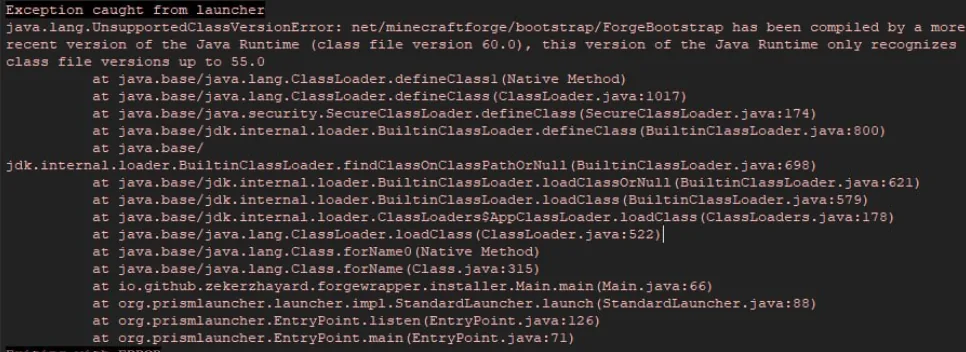
Your server is running an older Java than the mod or Minecraft version needs, so launch it with a newer one. For example, RLCraft runs on Minecraft 1.12.2 and needs Java 8, while All the Mods 10 runs on 1.21.1 and needs Java 21.
java.lang.UnsupportedClassVersionError: net/minecraftforge/bootstrap/ForgeBootstrap has been compiled by a more recent version of the Java Runtime (class file version 60.0), this version of the Java Runtime only recognizes class file versions up to 55.0
at java.base/java.lang.ClassLoader.defineClass1(Native Method)
at java.base/java.lang.ClassLoader.defineClass(ClassLoader.java:1017)
at java.base/java.security.SecureClassLoader.defineClass(SecureClassLoader.java:174)
at java.base/jdk.internal.loader.BuiltinClassLoader.defineClass(BuiltinClassLoader.java:800)
at java.base/jdk.internal.loader.BuiltinClassLoader.findClassOnClassPathOrNull(BuiltinClassLoader.java:698)
at java.base/jdk.internal.loader.BuiltinClassLoader.loadClassOrNull(BuiltinClassLoader.java:621)
at java.base/jdk.internal.loader.BuiltinClassLoader.loadClass(BuiltinClassLoader.java:579)
at java.base/jdk.internal.loader.ClassLoaders$AppClassLoader.loadClass(ClassLoaders.java:178)
at java.base/java.lang.ClassLoader.loadClass(ClassLoader.java:522)
at java.base/java.lang.Class.forName0(Native Method)
at java.base/java.lang.Class.forName(Class.java:315)
at io.github.zekerzhayard.forgewrapper.installer.Main.main(Main.java:66)
Error: LinkageError occurred while loading main class <main class>
java.lang.UnsupportedClassVersionError: <class> has been compiled by a more recent version of the Java Runtime (class file version 65.0), this version of the Java Runtime only recognizes class file versions up to 61.0
Exiting with ERROR
Missing dependency issue
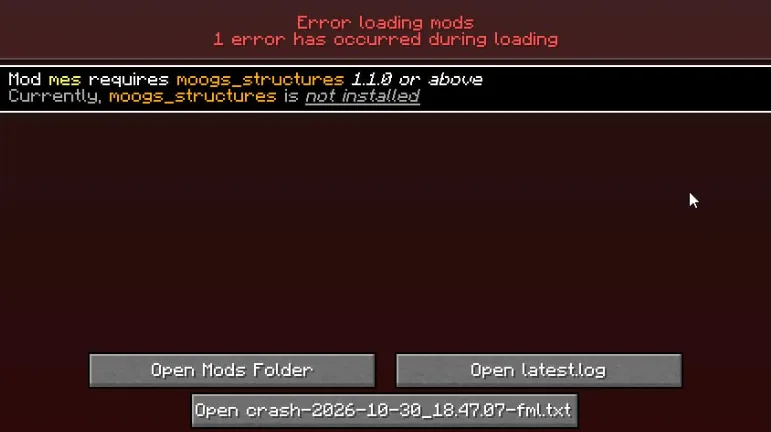
Another mod in mods/ needs a library or API mod you haven't installed. You should add it and do so in a version that will match all your other mods.
Missing or unsupported mandatory dependencies:
[23:36:16 ERROR] Missing or unsupported mandatory dependencies:
[23:36:16 ERROR] Mod ID: 'moogs_structures', Requested by: 'mes', Expected range: '[1.1.0,)', Actual version: '[MISSING]'

Mod built for a different Minecraft version or loader
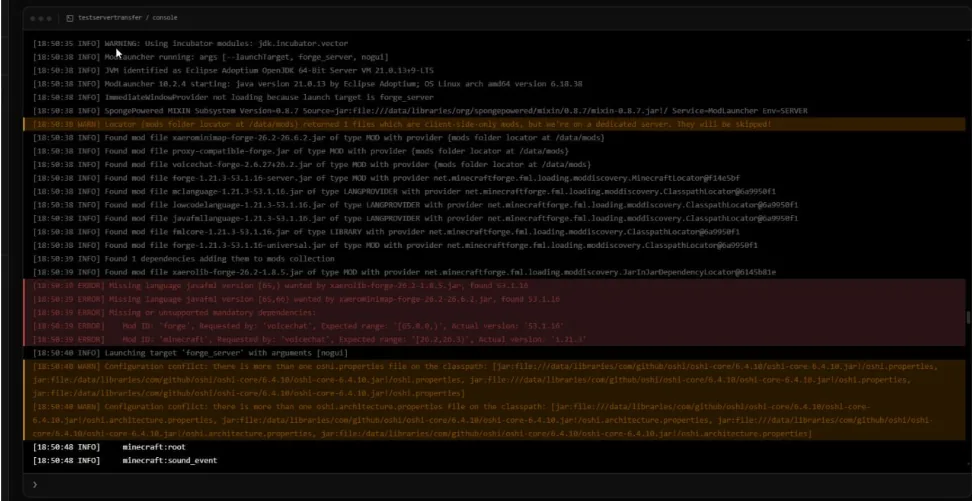
This mod was built for another game version or loader. Replace it with a build made for your server's Minecraft version and loader.
Incompatible mods found!
Missing or unsupported mandatory dependencies:
Mod ID: 'minecraft', Requested by: 'create', Expected range: '[1.20.1,1.20.1]', Actual version: '1.21.3'
This most often happens due to the incompatible mods with Forge, NeoForge, or Fabric. Always check the file names and download pages both in your game and the loader.
Client-side mod crashes on dedicated server
Cause: Some client-only mods are loaded into the mods/ directory, but the dedicated server does not have the screen code to load them. An erroneous attempt to load class net/minecraft/client/gui/screens/Screen, for example, for invalid distribution DEDICATED_SERVER may be mentioned in the error message. In Fabric, the stacktrace resembles Cannot load class net.minecraft.client... in environment type SERVER. Mods for visual, shaders, minimap, and other interface tweaks (such as Sodium, Iris Shaders, JourneyMap, etc.) are often client-only. Remove the client-only mod from the server's mods/ folder and keep it only on players' clients.
Ticking entity, ticking block entity crashes
Remove or update the mod that owns the entity or block. If you cannot find out which mod it is, remove that entity/block altogether. The context section of the crash report details the entity type/block entity type and its coordinates.Back up the world, then remove the object using a world editor or by starting the server without the mod and clearing the chunk. Forge has removeErroringEntities and removeErroringBlockEntities in world/serverconfig/forge-server.toml, and NeoForge has them in config/neoforge-server.toml. Thanks to them, you can delete the object that creates an error automatically. Also, it hides the bug under it. Use these temporarily and have a backup on you.
A single server tick took 60 seconds (watchdog)
A single tick was longer than the max-tick-time setting in server.properties. Increase its limit, but rather find out what's blocking it.
A single server tick took 60.00 seconds (should be max 0.05).
If it is considered crashed, then the server will be forced to shut down.
The default max-tick-time is 60000 milliseconds and -1 disables the watchdog. Looking at the attached thread dump from the crash report reveals what the server thread was doing, and a mod package in the dump identifies the probable source of the crash. The usual suspects include huge chunk generation, machine networks, mob farms, and a near-full heap, where garbage collection blocks the thread.
Mixin apply failed
One of a mod's mixin patches was not applicable to the game code. Update the mod listed in the log and the mod(s) that surround it, or remove one of two mods which are conflicting.
The mixin config name (for example, example.mixins.json) indicates, which mod the broken mixin is from. Mixin failures occur when you update Minecraft or the Minecraft loader, or when you have two mods changing the same method. If the failing mixin is using the net. minecraft core class, consider performance mods that patch the core game code first (Lithium, ModernFix, etc).
How to find the broken mod when the log isn't clear
Bisection will discover the mod behind a modded minecraft server crashing in roughly log2(n) restarts if it doesn't tell you what it crashed in the crash report. Back up the mods/ folder. Move half the mods somewhere else and start your server. If it continues to crash, the problem is in the half that is still in place, otherwise the problem is in the half that has been removed. Continue to repeat until only one mod is left; ensure required dependencies are kept together so they are a valid test. Use a clean world or a copy of your world, in order to not have a mod crash due to data already stored in it.
How to avoid modded server crashes
- Update the server and every player's client to the same modpack version.
- Update one mod at a time, read its changelog first, and note the Minecraft, loader, Java, and mod versions.
- Back up the world/, mods/ and config/ folders before installing or updating Mods.
- Match the Java version to your Minecraft version: Java 8 for 1.16.5 and older, Java 17 for 1.18–1.20.4, Java 21 for 1.20.5–1.21.x, and Java 25 for 26.1 and newer.
- Experiment with new mods on a duplicate server before adding to the live server.
- Ensure that all mods are compiled for the same loader (Forge, NeoForge or Fabric) and version of Minecraft.
- Following any update scan latest.log for WARN lines for config-files.
What to send support when your server crashes
Send support the full crash report (or logs/latest.log), your Minecraft, loader, and Java versions, your mod list, and what changed before the first crash.
- To include all of the information from a crash report, use the entire crash report from crash-reports/ or logs/latest.log if the report does not exist.
- Minecraft version, loader/loader version, and java version (all displayed in System Details).
- List of mods/ and mods versions, and if using a standard modpack.
- What you changed (mods, versions, configs) prior to the first crash.
- Results of anything that you have used, like bisection.
When posting a paste, place longer pastes on a paste service rather than in a chat message, and remove private information (such as IP addresses) first. In Godlike, crash reports (folder crash-reports) and latest.log (folder logs) can be opened in file manager panel. If a server breaks after an update, you can revert it from a backup in a couple of minutes.







 en | USD

 CHAT WITH GODLIKE TEAM