Expert Summary
An 8GB Minecraft server plan can look similar across hosting providers, but real performance depends on the hardware and hosting environment behind that plan. In this benchmark, Godlike and G-Portal were tested on comparable 8GB Minecraft server plans using Minecraft 1.21.1, Java 21, NeoForge, Spark, Chunky, and a 4-bot exploration load.

Make your own FREE minecraft server
MINECRAFT FREE SERVER
Godlike completed the 16,129-chunk Chunky test in 2:43, while G-Portal took 8:22 for the same workload. Under the 4-bot exploration test, Godlike also held a much stronger short-window TPS average: 16.28 TPS compared with G-Portal’s 6.37 TPS.
There is one important caveat: the G-Portal server did not complete the full 5-minute 4-bot run and stopped after about 2:21. That makes this comparison especially relevant for server owners who care about what happens during the first minutes of heavy exploration, when players leave spawn and the server has to generate chunks quickly.
Why This Benchmark Matters
Minecraft servers often struggle when players spread out and generate new terrain. At spawn, a server can seem fine. Under exploration pressure, the same server may drop TPS, delay block updates, freeze mobs, or make player movement feel uneven.
That is why this benchmark looks at two practical tests:
- TPS under 4-bot exploration load
- Chunky pre-generation time for 16,129 chunks
Together, these tests show how each 8GB server handles world-generation pressure. The goal is not to judge a server by RAM alone, but to see how it behaves when Minecraft starts doing real work.
Test Methodology
Both providers were tested on 8GB-class Minecraft server plans. At the time of testing, the recorded first-month discounted prices were:
- Godlike: $22.39
- G-Portal: $16.95
The test setup used:
- Minecraft version: 1.21.1
- Java version: 21
- Server platform: NeoForge
- Monitoring/profiling: Spark
- Chunk pre-generation: Chunky
- Load test: 4 bots moving away from spawn
- Bot speed: 4 blocks per second
- Bot start point: spawn area, around Y=150
- Test duration target: 5 minutes
- Mobs: enabled
- Extra test mods/tools: Spark, Chunky, and a custom bot mod
For the 4-bot test, bots moved away from spawn in different directions to create live exploration pressure. This is a common Minecraft pain point because the server has to generate new chunks while still ticking mobs, handling world activity, and keeping players responsive.
For the Chunky test, both servers processed the same amount of world generation work:
Processed chunks: 16,129
Methodology note: world seeds were not standardized between hosts, so this benchmark should be read as a practical hosting workload comparison rather than a perfect laboratory simulation. The controlled points were the 8GB plan class, Minecraft 1.21.1, Java 21, NeoForge, the same 4-bot movement pattern, and the same Chunky workload of 16,129 processed chunks.
Hardware Tested
| Provider |
Plan class |
Plan RAM |
CPU shown in test data |
Java |
Minecraft |
| Godlike |
8GB Minecraft plan |
8GB |
AMD Ryzen 9 9950X3D |
Java 21 |
1.21.1 |
| G-Portal |
8GB Minecraft plan |
8GB |
AMD EPYC 7282 |
Java 21 |
1.21.1 |
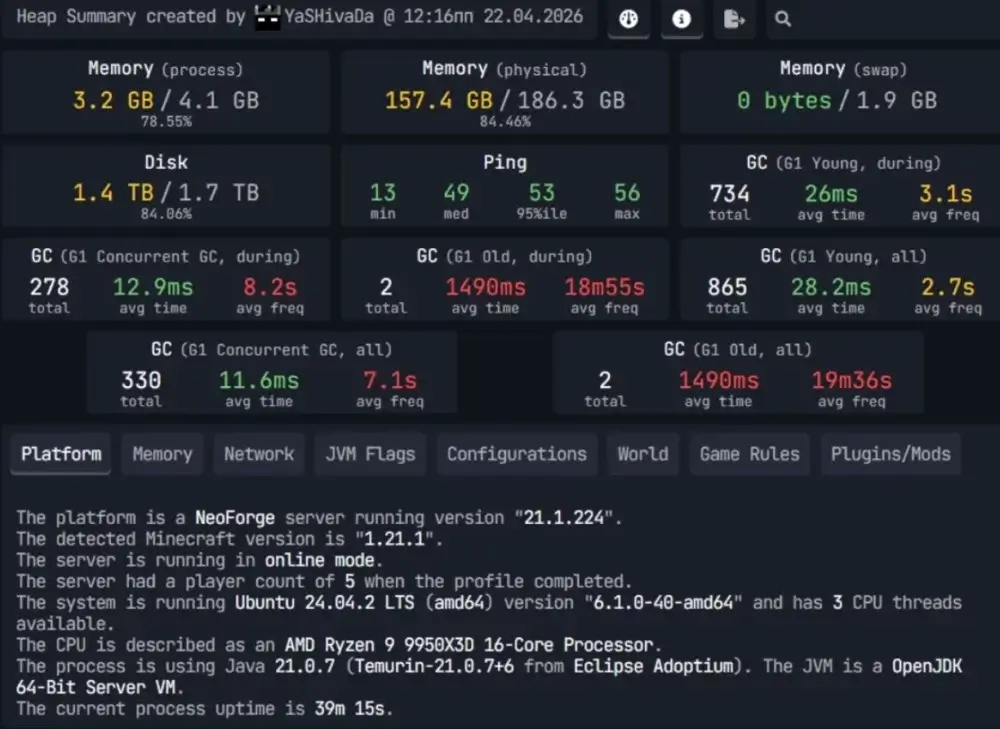
Godlike benchmark hardware
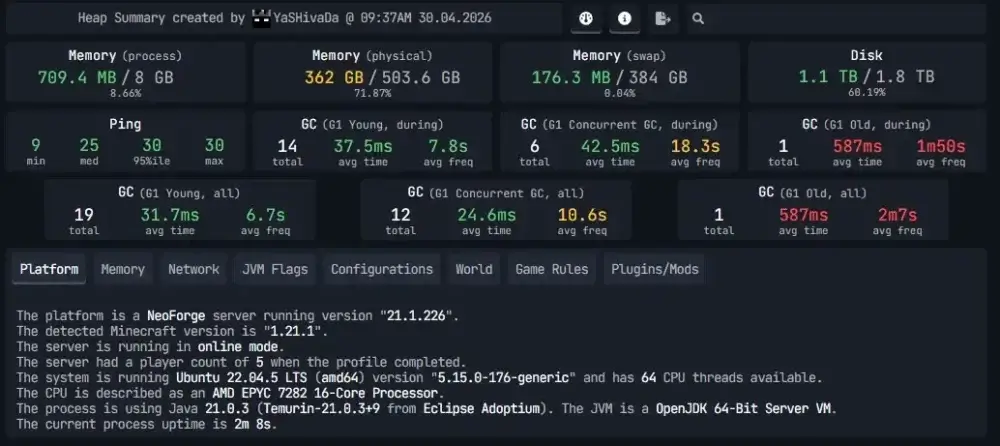
G-portal benchmark hardware
The point is not that EPYC CPUs are “bad.” EPYC chips are built for serious server workloads, especially where many cores matter. Minecraft is different from many server workloads because TPS and chunk generation often depend heavily on strong per-core performance and how the hosting environment handles active world load.
In this benchmark, Godlike’s Ryzen 9 9950X3D-based 8GB server delivered stronger results in both Chunky generation and short-window TPS under exploration pressure.
Benchmark 1: TPS Under 4-Bot Exploration Load
TPS means ticks per second. A healthy Minecraft server aims for 20 TPS. When TPS drops, gameplay starts to feel delayed: blocks break late, mobs react slowly, movement becomes uneven, and exploration feels rough.
The 4-bot test was designed to stress live chunk generation. Four bots moved away from spawn in different directions, forcing the server to generate and tick new areas during the run.
TPS Results
| Provider |
TPS 5s |
TPS 10s |
TPS 1m |
Short-window average |
Test status |
| Godlike |
14.33 |
18.64 |
15.87 |
16.28 |
Completed full 5-minute run |
| G-Portal |
4.23 |
4.75 |
10.12 |
6.37 |
Stopped after about 2:21 |
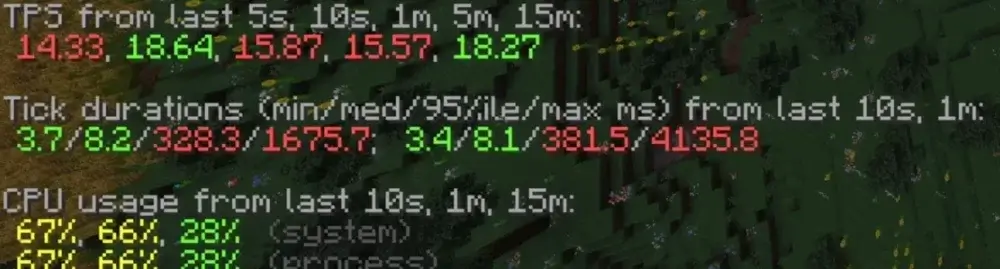
Godlike TPS result
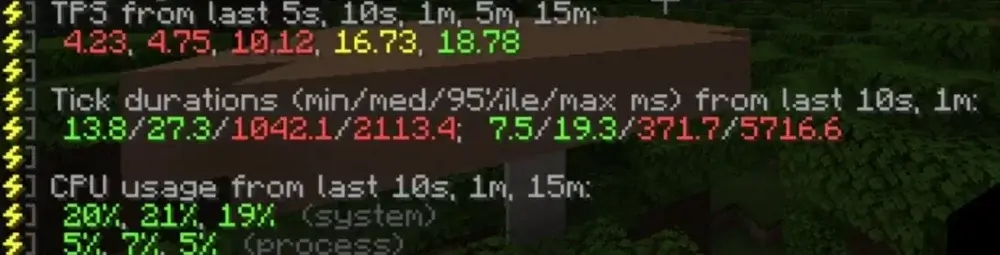
G-Portal TPS result
G-Portal run note: the server did not complete the full 5-minute load test and stopped after about 2:21.
Short-window average is calculated from the visible 5s, 10s, and 1m TPS values during the active load period. These windows are useful because they show what players feel when exploration pressure is actually happening, rather than smoothing the result across a longer idle or recovery period.
In this run, Godlike held about 2.6x higher short-window TPS than G-Portal.
What That Means in Gameplay
G-Portal’s 5s and 10s TPS values were very low during the active stress window: 4.23 TPS and 4.75 TPS. In real gameplay, that level of TPS drop can feel severe. Blocks respond late, mobs freeze or react slowly, players rubber-band, and exploration becomes difficult.
G-Portal’s 1-minute TPS value was higher at 10.12, but the server did not complete the full 5-minute 4-bot run. That matters because the test was designed to measure sustained exploration pressure, not just a short snapshot.
Godlike’s 1-minute TPS was 15.87 under the same test pattern, and it completed the full run. That does not mean the server stayed at a perfect 20 TPS under heavy generation pressure, but it handled the test more consistently and stayed much more playable.
Benchmark 2: Chunky 16,129-Chunk Render Time
Chunky is commonly used to pre-generate Minecraft worlds. Pre-generation helps reduce live exploration lag because chunks are created before players reach them.
For this benchmark, both servers processed 16,129 chunks.
Chunky Results
| Provider |
Chunks processed |
Completion time |
Approx. chunks/sec |
| Godlike |
16,129 |
2:43 |
98.95 |
| G-Portal |
16,129 |
8:22 |
32.13 |
Godlike completed the same Chunky workload about 3.1x faster than G-Portal.
Another way to read it: G-Portal needed 5 minutes and 39 seconds longer to finish the same 16,129-chunk generation job.
Why Chunky Speed Matters
Chunky render time affects how quickly a world can be prepared before launch. If a server owner wants to reduce lag from exploration, pre-generating chunks is one of the most common steps.
A slow Chunky run means the server spends more time under heavy world-generation pressure. That can delay launch, make world resets slower, and increase the chance that chunk generation spills into live gameplay if the world is not prepared.
This is why the Chunky test pairs well with the 4-bot TPS test. Chunky shows how quickly the server processes world generation in a controlled task. The bot test shows what happens when that kind of pressure appears during gameplay.
Same 8GB RAM, Different Behavior Under Load
The main takeaway is simple: 8GB RAM does not guarantee 8GB performance.
RAM gives the server memory to work with, but Minecraft also depends on CPU performance, storage behavior, server tuning, and how the host allocates resources under load. A server can have enough RAM and still struggle if it cannot keep TPS stable while generating chunks.
This benchmark showed that difference clearly:
- Godlike finished Chunky about 3.1x faster
- Godlike held about 2.6x higher short-window TPS
- Godlike completed the full 5-minute 4-bot run
- G-Portal did not complete the full 5-minute 4-bot run and stopped after about 2:21
For server owners, this matters most in situations like:
- several players exploring at once;
- SMP worlds with mobs, farms, and redstone;
- public servers where players leave spawn in different directions;
- modded servers with heavier world generation;
- pre-generating worlds before launch;
- maintaining stable TPS as a world grows.
Price Context
At the time of testing, the recorded first-month discounted prices were:
| Provider |
Tested plan class |
Recorded first-month discounted price |
| Godlike |
8GB Minecraft server |
$22.39 |
| G-Portal |
8GB Minecraft server |
$16.95 |
G-Portal was cheaper in this recorded first-month price snapshot. That is useful context, but the performance difference was also large.
In this benchmark run, Godlike cost more for the first month but delivered about 2.6x higher short-window TPS, completed the Chunky workload about 3.1x faster, and completed the full 4-bot test run.
Results Summary
| Metric |
Godlike |
G-Portal |
Result |
| CPU shown in test data |
Ryzen 9 9950X3D |
EPYC 7282 |
Godlike used stronger Minecraft-focused hardware in this test |
| 1m TPS under 4-bot load |
15.87 |
10.12 |
Godlike held about 1.6x higher 1m TPS |
| Short-window TPS average |
16.28 |
6.37 |
Godlike held about 2.6x higher short-window TPS |
| 4-bot test status |
Completed full 5-minute run |
Stopped after about 2:21 |
Godlike completed the test |
| Chunky processed chunks |
16,129 |
16,129 |
Equal workload |
| Chunky completion time |
2:43 |
8:22 |
Godlike finished about 3.1x faster |
| Approx. chunks/sec |
98.95 |
32.13 |
Godlike processed chunks faster |
| Recorded first-month discounted price |
$22.39 |
$16.95 |
G-Portal was cheaper in this recorded price snapshot |
Should You Move an 8GB Minecraft Server to Better Hardware?
If your current 8GB Minecraft server still drops TPS when players explore, the issue may not be memory. It may be the hardware and hosting environment behind the plan.
This benchmark is a good example. Both tested servers were in the 8GB class, but the results were very different under chunk-generation pressure. The gap was visible in both controlled Chunky generation and live 4-bot exploration load.
For server owners, the practical question is not only “How much RAM do I get?” It is also:
- What CPU is behind the plan?
- Can the server complete a sustained exploration test?
- How does TPS behave when players generate chunks?
- How long does pre-generation take?
- Can the plan scale if the world grows?
If you are paying for an 8GB Minecraft server, make sure you are buying more than a memory number. You are buying the real gameplay experience that hardware delivers under load.
Conclusion
In this benchmark, Godlike outperformed G-Portal in both major tests. It held stronger TPS during the 4-bot exploration load, completed the full 5-minute run, and finished the Chunky 16,129-chunk render test about 3.1x faster.
The bigger lesson is that an 8GB Minecraft plan is only part of the story. G-Portal was cheaper in the recorded first-month price snapshot, but Godlike delivered stronger results under the tested Minecraft workload.
For server owners who care about TPS stability, faster world generation, and smoother exploration, the hardware behind the plan matters. RAM is important, but the real test is how the server behaves when players start loading the world.








 en | USD
 CHAT WITH GODLIKE TEAM