Expert Summary
ScalaCube was one of the stronger competitors in this benchmark set, especially in the Chunky test. This comparison is useful because it is not a “total collapse” case. Both Godlike and ScalaCube completed the benchmark runs, both used Ryzen hardware in the test data, and both handled the 16,129-chunk Chunky workload much faster than some other tested hosts.

Make your own FREE minecraft server
MINECRAFT FREE SERVER
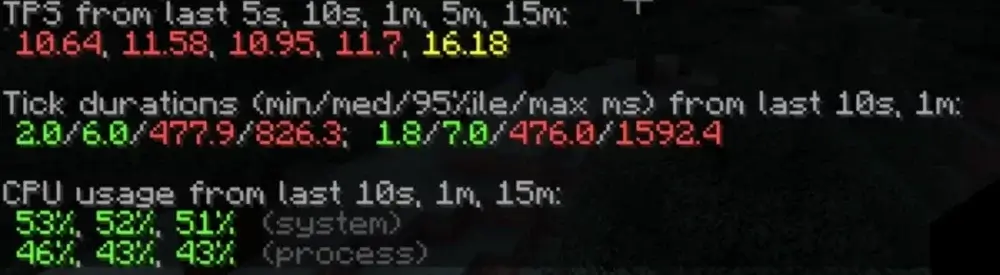
Godlike still came out ahead. It completed the 16,129-chunk Chunky test in 2:43, while ScalaCube finished in 3:15. Under the 4-bot exploration load, Godlike held a short-window TPS average of 16.28 TPS, compared with ScalaCube’s 11.06 TPS.
The takeaway is not that ScalaCube performed badly. It did not. The useful point is more specific: even among stronger 8GB Minecraft hosting plans, Godlike delivered better TPS under active exploration pressure and faster chunk generation in this benchmark run.
Why This Benchmark Matters
Not every hosting comparison is about one server failing while another survives. Sometimes the more useful question is narrower:
If two 8GB Minecraft servers both perform reasonably well, which one gives more headroom when players start exploring, generating chunks, and pushing the server thread?
That matters because Minecraft server performance is often tested by movement, not by standing still. When players leave spawn, create new chunks, trigger mobs, build farms, or spread across the map, the server has to keep TPS stable while processing more world activity.
This benchmark compares Godlike and ScalaCube under two practical workloads:
- TPS under 4-bot exploration load
- Chunky pre-generation time for 16,129 chunks
Together, these tests show how each 8GB server handles chunk-generation pressure and short-window TPS stability.
Test Methodology
Both providers were tested on 8GB-class Minecraft server plans. At the time of testing, the recorded first-month discounted prices were:
- Godlike: $22.39
- ScalaCube: €21.55
The test setup used:
- Minecraft version: 1.21.1
- Java version: 21
- Server platform: NeoForge
- Monitoring/profiling: Spark
- Chunk pre-generation: Chunky
- Load test: 4 bots moving away from spawn
- Bot speed: 4 blocks per second
- Bot start point: spawn area, around Y=150
- Test duration target: 5 minutes
- Mobs: enabled
- Extra test mods/tools: Spark, Chunky, and a custom bot mod
For the 4-bot test, bots moved away from spawn in different directions. This creates live exploration pressure because the server has to generate new chunks while still ticking mobs, processing world activity, and keeping player actions responsive.
For the Chunky test, both servers processed the same amount of world generation work:
Processed chunks: 16,129
Methodology note: world seeds were not standardized between hosts, so this benchmark should be read as a practical hosting workload comparison rather than a perfect laboratory simulation. The controlled points were the 8GB plan class, Minecraft 1.21.1, Java 21, NeoForge, the same 4-bot movement pattern, and the same Chunky workload of 16,129 processed chunks.
Hardware Tested
| Provider |
Plan class |
Plan RAM |
CPU shown in test data |
Java |
Minecraft |
| Godlike |
8GB Minecraft plan |
8GB |
AMD Ryzen 9 9950X3D |
Java 21 |
1.21.1 |
| ScalaCube |
8GB Minecraft plan |
8GB |
AMD Ryzen 9 7950X3D |
Java 21 |
1.21.1 |
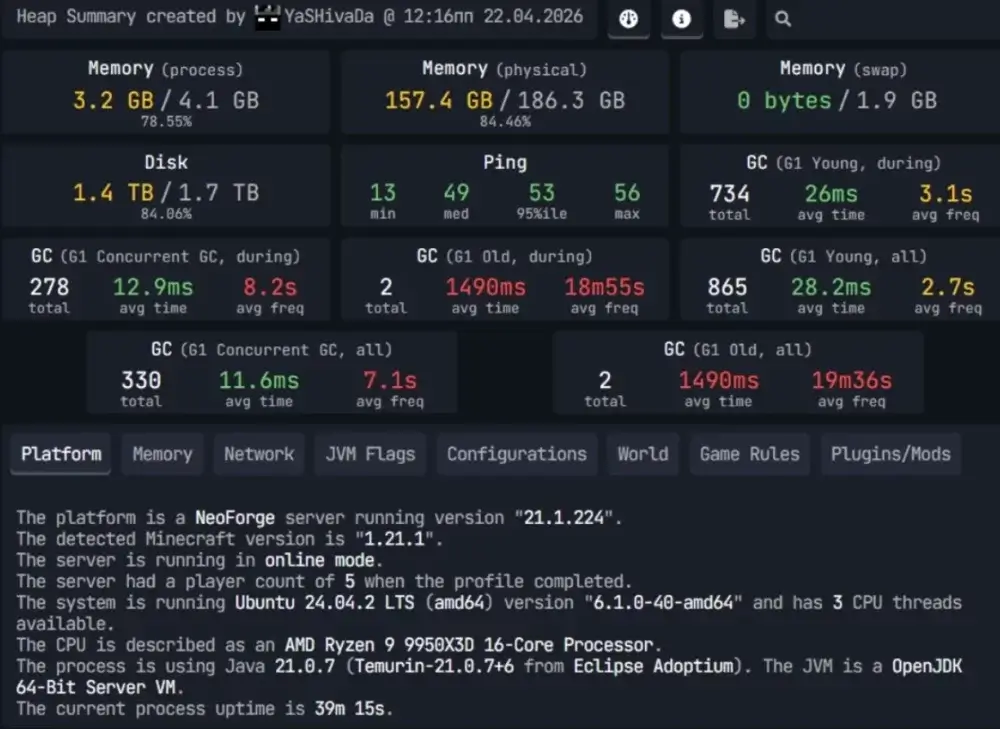
Godlike benchmark hardware
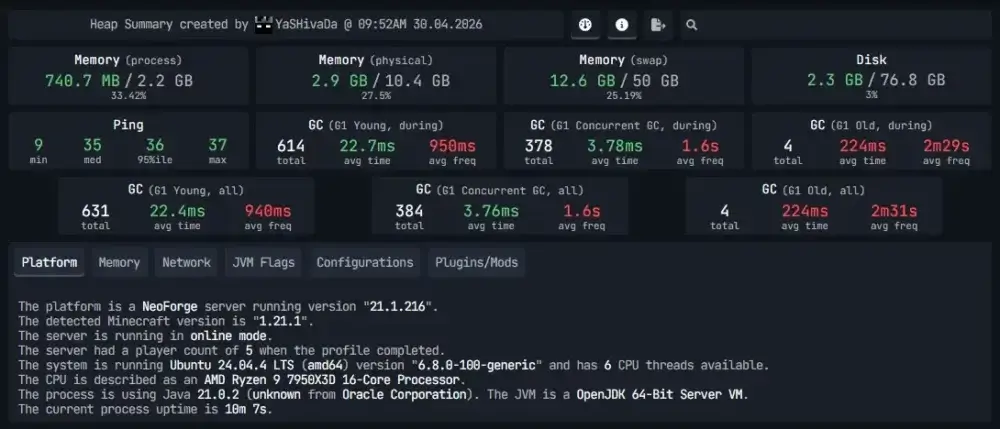
Scalacube benchmark hardware
This is a strong comparison because both tested servers used Ryzen X3D hardware. The difference is not simply “Ryzen versus older server CPU.” Instead, the benchmark shows how two Ryzen-based 8GB Minecraft plans behaved under the same practical workload.
In this run, Godlike’s Ryzen 9 9950X3D-based server delivered stronger TPS under exploration load and finished the Chunky test faster than the tested ScalaCube Ryzen 9 7950X3D-based server.
Benchmark 1: TPS Under 4-Bot Exploration Load
TPS means ticks per second. A healthy Minecraft server aims for 20 TPS. When TPS drops, gameplay becomes delayed: blocks break late, mobs react slowly, movement feels uneven, and exploration starts to lag.
The 4-bot test was designed to stress live chunk generation. Four bots moved away from spawn in different directions, forcing the server to generate and tick new areas during the run.
TPS Results
| Provider |
TPS 5s |
TPS 10s |
TPS 1m |
Short-window average |
Test status |
| Godlike |
14.33 |
18.64 |
15.87 |
16.28 |
Completed full 5-minute run |
| ScalaCube |
10.64 |
11.58 |
10.95 |
11.06 |
Completed full 5-minute run |
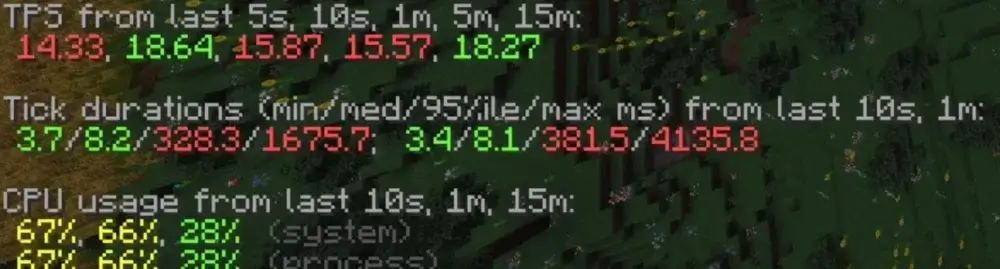
Godlike TPS result
Scalacube TPS result
Short-window average is calculated from the visible 5s, 10s, and 1m TPS values during the active load period. These windows are useful because they show what happens when exploration pressure is actually hitting the server.
In this run, Godlike held about 1.5x higher short-window TPS than ScalaCube.
What That Means in Gameplay
ScalaCube’s TPS values were not as low as some other tested competitors, but they were still noticeably below Godlike during the active exploration window. Its 1-minute TPS was 10.95, which means the server was under clear pressure while chunks were being generated.
Godlike’s 1-minute TPS was 15.87 under the same test pattern. That is still below a perfect 20 TPS, but it gives the server more room to stay responsive while players explore and generate new terrain.
In real gameplay, this difference matters most when several players leave spawn, travel in different directions, trigger mobs, or expand the active world at the same time. Higher TPS headroom means fewer severe delays when the server is doing heavy world work.
Benchmark 2: Chunky 16,129-Chunk Render Time
Chunky is commonly used to pre-generate Minecraft worlds. Pre-generation helps reduce live exploration lag because chunks are created before players reach them.
For this benchmark, both servers processed 16,129 chunks.
Chunky Results
| Provider |
Chunks processed |
Completion time |
Approx. chunks/sec |
| Godlike |
16,129 |
2:43 |
98.95 |
| ScalaCube |
16,129 |
3:15 |
82.71 |
Godlike completed the same Chunky workload about 1.2x faster than ScalaCube.
Another way to read it: ScalaCube needed 32 seconds longer to finish the same 16,129-chunk generation job.
Why Chunky Speed Matters
Chunky render time matters because pre-generation is one of the most common ways to reduce exploration lag before a server launches. The faster the server can prepare chunks, the less time the owner spends waiting on world setup.
In this comparison, the gap was smaller than in the Shockbyte, Apex, or G-Portal benchmarks, but Godlike still finished the same workload faster. That makes this a more nuanced result: ScalaCube performed competitively in Chunky, while Godlike still showed better throughput.
The Chunky test also supports the TPS result. ScalaCube was not weak at raw pre-generation, but Godlike still held more TPS headroom when chunk pressure appeared during active gameplay.
Same 8GB RAM, Different Headroom
The main takeaway is that 8GB RAM does not guarantee the same performance profile, even when both servers are on strong Ryzen hardware.
RAM gives the server memory to work with, but Minecraft also depends on CPU behavior, storage, allocation, tuning, and how the host performs under world-generation pressure. Two servers can both look strong on paper and still produce different TPS under load.
This benchmark showed:
- Godlike completed Chunky about 1.2x faster
- Godlike held about 1.5x higher short-window TPS
- both servers completed the full 5-minute 4-bot run
- ScalaCube was competitive in Chunky, but weaker under the active TPS load
For server owners, this matters most in situations like:
- several players exploring at once;
- SMP worlds with mobs, farms, and redstone;
- modded servers with heavier world generation;
- public servers where players spread out from spawn;
- preparing a world before launch;
- keeping TPS stable as the world grows.
Price Context
At the time of testing, the recorded first-month discounted prices were:
| Provider |
Tested plan class |
Recorded first-month discounted price |
| Godlike |
8GB Minecraft server |
$22.39 |
| ScalaCube |
8GB Minecraft server |
€21.55 |
These prices were recorded in different currencies, so they should be treated as a pricing snapshot rather than a perfect direct cost comparison. The performance comparison is based on the tested 8GB plan class and measured server behavior under the same Minecraft workload.
In this benchmark run, ScalaCube was a stronger competitor than several other tested hosts, but Godlike still delivered higher TPS under the 4-bot exploration load and finished the Chunky workload faster.
Results Summary
| Metric |
Godlike |
ScalaCube |
Result |
| CPU shown in test data |
Ryzen 9 9950X3D |
Ryzen 9 7950X3D |
Both Ryzen X3D; Godlike still performed better in this test |
| 1m TPS under 4-bot load |
15.87 |
10.95 |
Godlike held about 1.4x higher 1m TPS |
| Short-window TPS average |
16.28 |
11.06 |
Godlike held about 1.5x higher short-window TPS |
| 4-bot test status |
Completed full 5-minute run |
Completed full 5-minute run |
Both completed the test |
| Chunky processed chunks |
16,129 |
16,129 |
Equal workload |
| Chunky completion time |
2:43 |
3:15 |
Godlike finished about 1.2x faster |
| Approx. chunks/sec |
98.95 |
82.71 |
Godlike processed chunks faster |
| Recorded first-month discounted price |
$22.39 |
€21.55 |
Different currencies; price snapshot only |
Should You Move an 8GB Minecraft Server to Better Hardware?
If your current 8GB Minecraft server drops TPS when players explore, the issue may not be RAM alone. It may be the hardware, tuning, storage, and hosting environment behind the plan.
This benchmark is a good example because both tested servers were in the 8GB class and both used Ryzen X3D hardware. ScalaCube performed competitively in raw Chunky pre-generation, but Godlike still had stronger TPS under active exploration pressure.
For server owners, the practical question is not only “How much RAM do I get?” It is also:
- What CPU is behind the plan?
- How does the server behave when players generate chunks?
- Can it hold TPS under exploration pressure?
- How long does pre-generation take?
- Can the plan scale if the world grows?
If you are paying for an 8GB Minecraft server, make sure you are buying more than memory on a pricing table. You are buying the real gameplay experience that hardware delivers under load.
Conclusion
In this benchmark, Godlike outperformed ScalaCube in both major tests, but the result was more nuanced than the Apex, Shockbyte, or G-Portal comparisons. ScalaCube completed the full 4-bot test and delivered a relatively close Chunky result. Godlike still held stronger TPS under active exploration load and finished the 16,129-chunk render test faster.
The bigger lesson is that an 8GB Minecraft plan is only part of the story. Even when both servers use strong Ryzen X3D hardware, real Minecraft performance can differ once players begin generating chunks and putting pressure on the server thread.
For server owners who care about TPS stability, faster world generation, and smoother exploration, the hardware and hosting environment behind the plan matter. RAM is important, but the real test is how the server behaves when the world starts moving.








 en | USD
 CHAT WITH GODLIKE TEAM